Data Protection Advisor — erro fatal LAX ao tentar instalar ou fazer upgrade do DPA
Summary: Obtendo erro: "A invocação deste aplicativo Java causou e InvocationTargetException. Este aplicativo agora sairá (LAX)" ao tentar atualizar ou instalar o DPA.
Symptoms
Ao tentar instalar ou fazer upgrade do datastore do DPA, o seguinte erro será exibido na tela e o upgrade não continuará:
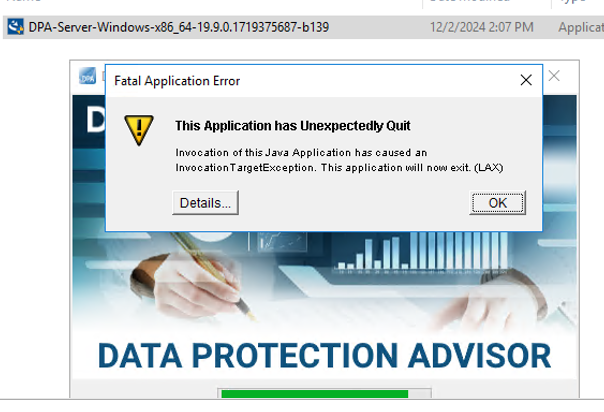
ERROR: "Invocation of this Java Application has caused an InvocationTargetException. This application will now exit. (LAX)"
Complete Error message: Invocation of this Java Application has caused and InvocationTargetException. This application will now exit (LAX)
A guia Details fornece o erro Java Lang:java.lang.NullPointerException at com.zerog.ia.installer.LifeCycleManager.getEnable8dot3(Unknown Source) at com.zerog.ia.installer.LifeCycleManager.a6(Unknown Source) at com.zerog.ia.installer.LifeCycleManager.executeApplication(Unknown Source) at com.zerog.ia.installer.Main.main(Unknown Source) at sun.reflect.NativeMethodAccessorImpl.invoke0(Native Method) at sun.reflect.NativeMethodAccessorImpl.invoke(NativeMethodAccessorImpl.java:62) at sun.reflect.DelegatingMethodAccessorImpl.invoke(DelegatingMethodAccessorImpl.java:43) at java.lang.reflect.Method.invoke(Method.java:498) at com.zerog.lax.LAX.launch(Unknown Source) at com.zerog.lax.LAX.main(Unknown Source)
Cause
Observando a mensagem em negrito dentro de Erro:
getEnable8dot3(Unknown Source)
Esse não é um problema de DPA, mas um problema no Registro do Windows que está faltando uma chave.
No servidor em que você está tentando instalar/atualizar, execute o seguinte comando em um prompt de comando:reg query HKEY_LOCAL_MACHINE\SYSTEM\CurrentControlSet\Control\FileSystem\ /v NtfsDisable8dot3NameCreation
Ele deve retornar: HKEY_LOCAL_MACHINE\SYSTEM\CurrentControlSet\Control\FileSystem
NtfsDisable8dot3NameCreation REG_DWORD 0x2
No entanto, se o seguinte for retornado, ele confirma o problema:This command resulted with the same message on both the application and datastore servers:C:\Windows\system32>reg query HKEY_LOCAL_MACHINE\SYSTEM\CurrentControlSet\Control\FileSystem\ /v NtfsDisable8dot3NameCreation
ERROR: The system was unable to find the specified registry key or value
Resolution
A chave REG_DWORD 0x2 pode ser adicionada ao registro do Windows.
Verifique com a equipe de segurança do sistema operacional/Windows do cliente, pois pode haver uma política que está bloqueando a criação dessa chave.