Data Protection Advisor - DPA'yı yüklemeye veya yükseltmeye çalışırken önemli LAX hatası
Summary: Getting error: "Bu Java Uygulamasının çağrılması ve InvocationTargetException'a neden oldu. DPA'yı yükseltmeye veya yüklemeye çalışırken bu uygulama şimdi çıkacak (LAX)".
Symptoms
DPA veri deposunu yüklemeye veya yükseltmeye çalışırken ekranda aşağıdaki hata görüntülenir ve yükseltme devam etmez:
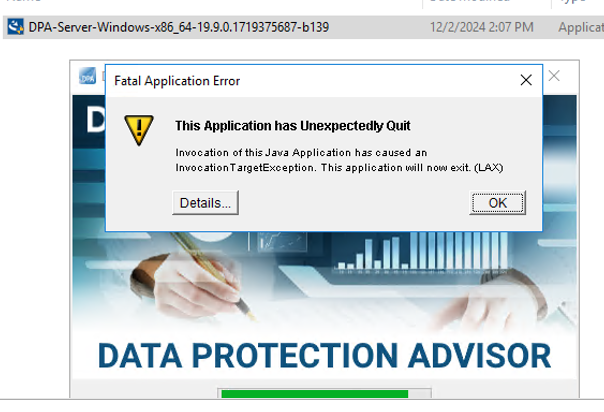
ERROR: "Invocation of this Java Application has caused an InvocationTargetException. This application will now exit. (LAX)"
Complete Error message: Invocation of this Java Application has caused and InvocationTargetException. This application will now exit (LAX)
Details sekmesi Java Lang hatası veriyor:java.lang.NullPointerException at com.zerog.ia.installer.LifeCycleManager.getEnable8dot3(Unknown Source) at com.zerog.ia.installer.LifeCycleManager.a6(Unknown Source) at com.zerog.ia.installer.LifeCycleManager.executeApplication(Unknown Source) at com.zerog.ia.installer.Main.main(Unknown Source) at sun.reflect.NativeMethodAccessorImpl.invoke0(Native Method) at sun.reflect.NativeMethodAccessorImpl.invoke(NativeMethodAccessorImpl.java:62) at sun.reflect.DelegatingMethodAccessorImpl.invoke(DelegatingMethodAccessorImpl.java:43) at java.lang.reflect.Method.invoke(Method.java:498) at com.zerog.lax.LAX.launch(Unknown Source) at com.zerog.lax.LAX.main(Unknown Source)
Cause
Hata içinde kalın yazılan mesaja bakmak:
getEnable8dot3(Unknown Source)
Bu bir DPA sorunu değil, Windows Kayıt Defteri'nde bir anahtarın eksik olduğu bir sorundur.
Yüklemeyi/yükseltmeyi denediğiniz sunucuda komut isteminde aşağıdaki komutu çalıştırın:reg query HKEY_LOCAL_MACHINE\SYSTEM\CurrentControlSet\Control\FileSystem\ /v NtfsDisable8dot3NameCreation
Şu yanıtı vermelidir: HKEY_LOCAL_MACHINE\SYSTEM\CurrentControlSet\Control\FileSystem
NtfsDisable8dot3NameCreation REG_DWORD 0x2
Ancak aşağıdakiler döndürülürse sorun doğrulanır:This command resulted with the same message on both the application and datastore servers:C:\Windows\system32>reg query HKEY_LOCAL_MACHINE\SYSTEM\CurrentControlSet\Control\FileSystem\ /v NtfsDisable8dot3NameCreation
ERROR: The system was unable to find the specified registry key or value
Resolution
REG_DWORD 0x2 anahtarı Windows kayıt defterine eklenebilir.
Bu anahtarın oluşturulmasını engelleyen bir ilke olabileceğinden müşterinin işletim sistemi/Windows güvenlik ekibiyle iletişime geçin.