VxRail:無法在 Windows SQL VM 上製作快照時靜止客體檔案系統
Summary: 這是執行 SQL 伺服器服務的 Windows 2022 虛擬機器 (VM)。無法在製作虛擬機器快照時靜止客體檔案系統。
This article applies to
This article does not apply to
This article is not tied to any specific product.
Not all product versions are identified in this article.
Symptoms
SQL Server 在 Windows 2022 虛擬機器上,備份一律失敗。
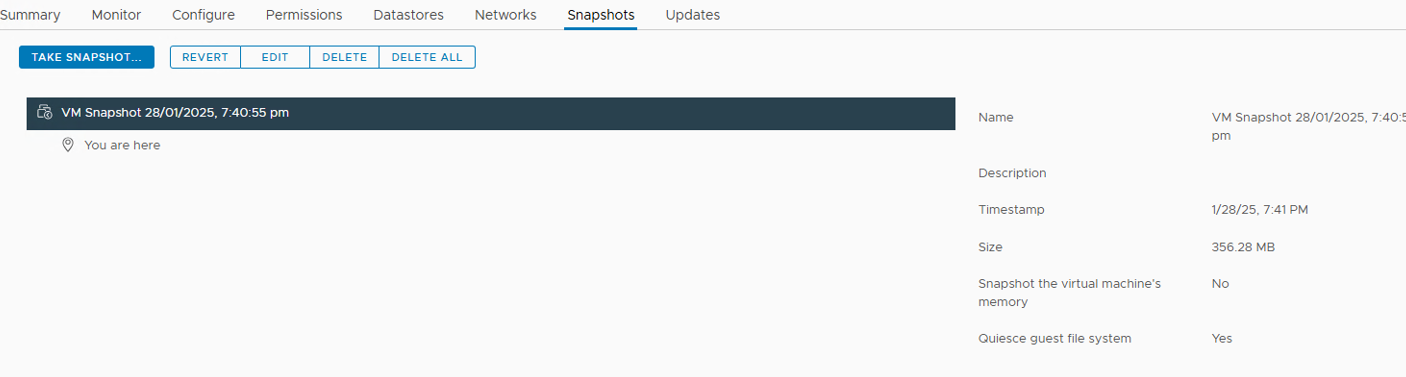
客戶的備份解決方案必須使檔案系統靜止。使用已勾選選項手動執行快照時,快照會完成,但選項「靜止客體檔案系統」會顯示為未選取。
VMware.log似乎沒問題,而且已在快照期間設定靜止選項。
檢查客體作業系統和 Windows 事件,沒有關於卷影複製的錯誤事件。
VMware 工具服務正在執行。
Cause
VMware 工具服務正在執行。但缺少 VMware 快照提供程式服務。
VMware 快照提供者服務是使用「靜止訪客檔案系統」選項拍攝客體虛擬機器快照的必要條件。
Resolution
若要解決此問題,請執行下列步驟:
- 解除安裝 VMware 工具,然後重新安裝。確保快照提供程式服務存在。
- 若要解除安裝 VMware 工具:
- RDP 至 Windows、開啟程式和功能,以及解除安裝 VMware 工具。

- 再次安裝工具後,選取靜止選項應該即可運作。
Affected Products
VxRail 460 and 470 Nodes, VxRail D Series NodesProducts
VxRail G Series Nodes, VxRail E Series Nodes, VxRail P Series NodesArticle Properties
Article Number: 000278658
Article Type: Solution
Last Modified: 05 Feb 2025
Version: 1
Find answers to your questions from other Dell users
Support Services
Check if your device is covered by Support Services.