How to Use the SystemInfo Command to Obtain Configuration Information
Summary: This article provides instructions on using the Microsoft Windows command SystemInfo to obtain information about the computer and operating system configuration.
This article applies to
This article does not apply to
This article is not tied to any specific product.
Not all product versions are identified in this article.
Instructions
Affected Operating Systems:
- Windows
Note: For more information about this topic, reference the Microsoft Knowledge Base article systeminfo  .
.
.
To run the command, perform the following steps:
- Press the Windows + Q key on the keyboard.
- In the search box, type: CMD or Terminal
- Click the Command Prompt or Terminal option in the list. (Admin privileges are not needed.)
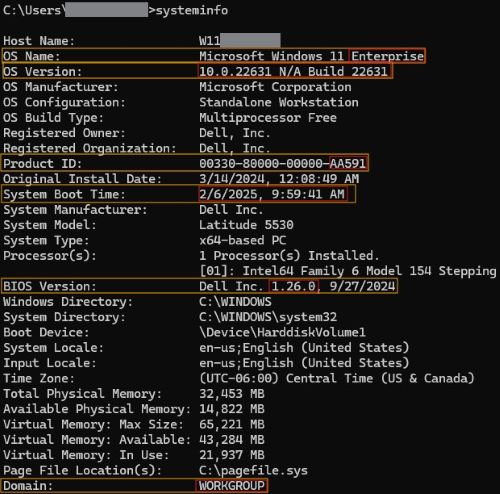
The following image shows the resulting output and highlights the items that may be beneficial for troubleshooting.
- OS Name
- This is used to determine whether a customer is using an Enterprise-version of Windows, which is never Dell OEM.
- OS Version
- This is used to determine the version of Windows that is installed.
- Product ID
- This is used to determine whether Windows is successfully activated. If a product ID is present, then Windows should be activated.
- This is used to determine whether the customer is using a Dell OEM image. If the last three characters say OEM, then a Dell OEM is in use.
- System Boot Time
- This is used to determine when the customer last performed a proper restart to reset the state of the computer.
Note: Shutting down the computer through Windows does not reset the state of the computer if fast startup is enabled. Always confirm the date and time.
- This is used to determine when the customer last performed a proper restart to reset the state of the computer.
- BIOS Version
- This is used to determine the current BIOS version that is installed.
- Domain
- This is used to determine whether a customer is on a domain or not.
Note: Workgroup does not mean that the customer is on a domain.
 Note: The original install date provided by systeminfo reflects major changes to Windows, including a Reset This PC or major Window updates. For a more accurate way to determine the original install date of the operating system, reference How to Use Command Prompt to Verify Install Date of Microsoft Windows.
- This is used to determine whether a customer is on a domain or not.
Article Properties
Article Number: 000284775
Article Type: How To
Last Modified: 07 Mar 2025
Version: 2
Find answers to your questions from other Dell users
Support Services
Check if your device is covered by Support Services.