Microsoft Intune에서 Dell Command Update AMDX 템플릿 업로드 실패
Summary: 이 문서에서는 업로드하는 동안 발생하는 오류에 대한 정보를 제공합니다. Dell Command | 업데이트(DCU) . ADMX 템플릿을 Microsoft Intune에 추가합니다.
This article applies to
This article does not apply to
This article is not tied to any specific product.
Not all product versions are identified in this article.
Symptoms
영향을 받는 제품:
- Dell Command | Update
가져오기를 시도할 때 상태가 업로드 실패 로 표시됩니다. Dell Command | ADMX 템플릿을 Microsoft Intune으로 업데이트합니다.
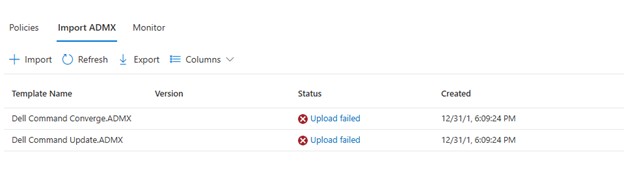
Upload failed를 클릭하면 다음이 표시됩니다.
ADMX file: Dell Command Update.ADMX
State: failed
Last modified date: xx/xx/xxxx
Error Details: ADMX file referenced not found NamespaceMissing:Dell.Policies. Please upload it first.
Cause
애플리케이션별 AMDX를 업로드하려면 먼저 기본 Dell.ADMX 및 Dell.ADML 템플릿 파일을 업로드해야 합니다.
Resolution
ADMX 템플릿은 Dell Command | 설치 패키지를 업데이트합니다. 먼저 Dell.ADMX 및 Dell.ADML 파일을 업로드합니다. 그러면 Dell Command Update.ADMX 및 Dell Command Update.ADML 업로드가 성공적으로 완료됩니다.
참고: 설치 패키지에서 템플릿을 추출하는 방법에 대한 자세한 내용은 액세스 방법을 참조하십시오. AMDX 및 . Dell Command Update에 사용할 ADML 파일
Affected Products
Dell Command | UpdateArticle Properties
Article Number: 000290019
Article Type: Solution
Last Modified: 11 Mar 2025
Version: 2
Find answers to your questions from other Dell users
Support Services
Check if your device is covered by Support Services.