Alienware Area-51 AAT2250可能无法使用第三方 XMP 内存开机或无法启用内存超频功能
Summary: 本文提供有关 Alienware Area-51 的信息 AAT2250 系统可能无法开机,或者在使用第三方 XMP 内存时内存超频功能可能隐藏。
This article applies to
This article does not apply to
This article is not tied to any specific product.
Not all product versions are identified in this article.
Symptoms
在 Alienware Area-51 AAT2250上安装未经戴尔认证的 XMP 内存可能会导致系统无法开机或无法在 BIOS 中启用内存超频功能。
- 系统无法开机
系统的兼容性取决于所用 XMP 内存的类型。如果安装了需要更高 VDD(漏极电压)的 XMP 内存模块,系统可能无法成功启动。在这种情况下,当无法开机时,它会闪烁 2A4W 或 2A5W 错误代码。 - 无法在 BIOS 中启用内存超频功能。
转至 BIOS> 性能→超频功能→切换到“开”。当用户将超频功能设置为“ON”时,将显示一条警告消息。选择“Yes”将请求系统在性能模式下运行,并显示可用的超频 (OC) 选项。选择“否”将绕过请求,使 OC 功能无法访问。
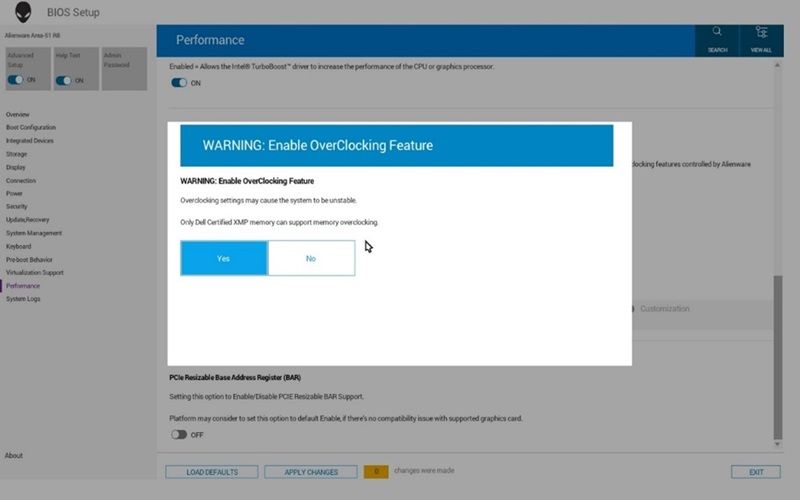
(图 1 — 超频功能)
在安装非戴尔限定的 XMP 内存时,不会显示 XMP 配置文件启用选项。
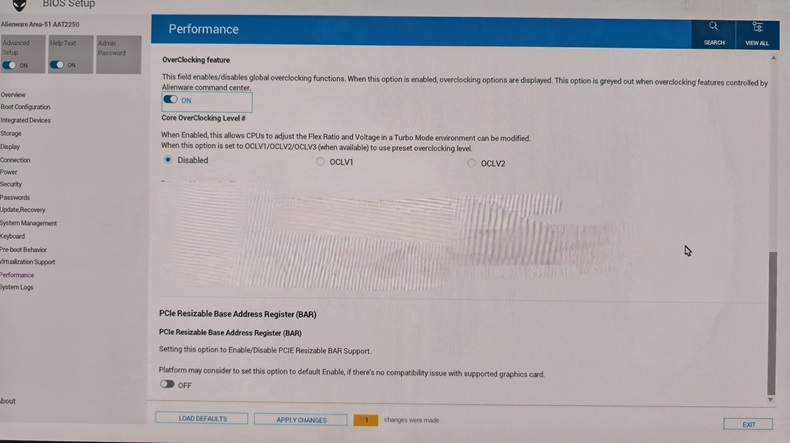
(图 2 — 性能)
安装戴尔认可的 XMP 内存时,超频下有一个 Extreme Memory Profile 选项列表。
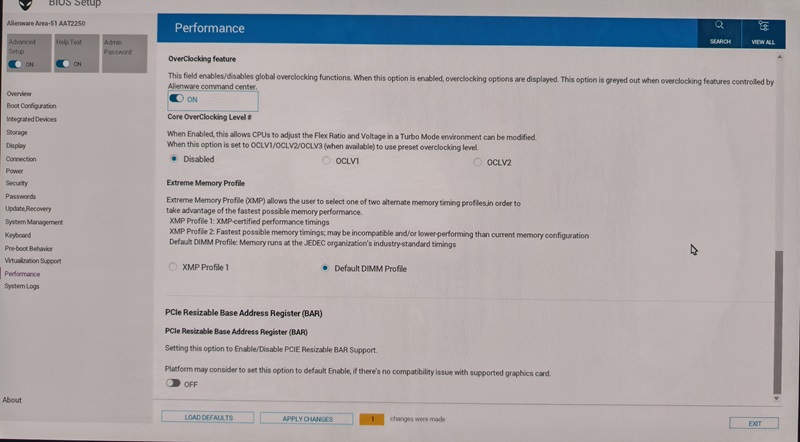
(图 3 — 极端内存配置文件)
受影响的平台:
- Alienware Area-51 AAT2250
Cause
第三方内存模块兼容性问题
Resolution
Alienware Area-51 AAT2250具有特定的 XMP 内存要求。(仅支持戴尔认证的 Kingston XMP 内存。)
这些详细信息可在 Alienware Area-51 AAT2250用户手册 (内存规格页面)中找到。
重新安装下表中列出的戴尔出厂内存模块或购买戴尔认可的 XMP 内存。
(表 1 — 戴尔认可的 XMP 内存)
| 668G8 | DIMM、16 GB、6400、DDR5、NU、XMP | Kingston | X66G8-HYA-A |
| DIMM、16 GB、6400、DDR5、NU、XMP | Kingston | X66G8-HYA-K | |
| N09RP型 | DIMM、32 GB、6400、DDR5、NU、XMP | Kingston | N09RP-HYA-A |
| DIMM、32 GB、6400、DDR5、NU、XMP | Kingston | N09RP-HYA-K |
Affected Products
Alienware Area-51 AAT2250Article Properties
Article Number: 000299961
Article Type: Solution
Last Modified: 13 May 2025
Version: 2
Find answers to your questions from other Dell users
Support Services
Check if your device is covered by Support Services.