Come riconoscere IPS Glow e perdite di luce in un monitor Dell
Summary: Scopri come identificare le differenze tra il bagliore IPS (In-Plane Switching) e la perdita di luce in un monitor Dell utilizzando un pannello IPS.
This article applies to
This article does not apply to
This article is not tied to any specific product.
Not all product versions are identified in this article.
Symptoms
Il bagliore IPS è una caratteristica dei pannelli IPS, dove appare un debole bagliore ai bordi dello schermo se osservato da determinate angolazioni. Non si tratta di un difetto, bensì di una caratteristica intrinseca della tecnologia IPS. L'immagine seguente evidenzia due esempi di bagliore IPS.
La perdita di luce si riferisce a una distribuzione non uniforme della retroilluminazione, che può essere considerata un difetto se influisce in modo significativo sull'esperienza visiva. L'immagine seguente evidenzia un esempio di perdita di luce.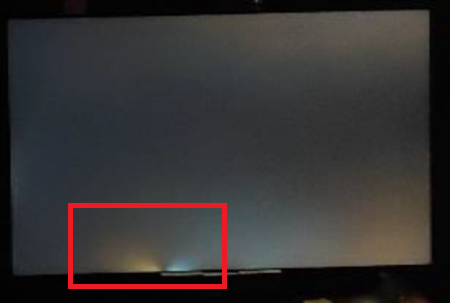
Monitor interessati:
- Alienware 25 Gaming Monitor AW2521H
- Alienware 25 Gaming Monitor AW2521HF
- Alienware 25 Gaming Monitor AW2521HFL
- Alienware 25 Gaming Monitor AW2523HF
- Monitor per gaming Alienware 27 4K a doppia risoluzione AW2725QF
- Alienware 27 Gaming Monitor AW2721D
- Alienware 27 Gaming Monitor AW2723DF
- Alienware 27 Gaming Monitor AW2724DM
- Alienware 27 Gaming Monitor AW2724HF
- Monitor curvo per il gaming Alienware 38 AW3821DW
- Monitor per gaming Alienware a 500 Hz AW2524H
- Monitor per gaming Alienware a 500 Hz AW2524HF
- Monitor curvo per gaming Dell 24 S2422HG
- Monitor per gaming da 24" Dell G2422HS
- Dell 24 Monitor SE2425HM
- Monitor per videoconferenze Dell 24 C2422HE
- Dell 25 Gaming Monitor G2524H
- Dell 25 Gaming Monitor S2522HG
- Dell 27 Gaming Monitor G2722HS
- Dell 27 Gaming Monitor G2723H
- Dell 27 Gaming Monitor G2723HN
- Dell 27 Gaming Monitor G2724D
- Dell 27 Gaming Monitor G2725D
- Dell 27 Gaming Monitor S2721DGF
- Dell 27 Monitor SE2725HM
- Dell 27 Plus 4K Monitor S2725QS
- Dell 27 Plus 4K USB-C Monitor S2725QC
- Monitor per videoconferenze Dell 27 C2722DE
- Dell 32 4K UHD Gaming Monitor G3223Q
- Dell 32 Gaming Monitor G3223D
- Monitor curvo per videoconferenze Dell 34 C3422WE
- Dell C1422H
- Dell C2423H
- Dell C2723H Monitor
- Dell C5522QT
- Dell C6522QT
- Dell C8621QT
- Dell E2421HN
- Dell E2422H
- Dell E2422HN
- Dell E2422HS
- Dell E2722H
- Dell E2722HS
- Dell E2723HN
- Dell Gaming S2721HGF
- Dell P1424H
- Dell P2222H
- Dell P2223HC
- Dell P2225H
- Dell P2421
- Dell P2421D
- Dell P2421DC
- Dell P2422H
- Dell P2422HE
- Dell P2423D
- Dell P2423DE
- Dell P2424HEB
- Dell P2424HT
- Dell P2425
- Dell P2425E
- Dell P2425H
- Dell P2425HE
- Dell P2721Q
- Dell P2722H
- Dell P2722HE
- Dell P2723D
- Dell P2723DE
- Dell P2723QE
- Dell P2724DEB
- Dell P2725H
- Dell P2725HE
- Dell P3221D
- Dell P3222QE
- Dell P3223DE
- Dell P3223QE
- Dell P3421W
- Dell P3424WE
- Dell P3424WEB
- Dell P5525QC
- Dell P6524QT
- Dell P7524QT
- Dell P8624QT
- Monitor portatile Dell Pro 14 Plus P1425
- Dell Pro 24 Monitor E2425HM
- Supporto regolabile per monitor Dell Pro 24 E2425HSM
- Monitor touch-screen Dell Pro 75 Plus 4K P7525QT
- Dell S2421H
- Dell S2421HN
- Dell S2421HS
- Dell S2421HSX
- Dell S2421NX
- Dell S2422HZ
- Dell S2425H
- Dell S2425HS
- Dell S2721D
- Dell S2721DS
- Dell S2721H
- Dell S2721HN
- Dell S2721HS
- Dell S2721HSX
- Dell S2721NX
- Dell S2721Q
- Dell S2721QS
- Dell S2722DC
- Dell S2722DZ
- Dell S2722QC
- Dell S2725DS
- Dell S2725H
- Dell S2725HS
- Dell SE2423DS
- Dell SE2722HR
- Dell SE2723DS
- Dell U2421E
- Dell U2421HE
- Dell U2422H
- Dell U2424H
- Dell U2424HE
- Dell U2722D
- Dell U2723QE
- Dell U2723QX
- Dell U2724D
- Dell U2724DE
- Dell U3023E
- Dell U3223QE
- Dell U3223QZ
- Dell U3224KB
- Dell U3421WE
- Dell U3423WE
- Dell U3425WE
- Dell U3821DW
- Dell U3824DW
- Dell U4021QW
- Dell U4025QW
- Dell U4323QE
- Dell U4924DW
- Dell UP3221Q
- Dell UltraSharp 27 4K Thunderbolt Hub Monitor U2725QE
- Dell UltraSharp 32 4K Thunderbolt Hub Monitor U3225QE
Cause
- IPS luminoso:
- Cambia con l'angolo di visione e la distanza
- Interessa principalmente gli angoli del display
- Presente in una certa misura in tutti gli schermi IPS
- Specifico per IPS e tecnologie simili
- Perdita di luce:
- Rimane costante indipendentemente dall'angolo di visione e dalla distanza
- Può verificarsi in qualsiasi punto lungo i bordi o gli angoli
- Non inerente a nessun tipo di pannello; Un problema di produzione
- Può verificarsi in qualsiasi tipo di pannello LCD
Resolution
Per ridurre il bagliore IPS, effettuare le seguenti operazioni di configurazione e procedura:
Configurazione iniziale
- Posizionare il monitor nella posizione prevista all'altezza degli occhi. La distanza minima di visualizzazione è generalmente di circa un braccio.
- Collegare tutti i cavi necessari e accendere il monitor.
- Lasciare che il monitor si riscaldi per circa 30 minuti prima di effettuare qualsiasi regolazione.
- L'illuminazione ambientale dovrebbe essere leggermente illuminata piuttosto che scura.
Regolazione delle impostazioni del monitor
- Regolare la luminosità del monitor a circa il 30%-50% della luminosità massima.
- Regolare l'impostazione del contrasto per mantenere la nitidezza dell'immagine senza sovrasaturare le aree luminose.
- Se disponibile, impostare la temperatura del colore su un'impostazione calda (circa 6500 K) per ridurre l'intensità del bagliore.
Affected Products
Alienware 25 Gaming Monitor AW2523HF, Alienware 500Hz Gaming Monitor AW2524H, Alienware 500Hz Gaming Monitor AW2524HF, Alienware 27 Gaming Monitor AW2723DF, Alienware 27 Gaming Monitor AW2724DM, Alienware 27 Gaming Monitor AW2724HF
, Alienware 27 4K Dual-Resolution Gaming Monitor AW2725QF, Dell C2423H, Dell C2723H Monitor, Alienware 25 Gaming Monitor AW2521H, Alienware 25 Gaming Monitor AW2521HF, Alienware 25 Gaming Monitor AW2521HFL, Alienware 27 Gaming Monitor AW2721D, Alienware 38 Curved Gaming Monitor AW3821DW, Dell C1422H, Dell 24 Video Conferencing Monitor C2422HE, Dell 27 Video Conferencing Monitor C2722DE, Dell 34 Video Conferencing Curved Monitor C3422WE, Dell C5522QT, Dell C6522QT, Dell C8621QT, Dell E2421HN, Dell E2422H, Dell E2422HN, Dell E2422HS, Dell E2722H, Dell E2722HS, Dell P2222H, Dell P2421, Dell P2421D, Dell P2421DC, Dell P2422H, Dell P2422HE, Dell P2721Q, Dell P2722H, Dell P2722HE, Dell P3221D, Dell P3222QE, Dell P3421W, Dell S2421H, Dell S2421HN, Dell S2421HS, Dell S2421HSX, Dell S2421NX, Dell 24 Curved Gaming Monitor S2422HG, Dell S2422HZ, Dell 25 Gaming Monitor S2522HG, Dell S2721D, Dell 27 Gaming Monitor S2721DGF, Dell S2721DS, Dell S2721H, Dell Gaming S2721HGF, Dell S2721HN, Dell S2721HS, Dell S2721HSX, Dell S2721NX, Dell S2721Q, Dell S2721QS, Dell S2722DZ, Dell S2722QC, Dell U2421E, Dell U2421HE, Dell U2422H, Dell U2722D, Dell U3421WE, Dell U3821DW, Dell U4021QW, Dell UP3221Q, Dell Pro 24 Monitor E2425HM, Dell Pro 24 Adjustable Stand Monitor E2425HSM, Dell E2723HN, Dell 24 Gaming Monitor G2422HS, Dell 25 Gaming Monitor G2524H, Dell 27 Gaming Monitor G2722HS, Dell 27 Gaming Monitor G2723H, Dell 27 Gaming Monitor G2723HN, Dell 27 Gaming Monitor G2724D, Dell 27 Gaming Monitor G2725D, Dell 32 Gaming Monitor G3223D, Dell 32 4K UHD Gaming Monitor G3223Q, Dell P1424H, Dell Pro 14 Plus Portable Monitor P1425, Dell P2223HC, Dell P2225H, Dell P2423D, Dell P2423DE, Dell P2424HEB, Dell P2424HT, Dell P2425, Dell P2425E, Dell P2425H, Dell P2425HE, Dell P2723D, Dell P2723DE, Dell P2723QE, Dell P2724DEB, Dell P2725H, Dell P2725HE, Dell P3223DE, Dell P3223QE, Dell P3424WE, Dell P3424WEB, Dell P5525QC, Dell P6524QT, Dell P7524QT, Dell Pro 75 Plus 4K Touch Monitor P7525QT, Dell P8624QT, Dell S2425H, Dell S2425HS, Dell S2722DC, Dell S2725DS, Dell S2725H, Dell S2725HS, Dell 27 Plus 4K USB-C Monitor S2725QC, Dell 27 Plus 4K Monitor S2725QS, Dell SE2423DS, Dell 24 Monitor SE2425HM, Dell SE2723DS, Dell 27 Monitor SE2725HM, Dell U2424H, Dell U2424HE, Dell U2723QE, Dell U2723QX, Dell U2724D, Dell U2724DE, Dell UltraSharp 27 4K Thunderbolt Hub Monitor U2725QE, Dell U3023E, Dell U3223QE, Dell U3223QZ, Dell U3224KB, Dell UltraSharp 32 4K Thunderbolt Hub Monitor U3225QE, Dell U3423WE, Dell U3425WE, Dell U3824DW, Dell U4025QW, Dell U4323QE, Dell U4924DW
...
Article Properties
Article Number: 000318297
Article Type: Solution
Last Modified: 16 Sept 2025
Version: 2
Find answers to your questions from other Dell users
Support Services
Check if your device is covered by Support Services.