Azure Stack:HLH 升級:找不到位置參數 無法存取的網路分享
Summary: 使用類似於以下網域\使用者名稱的登入資料時,PnU 工具無法將 HLH ISO 檔案連接至 iDRAC。 找不到接受參數「無法存取的網路共用」的位置參數。
This article applies to
This article does not apply to
This article is not tied to any specific product.
Not all product versions are identified in this article.
Symptoms
使用類似以下的登入資料時,PnU 工具無法將 HLH ISO 檔案連接至 iDRAC:
Connected Console Username: domain\username
錯誤詳細資料:
2025-05-08 01:55:04.350 +03:00 [INF] Settings ISO found at C:\Program Files\Dell EMC\VxRack AS Patch and Update Automation\PSScripts\HLH\Windows\OSDShare\PnU-Setup.iso
2025-05-08 01:55:04.356 +03:00 [INF] HLH ISO found at C:\Program Files\Dell EMC\VxRack AS Patch and Update Automation\PSScripts\HLH\Windows\OSDShare\MS2406_Dell2411.4_Redeployment.iso
2025-05-08 01:55:04.362 +03:00 [INF] Attaching HLH OS ISO for iDRAC 172.16.112.2.
2025-05-08 01:55:04.686 +03:00 [INF] OSD initiated successfully.
2025-05-08 01:55:05.693 +03:00 [INF] OSD Task State :
2025-05-08 01:55:05.788 +03:00 [ERR] A positional parameter cannot be found that accepts argument 'Inaccessible network share.'.
2025-05-08 01:55:05.792 +03:00 [INF] Validating iDRAC credentials and creating session
2025-05-08 01:55:05.796 +03:00 [INF] Checking connectivity for HLH iDRAC
Cause
如果在 PNU 自動化工具中使用網域認證「網域\使用者名稱」,iDRAC 的 API 將無法運作。
Resolution
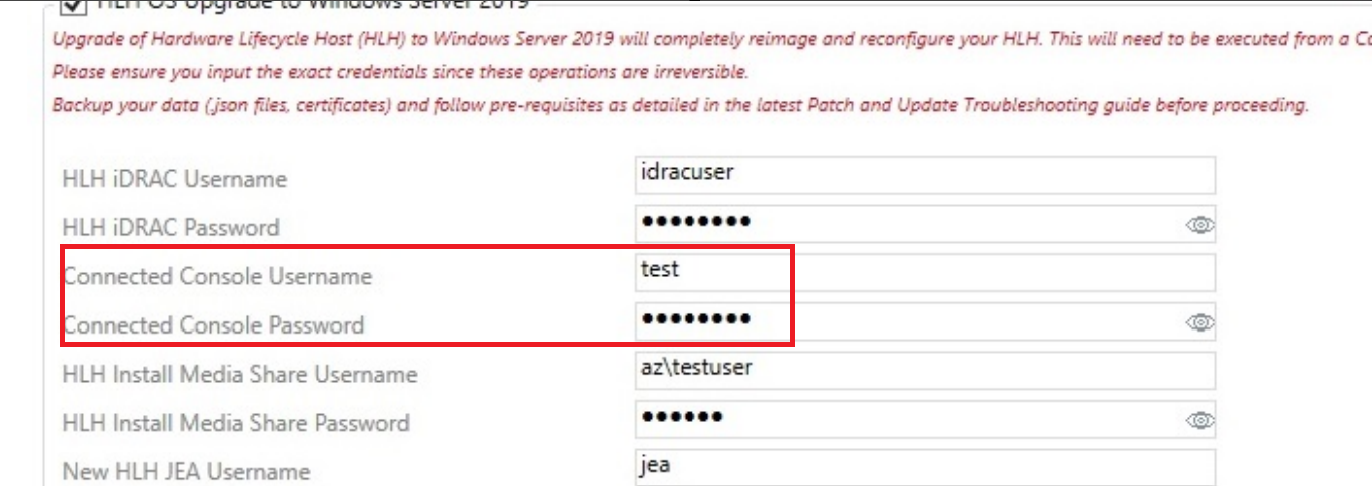
若要變通解決此問題,請使用沒有功能變數名稱的本地管理員帳戶。
Connected Console Username: testuser
Affected Products
Integrated System for Microsoft Azure Stack Hub 14GProducts
Integrated System for Microsoft Azure Stack Hub, Integrated System for Microsoft Azure Stack Hub 16GArticle Properties
Article Number: 000323734
Article Type: Solution
Last Modified: 11 Jun 2025
Version: 1
Find answers to your questions from other Dell users
Support Services
Check if your device is covered by Support Services.