如何打包适用于 Intel x64 处理器的 Nomic Embed Text v1.5 for Microsoft Configuration Manager
Summary: 以下文章提供有关如何为 Intel x64 处理器打包适用于 Microsoft 配置管理器的 Nomic Embed Text v1.5 的信息。
This article applies to
This article does not apply to
This article is not tied to any specific product.
Not all product versions are identified in this article.
Instructions
受影响的产品:
- Dell Pro AI Studio
前提条件
- 从以下位置下载适用于英特尔 x64 处理器的 Nomic Embed Text v1.5:Dell Pro AI Studio > 驱动程序与下载
- 将解压的内容
Dell.Model.Nomic-embed-text-v1.5.CPU.ORT.x64.zip在环境中的文件共享上。
提醒:戴尔 AI 框架和模型是特定于平台的下载。从戴尔支持链接中,将作系统下拉列表设置为 Windows 11(对于英特尔)或 Windows 11 ARM64(对于 Qualcomm 兼容下载)。
添加了适用于 Intel x64 处理器的 Nomic Embed Text v1.5
提醒:由于文件大小限制,模型.zip文件和 MSI 安装程序必须位于同一文件夹中。
- 打开 Configuration Manager 控制台。

- 转至 软件库 > 应用程序管理 > 应用程序。

- 单击顶部功能区中的 Create Application 按钮。

- 单击 Manually specify the application information 单选按钮,然后单击 Next。

- 输入名称并提供任何所需的信息,例如发布者和软件版本。如果需要,请更新应用程序所有者和支持联系人,然后单击 下一步。

- 在软件中心页面上,根据需要更新语言,然后单击 下一步。
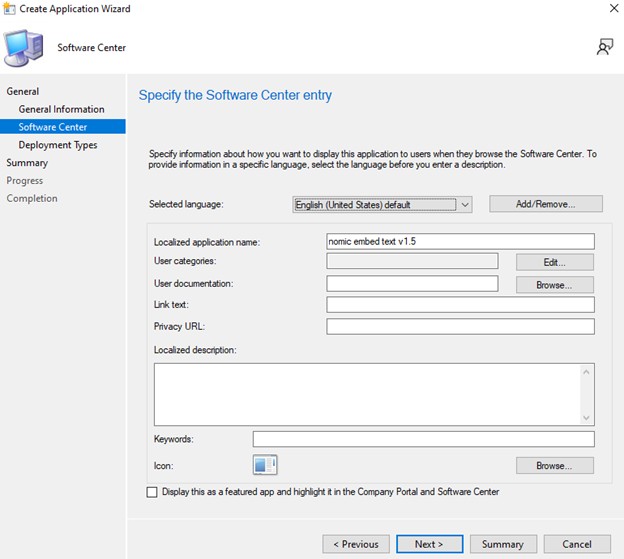 ;
; - 在部署类型屏幕上,单击 添加。

- 单击单选按钮以 手动指定部署类型信息 ,然后单击 下一步。

- 提供名称并根据需要选择一种语言,然后单击 Next。

- 单击内容位置旁边的 浏览 ,选择安装程序所在的文件夹,然后单击 下一步。

- 在安装程序字段中,键入:
msiexec /i "Dell.Model.Nomic-embed-text-v1.5.CPU.ORT.x64.msi" /norestart /qn
- 对于卸载程序,请键入:
msiexec /x "Dell.Model.Nomic-embed-text-v1.5.CPU.ORT.x64.msi" /norestart /qn,然后点按 “下一步”。
- 在检测方法页面,单击 “添加子句 ”按钮。

- 单击设置类型 下拉菜单 并选择 Windows 安装程序,然后单击 浏览。

- 选择 Nomic Embed Text v1.5 并单击 open,然后单击 OK。

- 单击 Next。

- 在用户体验页面上,设置以下选项,然后单击 下一步。
Installation behavior: Install for system
Logon requirement: Whether or not a user is logged on
Installation program visibility: Hidden

-
在要求页面上,单击添加并根据需要选择要求。单击 “确定 ”并 添加 任何其他要求。

- 完成后,单击 下一步。

- 在依赖关系页面上,单击 添加。

- 提供依赖项组名称,然后单击 Add。

- 选择 Dell AI Framework ,然后单击 OK

- 单击 Add Dependency 屏幕上的 OK ,然后单击 Next。

- 在摘要页面上,单击 下一步。

- 在完成页面上,单击 关闭。

- 在部署类型页面上单击 下一步 。

- 在摘要页面上,单击 下一步。

- 在完成屏幕上,单击 关闭。

Affected Products
Dell Pro AI StudioArticle Properties
Article Number: 000330982
Article Type: How To
Last Modified: 10 Jun 2025
Version: 1
Find answers to your questions from other Dell users
Support Services
Check if your device is covered by Support Services.