Dell NativeEdge:上傳權杖發生「無法解碼權杖」錯誤
Summary: 上傳權杖在 NativeEdge Orchestrator 上傳有「無法解碼權杖」錯誤的代碼。
This article applies to
This article does not apply to
This article is not tied to any specific product.
Not all product versions are identified in this article.
Symptoms
在 2025 年 5 月 29 日之後,如果使用者嘗試從 Dell Digital Locker 產生新的存取權杖 (或是「我的帳戶」) 並上傳至現有的 NativeEdge Orchestrator,使用者會在 Orchestrator 使用者介面上發現「無法解碼權杖」錯誤。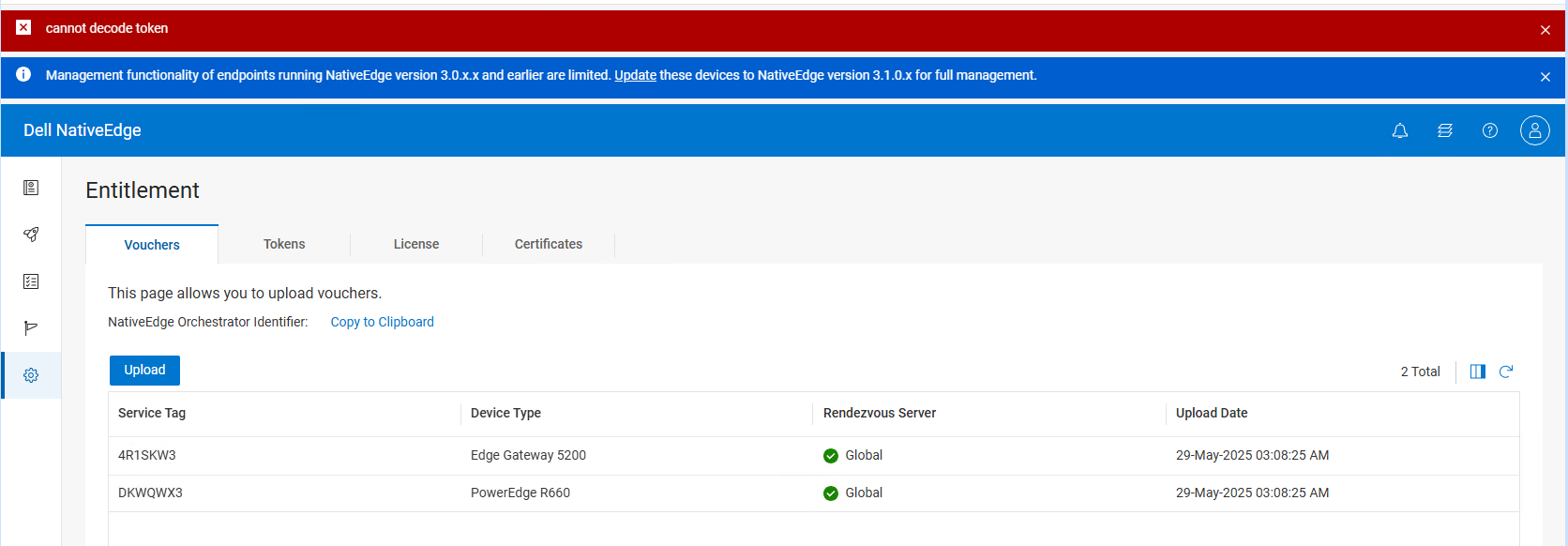
Cause
這是因為 Dell Digital Locker 的後端發生未預期的變更。
頁眉和頁腳應位於字串下方。
-----BEGIN EDGE ORCHESTRATOR ACCESS TOKEN-----
-----END EDGE ORCHESTRATOR 存取權杖-----
相反,它顯示為以下字串。
-----開始存取權杖-----
-----終端存取權杖-----
Resolution
NativeEdge 工程部門正在調查此問題,並與 Dell Digital Locker 端合作以還原變更。
當頁眉和頁尾還原為正確格式後,此 KB 便會更新。
唯一的解決方法是使用氣隙方法上傳憑證。
注意 將錯誤格式的頁眉和頁腳更換為正確的頁眉和頁腳格式,將不允許存取權杖從 Dell Digital Locker 提取憑證,因為它無法辨識修改後的存取權杖。
6月18日更新
Dell Digital Locker 端已還原變更,且新建立的存取權杖可正常運作。5 月 29 日至 6 月 18 日期間生成的訪問令牌已損壞。建議客戶從「我的帳戶」生成新令牌。
Affected Products
NativeEdge SolutionsArticle Properties
Article Number: 000333293
Article Type: Solution
Last Modified: 23 Jun 2025
Version: 2
Find answers to your questions from other Dell users
Support Services
Check if your device is covered by Support Services.