Dell SB725サウンドバーがDellモニターに接続されている場合にオーディオが出力されない
Summary: この記事では、Dell製モニターが接続されている状態でDell SB725サウンドバーをDell製コンピューターに接続する方法について説明します。
This article applies to
This article does not apply to
This article is not tied to any specific product.
Not all product versions are identified in this article.
Symptoms
サウンドバーがDellモニターのUSBポートに接続されている場合、Dell SB725サウンドバーで音が出ない場合があります。
影響を受けるデバイス:
- Dell Proプレミアム会議用サウンドバーSB725
Cause
モニターのUSBアップストリーム ケーブルがDell PCに接続されていない場合、PCとDellモニターの間でオーディオ データは送信されません。
Resolution
USBアップストリーム ケーブル
HDMIまたはDisplayPort接続を使用してモニターがコンピューターに接続されている場合は、サウンドバーに電源を供給するために、DellモニターのUSBアップストリーム ケーブルをコンピューターに接続する必要があります。
Dellモニターに同梱されているUSBアップストリーム ケーブルをモニターに接続し、ケーブルのもう一方の端をコンピューターに接続します。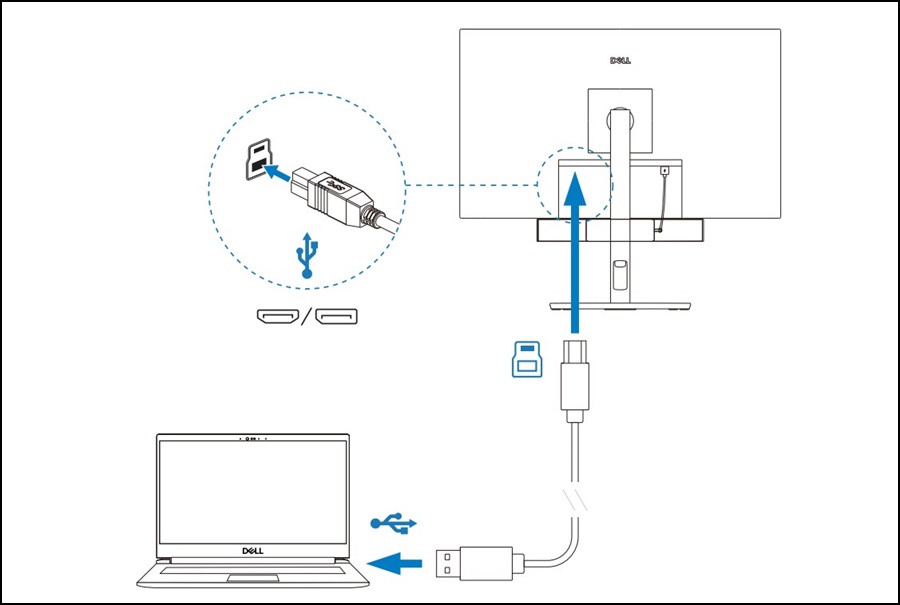
注:Dell製モニターがサウンドバーと互換性があることを確認する必要があります。互換性リストは、サウンドバーの製品ページにある[仕様詳細]まで下にスクロールし、[その他]セクションで確認できます。
Dell Proプレミアム会議サウンドバー - SB725の技術仕様
Dell Proプレミアム会議サウンドバー - SB725の技術仕様
Affected Products
Dell P2222H, Dell P2422H, Dell P2422HE, Dell P2721Q, Dell P2722H, Dell P2722HE, Dell P3221D, Dell P3222QE, Dell P3421W, Dell Pro Premium Conferencing Soundbar SB725, Dell U2421E, Dell U2422H, Dell U2422HE, Dell U2422HX, Dell U2722D, Dell U2722DE
, Dell U2722DX, Dell P2223HC, Dell P2225H, Dell P2422HA, Dell P2423, Dell P2423D, Dell P2423DE, Dell P2425, Dell Pro 24 Plus QHD Monitor P2425D, Dell Pro 24 Plus QHD USB-C Hub Monitor P2425DE, Dell P2425E, Dell P2425H, Dell P2425HE, Dell P2723D, Dell P2723DE, Dell P2723QE, Dell Pro 27 Plus QHD Monitor P2725D, Dell Pro 27 Plus QHD USB-C Hub Monitor P2725DE, Dell P2725H, Dell P2725HE, Dell Pro 27 Plus 4K USB-C Hub Monitor P2725QE, Dell P3223DE, Dell P3223QE, Dell Pro 32 Plus QHD USB-C Hub Monitor P3225DE, Dell Pro 32 Plus 4K USB-C Hub Monitor P3225QE, Dell P3424WE, Dell Pro 34 Plus USB-C Hub Monitor P3425WE, Dell U2424H, Dell U2424HE, Dell U2723QE, Dell U2723QX, Dell U2724D, Dell U2724DE, Dell UltraSharp 27 4K Thunderbolt Hub Monitor U2725QE, Dell U3023E, Dell U3223QE, Dell UltraSharp 32 4K Thunderbolt Hub Monitor U3225QE
...
Article Properties
Article Number: 000350991
Article Type: Solution
Last Modified: 15 Sept 2025
Version: 3
Find answers to your questions from other Dell users
Support Services
Check if your device is covered by Support Services.