Dell Pro 13 Plus PB13250 LCD Corrupted When Lid Closed and Opened Too Quickly
Summary: The following article provides information about an on-screen liquid crystal display (LCD) issue on Dell Pro 13 Plus PB13250 laptops. This is seen when opening or closing the lid too quickly in the Windows operating system. ...
Symptoms
Closing and opening the lid too quickly in Windows causes display corruption
The Dell Pro 13 Plus PB13250 laptop LCD becomes corrupted along the Windows taskbar.
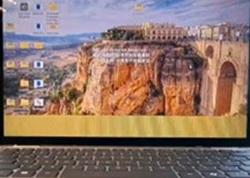
This happens under the following circumstances:
-
The laptop is open and is running the Windows operating system.
-
Quickly close and then reopen the lid. (It takes less than one second to open and close the lid.)
-
The on-screen LCD garbage is intermittently seen in place of the Windows taskbar.
Cause
This raises the Intel platform service record (PSR) state before the LCD panel and the laptop completes synching up.
Resolution
Updating the BIOS to version 2.6.1 or later on the laptop resolves the issue. To download and install the Dell_Pro_PA13250_PA14250_PB13250_PB14250_PB16250_2.6.1.exe update file, refer to: BIOS Update Guide
How to recover the laptop screen if the issue happens before updating the BIOS:
The following instructions are how to recover your laptop when experiencing this problem:
-
When the on-screen garbage is seen, close the laptop lid.
-
Wait for at least three seconds before opening the laptop lid.
-
Does the on-screen corruption go away?
-
Yes it does go away. Update to the latest version of the BIOS.
-
No it does not go away. Run through steps 1 and 2 again.
-
-
What if the laptop enters operating system mode when the lid is opened?
-
Wait for at least five to ten seconds, does the screen clear?
-
Yes the screen clears. Update to the latest version of the BIOS.
-
No it does not go away. Run through steps 1 and 2 again.
-
-