Facial Recognition Using the Windows Hello Camera May Not Work as Expected After Updating to Windows 11 Version 24H2 (Build 26100.5074 or Later)
Summary: This article addresses a technical issue with facial recognition on some Dell devices after updating to Windows 11 24H2 build 26100.5074 or later.
This article applies to
This article does not apply to
This article is not tied to any specific product.
Not all product versions are identified in this article.
Symptoms
Facial recognition (Windows Hello) setup may fail on Windows 11 version 24H2 (build 26100.5074 or later), with no face detection box appearing during enrollment.
If facial recognition (Windows Hello) was set up before updating to Windows 11 version 24H2 (build 26100.5074 or later), you may be unable to sign in using it after the update.
The following example shows the message that you might see when you experience this issue.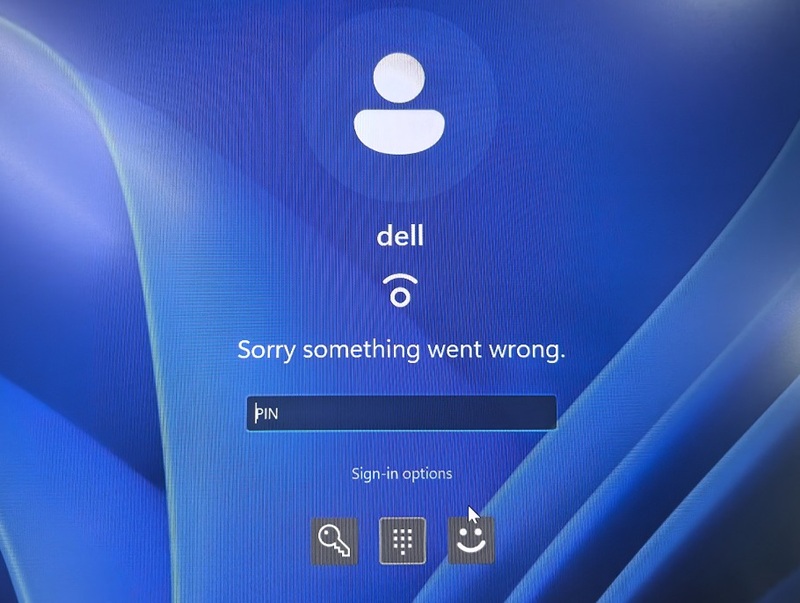
Affected Platforms:
- Dell Pro 13 Plus PB13250
- Dell Pro 13 Plus PB13255
- Dell Pro 14 Plus PB14250
- Dell Pro 14 Plus PB14255
- Dell Pro 16 Plus PB16250
- Dell Pro 16 Plus PB16255
- Dell Pro Max 14 MC14250
- Dell Pro Max 14 MC14255
- Dell Pro Max 16 XE MC16250
- Dell Pro Max 16 MC16255
Affected Operating Systems:
- Windows 11 Version 24H2 (build 26100.5074 or later)
Cause
After updating to Windows 11 version 24H2 (build 26100.5074), some devices may experience Windows Hello facial recognition issues.
Switching the infrared (IR) camera's frame format from MJPEG (Motion JPEG) to L8 (8-bit grayscale) may improve performance in some systems, but it might not fully resolve the issue across all devices.
Resolution
The solution to this issue has been added to Windows 11 24H2 and 25H2 build version 26100.6899. (10B update KB5066835.) Any previous version of Windows may experience the issue.
Affected Products
Dell Pro Max 14 MC14250, Dell Pro Max 14 MC14255, Dell Pro Max 16 XE MC16250, Dell Pro Max 16 MC16255, Dell Pro 13 Plus PB13250, Dell Pro 13 Plus PB13255, Dell Pro 14 Plus PB14250, Dell Pro 14 Plus PB14255, Dell Pro 16 Plus PB16250
, Dell Pro 16 Plus PB16255
...
Article Properties
Article Number: 000376721
Article Type: Solution
Last Modified: 20 Oct 2025
Version: 5
Find answers to your questions from other Dell users
Support Services
Check if your device is covered by Support Services.