Dell Endpoint Security Suite Enterprise Web Protection and Firewall Shows Vulnerable After Install
Summary: Dell Endpoint Security Suite Enterprise Web Protection and Firewall Shows Vulnerable After Install
Symptoms
- As of May 2022, Dell Endpoint Security Suite Enterprise has reached End of Maintenance. This article is no longer updated by Dell. For more information, reference the Product Life Cycle (End of Support / End of Life) Policy for Dell Data Security. If you have any questions on alternative articles, either reach out to your sales team or contact endpointsecurity@dell.com.
- Reference Endpoint Security for additional information about current products.
Affected Products:
- Dell Endpoint Security Suite Enterprise
Affected Versions:
- v10.4 and Earlier
Customers who are running Dell Endpoint Security Suite Enterprise may see this in the Dell Data Security Console after installing using the Dell Endpoint Security Suite Enterprise Suite installer or child installers.
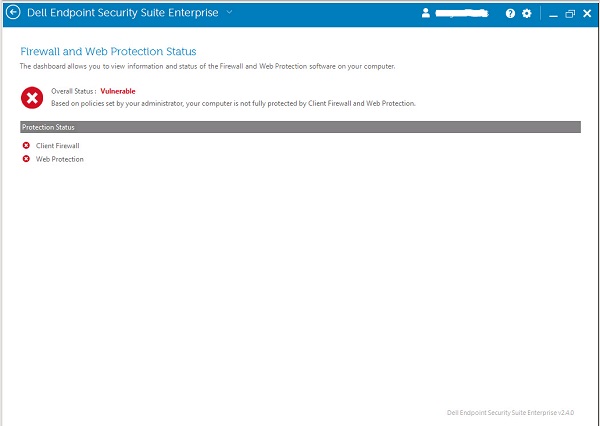
Figure 1: (English Only) Firewall and Web Protection Status
Cause
This may be due to a missing C++ run time pre-requisite:
- Open an administrative command prompt.
- Run:
wmic product where "name like '%Visual C++ 2012%'" get name, version. - If there are no lines like below in the output, then the Microsoft Visual C++ 2012 runtime is missing.

Figure 2: (English Only) Run wmic product where "name like '%Visual C++ 2012%'" get name, version
Resolution
Reference Dell Endpoint Security Suite Enterprise System Requirements for version specific requirements.
To contact support, reference Dell Data Security International Support Phone Numbers.
Go to TechDirect to generate a technical support request online.
For additional insights and resources, join the Dell Security Community Forum.