Long Boot Time in PBA Using Dell Encryption Enterprise After Switching Networks
Summary: A customer may report that they have to wait for three or more minutes until they can enter their credentials in the Pre Boot Authentication environment on the first boot after the computer was connected to a network with a different IP range (for example 192.168.1.X as company network and 192.168.178.X as private network). ...
This article applies to
This article does not apply to
This article is not tied to any specific product.
Not all product versions are identified in this article.
Symptoms
Affected Products:
- Dell Full Disk Encryption
- Dell Encryption Enterprise Self-Encrypting Drive Manager
Affected Versions:
- v10.7
- v10.8
- v10.9.0.3
Affected Operating Systems:
- Windows
Cause
This behavior can be observed when the customer does not use a Dell Security Management Server Front-End Server.
Resolution
To resolve the issue update to the latest version of Dell Full Disk Encryption or Dell Encryption Enterprise Self-Encrypting Drive Manager.
The issue is resolved in v10.9.1.1 and later.
You can check the installed PBA Version by clicking Options (bottom left) in PBA and select About.
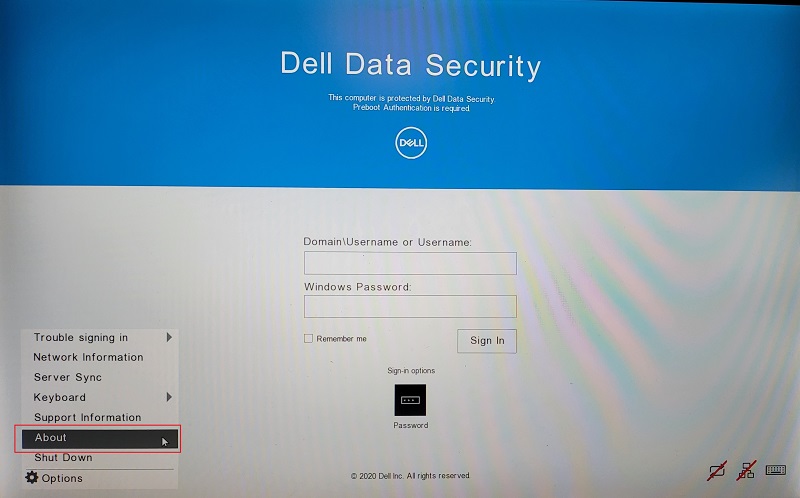
Figure 1: (English Only) Select Options and About
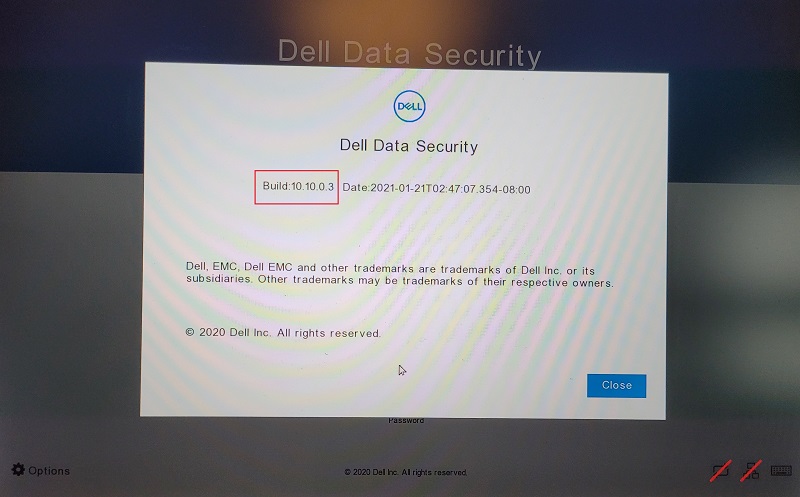
Figure 2: (English Only) Dell Data Security Build information
To contact support, reference Dell Data Security International Support Phone Numbers.
Go to TechDirect to generate a technical support request online.
For additional insights and resources, join the Dell Security Community Forum.
Affected Products
Dell EncryptionArticle Properties
Article Number: 000186109
Article Type: Solution
Last Modified: 08 May 2024
Version: 11
Find answers to your questions from other Dell users
Support Services
Check if your device is covered by Support Services.