NVP-vProxy: Virtual Machine Backup Fails With 'Failed to Lock Virtual Machine for Backup'
Summary: NetWorker VMware Protection (NVP) vProxy backups fail because the vProxy cannot lock the virtual machine at the start of the backup workflow. A previous backup operation left VM lock attributes in place after encountering a problem during execution. The stale lock prevents new backup operations from starting on the affected VM. ...
Symptoms
The NVP integration uses a vProxy appliance to perform VM backups. A backup fails at the start of the workflow with a message indicating another vProxy operation is active.
The vProxy backup log shows the lock failure:
YYYY/MM/DD HH:MM:SS INFO:  [@(#) Build number: 43] Another vProxy operation is active on VM vm-XXX: {Operation:Backup StartTime:YYYY-MM-DDTHH:MM:SSZ Proxy:[VPROXY_NAME] SessionId:4cf6f76c-ef6c-435d-880c-77fbaf49e17d}
YYYY/MM/DD HH:MM:SS ERROR: [@(#) Build number: 43] Failed to lock Virtual Machine for backup: Another vProxy operation is active on VM vm-XXX: {Operation:Backup StartTime:YYYY-MM-DDTHH:MM:SSZ Proxy:[VPROXY_NAME] SessionId:4cf6f76c-ef6c-435d-880c-77fbaf49e17d}.
No other backup or restore operation is currently running on the VM. The lock is stale from a previous failed backup.
Cause
The vProxy backup workflow sets VM custom attributes at the start of each backup. These attributes prevent multiple vProxy operations on the same VM. The workflow removes the attributes when the backup completes.
If a previous backup encountered a problem during execution, the attributes may not be removed. The stale lock persists and blocks all new backup operations on the VM.
The VM custom attributes involved are EMC vProxy Session and Last EMC vProxy.
Resolution
Two methods are available to clear the stale VM lock.
Method 1 — Clear the Lock Using the vmconfig Utility
- Open an SSH session to one of the vProxy appliances. Authenticate as root.
- Load the vProxy environment variables:
source /opt/emc/vproxy/unit/vproxy.env - Query the VM lock state to confirm the lock is active:
/opt/emc/vproxy/bin/vmconfig -v <vcenter_fqdn> -u '<vcenter_user>' -p '<vcenter_password>' -c "info" -l moref -k <vm_moref> - The output shows Backup Locked: true if the lock is active.
- Reset the backup lock:
/opt/emc/vproxy/bin/vmconfig -v <vcenter_fqdn> -u '<vcenter_user>' -p '<vcenter_password>' -c "reset-backup" -l moref -k <vm_moref> - Query the VM again to confirm the lock is cleared:
/opt/emc/vproxy/bin/vmconfig -v <vcenter_fqdn> -u '<vcenter_user>' -p '<vcenter_password>' -c "info" -l moref -k <vm_moref> - The output should show Backup Locked: false.
- Retry the backup for the affected VM.
Method 2 — Clear the Lock Using the vSphere Web Client
- Log in to the vSphere Web Client.
- Navigate to the affected virtual machine.
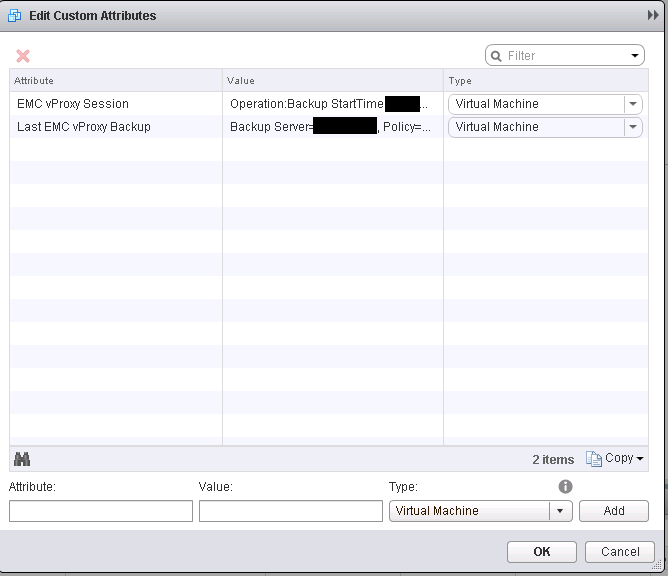
- Edit the Custom Attributes for the VM.
- Remove the values for the following attributes:
- EMC vProxy Session
- Last EMC vProxy
- Save the changes and retry the backup.
Additional Information
Example output:
myvproxyname:~ # /opt/emc/vproxy/bin/vmconfig -v vCenter_name.domain.com -u myProxyUser@vsphere.local -p myProxyPassword -c "info" -l moref -k vm-96
 VM Config
 vCenter: "vCenter_name.domain.com", User: "myProxyUser@vsphere.local", Password: "myProxyPassword", Lookup Mode: "moref", Lookup Key: "vm-96", Command: "info"
 Logged into vCenter 'vCenter_name.domain.com'.
 Connected to session on vCenter 'vCenter_name.domain.com' Version '6.5.0 build-8307201, API:6.5', Uuid:5b106da3-cb53-48e6-af57-7ac1d5154ab6.
 Found virtual machine "virtualmachine_name.domain.com" with MORef "vm-96".
 Name: "virtualmachine_name.domain.com".
 CBT Enabled: true.
 Migration Enabled: true.
 Backup Locked: true.
 Disconnected from session on vCenter 'vCenter_name.domain.com'.
 Logged out from vCenter 'vCenter_name.domain.com'.

myvproxyname:~ # /opt/emc/vproxy/bin/vmconfig -v vCenter_name.domain.com -u myProxyUser@vsphere.local -p myProxyPassword -c "reset-backup" -l moref -k vm-96
 VM Config
 vCenter: "vCenter_name.domain.com", User: "myProxyUser@vsphere.local", Password: "myProxyPassword", Lookup Mode: "moref", Lookup Key: "vm-96", Command: "reset-backup"
 Logged into vCenter 'vCenter_name.domain.com'.
 Connected to session on vCenter 'vCenter_name.domain.com' Version '6.5.0 build-8307201, API:6.5', Uuid:5b106da3-cb53-48e6-af57-7ac1d5154ab6.
 Found virtual machine "virtualmachine_name.domain.com" with MORef "vm-96".
 Clearing EMC vProxy Session lock for virtual machine "virtualmachine_name.domain.com" "vm-96", locked by "{Operation:Backup StartTime:2018-07-31 09:36:31.487334906 -0700 PDT Proxy:myvproxyname SessionId:test-lock}".
 Set custom attribute 'EMC vProxy Session' value for object vm-96 to ''.
 Backup lock is cleared.
 Initializing VDDK...
 Migration is already enabled.
 De-initializing VDDK libraries.
 Disconnected from session on vCenter 'vCenter_name.domain.com'.
 Logged out from vCenter 'vCenter_name.domain.com'.

myvproxyname:~ # /opt/emc/vproxy/bin/vmconfig -v vCenter_name.domain.com -u myProxyUser@vsphere.local -p myProxyPassword -c "info" -l moref -k vm-96
 VM Config
 vCenter: "vCenter_name.domain.com", User: "myProxyUser@vsphere.local", Password: "myProxyPassword", Lookup Mode: "moref", Lookup Key: "vm-96", Command: "info"
 Logged into vCenter 'vCenter_name.domain.com'.
 Connected to session on vCenter 'vCenter_name.domain.com' Version '6.5.0 build-8307201, API:6.5', Uuid:5b106da3-cb53-48e6-af57-7ac1d5154ab6.
 Found virtual machine "virtualmachine_name.domain.com" with MORef "vm-96".
 Name: "virtualmachine_name.domain.com".
 CBT Enabled: true.
 Migration Enabled: true.
 Backup Locked: false.
 Disconnected from session on vCenter 'vCenter_name.domain.com'.
 Logged out from vCenter 'vCenter_name.domain.com'.
myvproxyname:~ #