Avamar: Proxy Deployment Manager Error – Invalid Domain
Summary: Proxy Deployment Manager fails in registration with error 'could not register proxy: invalid domain'
Symptoms
When trying to deploy proxy by Proxy Deployment Manager, it always failed with error could not register proxy: invalid domain
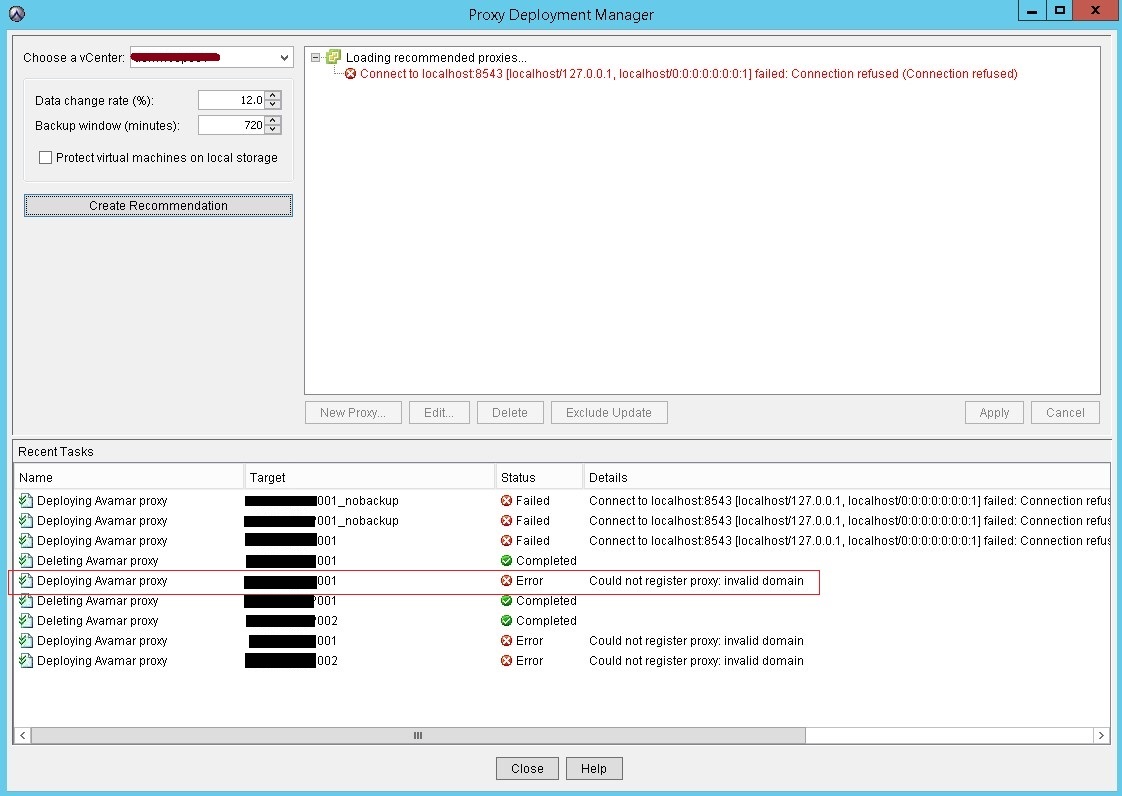
MCS log shows Avamar Server already has this client
mcserver.log.43:FINE: Cl->MC 10.100.1.201:32876<client isclientos="0" type="init" ack="yes" fqhostname="usivnavmp001.sus.local" msgver="1" os_type="Linux" hostname="usivnavmp001.sus.lcal" client_type="VPROXY_GUEST" mcsaddr="10.100.1.200" uuid="4206c9d11fc2d8ef735d2c816c90712c" dpndomain="/" cid="0" version="7.4.101-58" secure-st-version="2"><DNSname>127.0.0.2</DNSame><DNSname>usivnavmp001.sus.local</DNSname><DNSname>usivnavmp001</DNSname><DNSname>10.100.1.201</DNSname></client>

mcserver.log.43:FINE: client connection called id indicates:10.100.1.201

mcserver.log.43:FINE: Paging will be disabled on client connecting from 10.100.1.201 because the client did not provide a paging address when connecting

mcserver.log.43:FINE: MC->Cl 10.100.1.201:32876 <message  errno="202" errdesc="Proxy client already exists as a client for image backup." msgver="5" ack="no" type="response" sync="fg"hfsaddr="10.100.1.200"  />
deploymanager.log in /usr/local/avamar/var/log/vcs shows the below error:
avagent.d Info: Stopping Avamar Client Agent (avagent)...

avagent.d Info: Client Agent stopped.

avagent Info <5008>: Logging to /usr/local/avamarclient/var/avagent.log

avagent Error <7531>: Unable to register /deab/proxy01.av.local with Administrator 192.167.191.29:28001


      'Proxy client already exists as a client for image backup.' (202)

avagent.d Info: Client activation error.

avagent Info <5008>: Logging to /usr/local/avamarclient/var/avagent.log

avagent Info <5417>: daemonized as process id 14474

avagent.d Info: Client Agent started.
Cause
The issue happens for 2 reasons:
reason 1:
On the affected Avamar Server, there was a rule configured to add VMs to Avamar Server automatically. During proxy deployment, the VM is created in vCenter and automatically added to the Avamar Server by rule before self-activation. Therefore, the error "Proxy client already exists as a client for image backup" was logged by MCS when proxy tries register itself later.
reason 2:
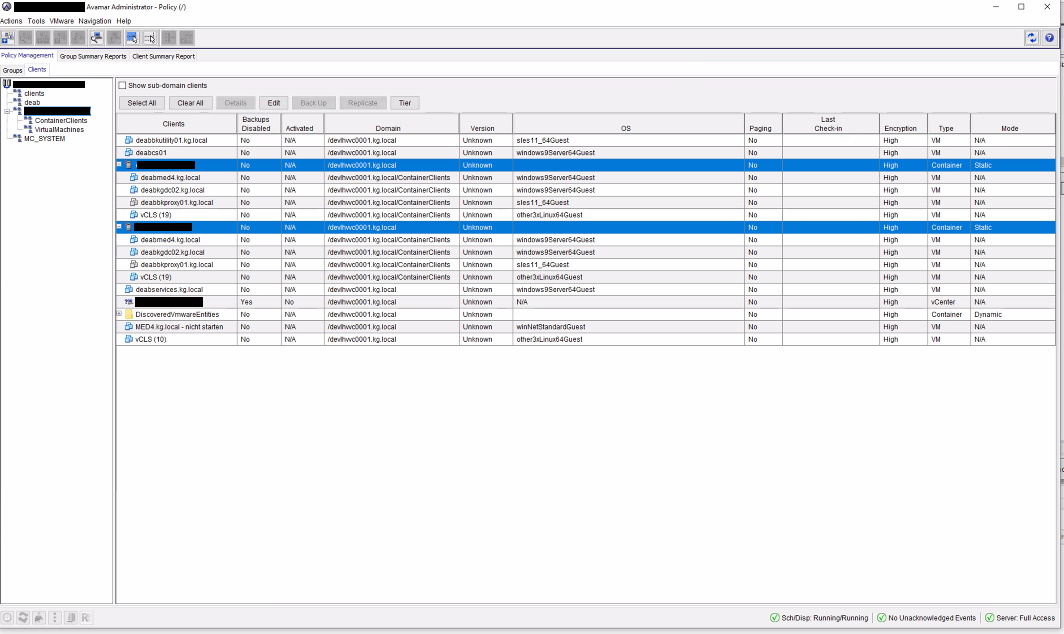
There is a dynamic container set on Avamar meaning that any new client created on the vCenter will be added under it thus get added as a VM causing the error "Proxy client already exists as a client for image backup"
Example of a container added as ESXi with proxy added under it as VM image backup client:
a { text-decoration: none; color: #464feb; } tr th, tr td { border: 1px solid #e6e6e6; } tr th { background-color: #f5f5f5; }
Resolution
For reason 1:
1. Open Avamar GUI, click Tools-->choose Manage Rules
2. Check the rule configured and make sure new deployed proxy is not added to Avamar automatically
For reason 2:
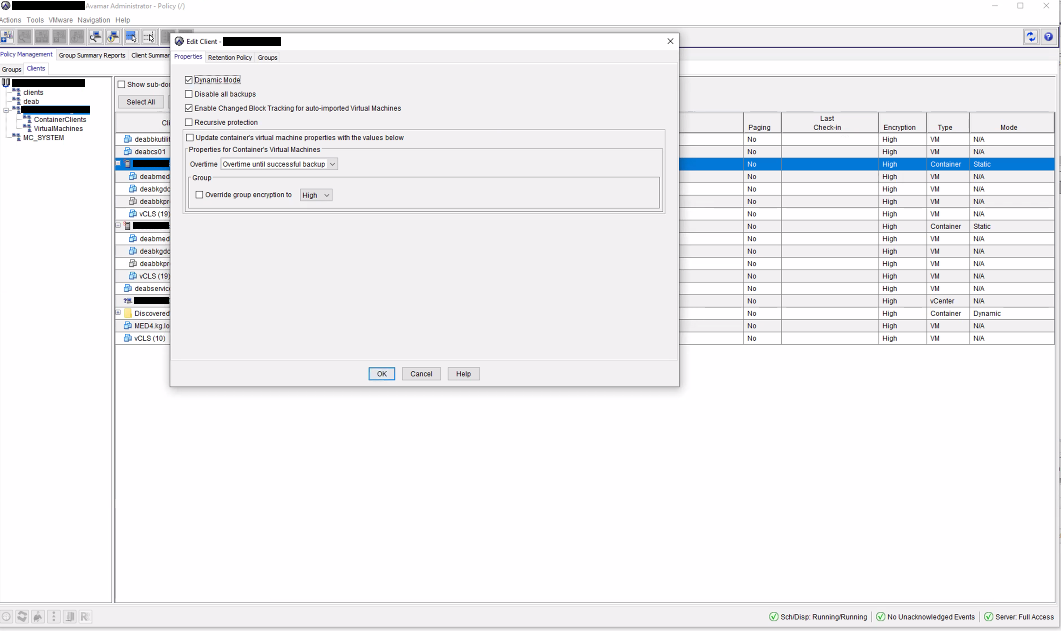
1. Open Avamar GUI, click on Policy tab-->choose Clients (besides Groups) from left pane
2. Click on the container (ESXi in the following example) and click Edit then locate the flag Dynamic Mode:
3. Uncheck Dynamic Mode and run the proxy deployment manager task again:
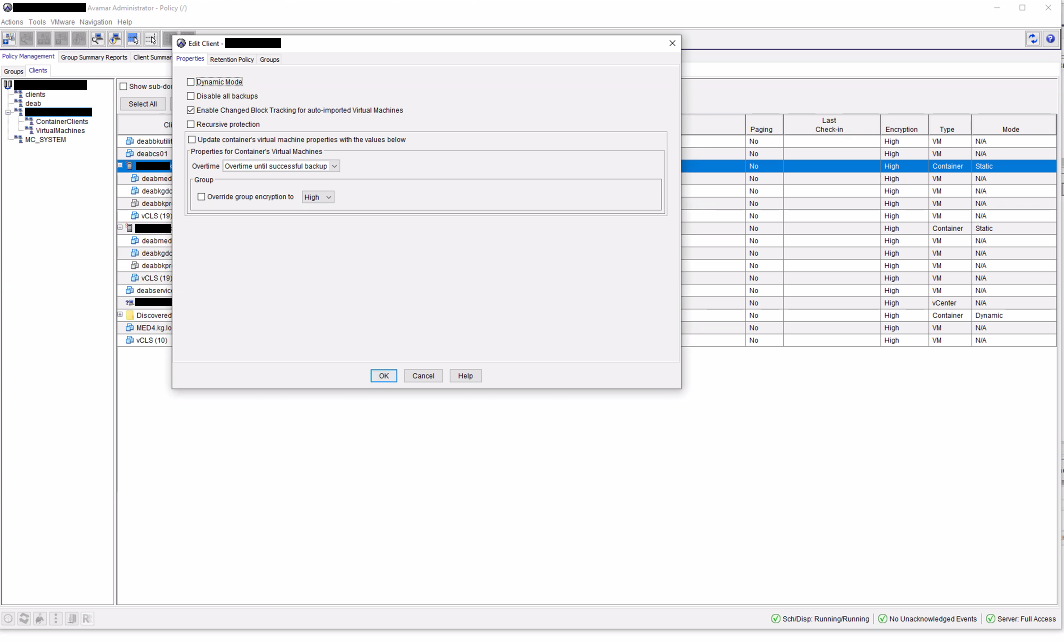
Please note: if Dynamic Mode is needed you can enable it back and the proxy deployed will go underneath the Container Clients but will be functioning normally and disable it when deploying a new proxy