VxRail:如何将文件上传到 VxRail Manager
Summary: 本知识库文章提供有关如何将文件上传到 VxRail Manager 虚拟机的说明。
This article applies to
This article does not apply to
This article is not tied to any specific product.
Not all product versions are identified in this article.
Instructions
对于 Windows 个人计算机,请使用 WinSCP 将文件上传到 VxRail Manager。
- 启动 WinSCP 会话,选择 SFTP 作为文件协议。(如果您的 Windows 个人计算机未安装 WinSCP,请先安装。)
- 输入 VxRail Manager IP 作为主机名。
- 输入“mystic”作为用户名并输入其密码。
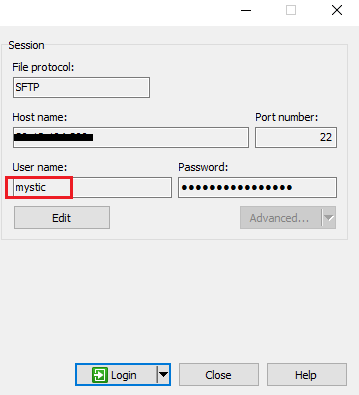
- 建立连接后,导航到本地文件目录,并将文件上传到 VxRail 管理器“/home/mystic”目录。

对于 Linux 计算机,使用 SCP 命令将文件上传到 VxRail Manager。
-
scp <local_file_path>/<file_name> mystic@<VxRail_manager_IP>:/home/mystic
例如,以下命令将本地 Linux 计算机“/tmp”目录下的文件“Testupload.zip”上传到目标 VxRail Manager“/home/mystic”目录。
Affected Products
VxRail SoftwareArticle Properties
Article Number: 000224029
Article Type: How To
Last Modified: 28 Jun 2024
Version: 3
Find answers to your questions from other Dell users
Support Services
Check if your device is covered by Support Services.