No Error Message Displays When Flashing an Unsupported BIOS on Precision, OptiPlex, Vostro, and Inspiron Desktop
Summary: This article provides information about a message what should display when flashing an unsupported BIOS on Precision, OptiPlex, Vostro, or Inspiron desktops.
This article applies to
This article does not apply to
This article is not tied to any specific product.
Not all product versions are identified in this article.
Symptoms
Precision, OptiPlex, Vostro, or Inspiron desktop is expected to display an error when flashing an unsupported BIOS.
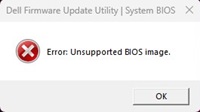
However, some computers may display no error message and show that the progress continues. They display no error message and stay on the EXE BIOS Flash tool after double-clicking an unsupported BIOS file. This is a wrong behavior.
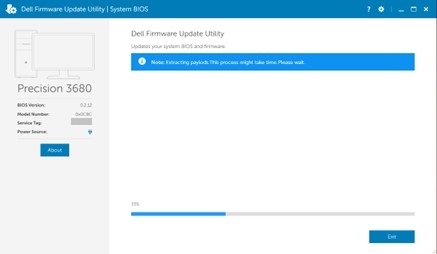
Affected Platforms:
- Inspiron 3030 Desktop
- Inspiron 3030 Small Desktop
- OptiPlex Small Form Factor 7020
- OptiPlex Small Form Factor Plus 7020
- OptiPlex Tower 7020
- OptiPlex Tower Plus 7020
- Precision 3460 Small Form Factor
- Precision 3660 Tower
- Precision 3680 Tower
- Vostro 3030 Desktop
- Vostro 3030 Small Desktop
Cause
This is due to the BIOS coding issue.
Resolution
Updating to the latest BIOS version for your computer resolves the issue. To download and install the BIOS, reference BIOS Update Guide.
Affected Products
Inspiron 3030 Desktop, Inspiron 3030 Small Desktop, OptiPlex Small Form Factor Plus 7020, OptiPlex Small Form Factor 7020, OptiPlex Tower 7020, OptiPlex Tower Plus 7020, Precision 3460 Small Form Factor, Precision 3660 Tower, Precision 3680 Tower
, Vostro 3030 Desktop, Vostro 3030 Small Desktop
...
Article Properties
Article Number: 000222841
Article Type: Solution
Last Modified: 13 Nov 2025
Version: 6
Find answers to your questions from other Dell users
Support Services
Check if your device is covered by Support Services.