MHC Azure Stack: OEM 역할 OEM의 OEM 유형 FirmwareCheckHealth에서 예외가 발생했습니다.
Summary: Type FirmwareCheckHealth of Role OEM raised an exception Error running Test-OEMFirmwareHealth iDRAC has Critical Major faults could not proceed with Firmware update.
This article applies to
This article does not apply to
This article is not tied to any specific product.
Not all product versions are identified in this article.
Symptoms
OEM 사전 검사에 실패했습니다. 오류:
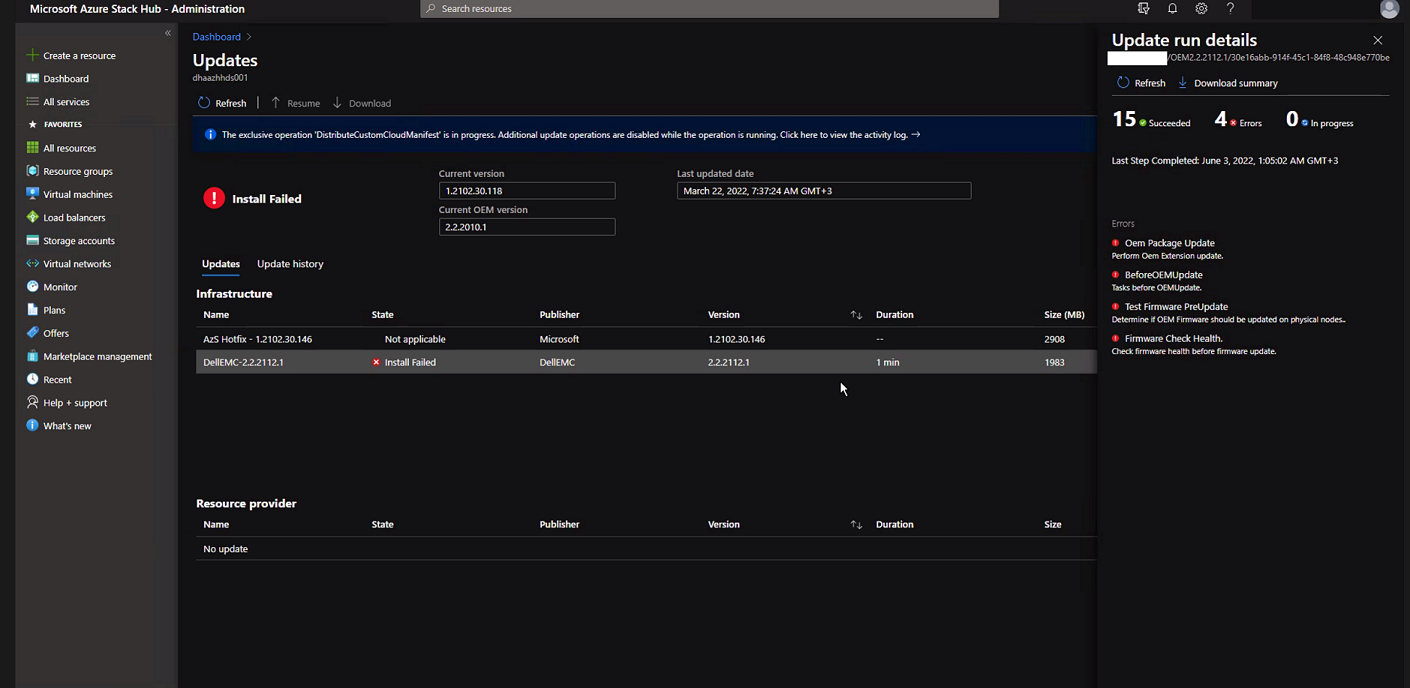
"Download Summary"를 클릭합니다.
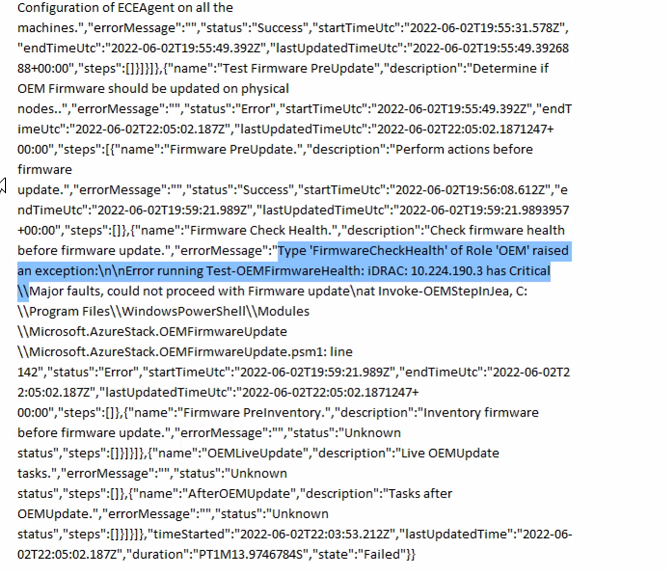
Error.json:
Oem Package Update
Perform Oem Extension update.

BeforeOEMUpdate
Tasks before OEMUpdate.

Test Firmware PreUpdate
Determine if OEM Firmware should be updated on physical nodes.

Firmware Check Health.
Check firmware health before update.
"Download Summary"를 클릭합니다.
Error.json:
Type ‘FirmwareCheckHealth’ of Role ‘OEM’ raised an exception:\n\nError running Test-OEMFirmwareHealth: iDRAC: 10.224.190.3 has Critical Major faults, could not proceed with Firmware update….
Cause
서버 4대 중 3대에서 메모리 오류가 발생했습니다. 계속하기 전에 이러한 문제를 해결해야 합니다.
The memory health monitor feature has detected a degradation in the DIMM installed in DIMM_A6. Reboot system to initiate self-heal process.
Resolution
이 문제를 해결하려면 메모리 오류를 수정하십시오.
- iDRAC에 장애가 발생한 메모리가 표시된 상태에서 노드를 드레이닝합니다.
- 드레이닝되면 PEP PowerShell 창에서 다음 명령을 실행합니다.
get-virtualdisk -cimsession "s-cluster"
get-virtualdisk -cimsession "s-cluster" | get-storagejob
- 모든 스토리지 작업이 완료되면 iDRAC에서 서버를 콜드 부팅합니다
- DIMM이 복구되었는지 확인합니다.
The self-heal operation successfully completed at DIMM DIMM_A6.
- Azure Stack 창에서 노드를 시작합니다.
- Azure Stack 창에서 노드를 다시 시작합니다.
Affected Products
Integrated System for Microsoft Azure Stack Hub, Integrated System for Microsoft Azure Stack Hub 14GArticle Properties
Article Number: 000200301
Article Type: Solution
Last Modified: 08 Sep 2025
Version: 3
Find answers to your questions from other Dell users
Support Services
Check if your device is covered by Support Services.