NVP-vProxy: La restauración de FLR falla con el error "Unable to get partition information: exit status 2"
Summary: La restauración a nivel de archivos (FLR) de VM falla durante la operación de montaje con el siguiente error: "Unable to get partition information: exit status 2" (No se puede obtener la información de partición: estado de salida 2) ...
This article applies to
This article does not apply to
This article is not tied to any specific product.
Not all product versions are identified in this article.
Symptoms
- La máquina virtual (VM) para la que se ejecutaba FLR tenía un disco duro agregado que no estaba particionado.
- La integración de NetWorker VMware Protection se configura con el vProxy Appliance.
- NetWorker 19.7.0.x (vProxy 4.3.0-22) y versiones anteriores.
- Se está realizando una restauración de FLR de máquina virtual (VM) en el ambiente y falla con el siguiente error:
Desmontaje después de una falla de montaje: No se puede obtener la información de la partición: estado de salida 2
159373:nsrvproxy_flr: vProxy Log: 2019/01/08 14:56:38 TRACE:  [@(#) Build number: 246] /dev/loop0
159373:nsrvproxy_flr: vProxy Log: 2019/01/08 14:56:38 TRACE:  [@(#) Build number: 246] ====End of output from '/sbin/losetup'.
159373:nsrvproxy_flr: vProxy Log: 2019/01/08 14:56:40 TRACE:  [@(#) Build number: 246] ====Executing [/sbin/blkid -c /dev/null /dev/loop0]
159373:nsrvproxy_flr: vProxy Log: 2019/01/08 14:56:40 TRACE:  [@(#) Build number: 246] /dev/loop0: PTUUID="00041d0c" PTTYPE="dos"
159373:nsrvproxy_flr: vProxy Log: 2019/01/08 14:56:40 TRACE:  [@(#) Build number: 246] ====End of output from '/sbin/blkid'.
159373:nsrvproxy_flr: vProxy Log: 2019/01/08 14:56:40 TRACE:  [@(#) Build number: 246] Attached VMDK 'vm-422-disk-key-2000-flat.vmdk' at '/dev/loop0' with partitions [/dev/loop0p3 /dev/loop0p2 /dev/loop0p1]
159373:nsrvproxy_flr: vProxy Log: 2019/01/08 14:56:40 TRACE:  [@(#) Build number: 246] ====Executing [/sbin/losetup --find --show -P /opt/emc/vproxy/runtime/state/flr/temp/nfs-905033c8-d093-46c7-a8b3-ea9722b76eeb/vm-422-disk-key-2001-flat.vmdk]
159373:nsrvproxy_flr: vProxy Log: 2019/01/08 14:56:40 TRACE:  [@(#) Build number: 246] /dev/loop2
159373:nsrvproxy_flr: vProxy Log: 2019/01/08 14:56:40 TRACE:  [@(#) Build number: 246] ====End of output from '/sbin/losetup'.
159373:nsrvproxy_flr: vProxy Log: 2019/01/08 14:56:42 TRACE:  [@(#) Build number: 246] ====Executing [/sbin/blkid -c /dev/null /dev/loop2]
159373:nsrvproxy_flr: vProxy Log: 2019/01/08 14:56:42 TRACE:  [@(#) Build number: 246] ====Executing [/sbin/losetup -d /dev/loop2]
159373:nsrvproxy_flr: vProxy Log: 2019/01/08 14:56:44 TRACE:  [@(#) Build number: 246] ====Executing [/sbin/losetup --find --show -P /opt/emc/vproxy/runtime/state/flr/temp/nfs-905033c8-d093-46c7-a8b3-ea9722b76eeb/vm-422-disk-key-2001-flat.vmdk]
159373:nsrvproxy_flr: vProxy Log: 2019/01/08 14:56:44 TRACE:  [@(#) Build number: 246] /dev/loop2
159373:nsrvproxy_flr: vProxy Log: 2019/01/08 14:56:44 TRACE:  [@(#) Build number: 246] ====End of output from '/sbin/losetup'.
159373:nsrvproxy_flr: vProxy Log: 2019/01/08 14:56:46 TRACE:  [@(#) Build number: 246] ====Executing [/sbin/blkid -c /dev/null /dev/loop2]
159373:nsrvproxy_flr: vProxy Log: 2019/01/08 14:56:46 TRACE:  [@(#) Build number: 246] Removing 1 temporary loop devices
159373:nsrvproxy_flr: vProxy Log: 2019/01/08 14:56:46 TRACE:  [@(#) Build number: 246] ====Executing [/sbin/losetup -d /dev/loop0]
159373:nsrvproxy_flr: vProxy Log: 2019/01/08 14:56:46 TRACE:  [@(#) Build number: 246] ====Executing [/sbin/pvscan --cache]
159373:nsrvproxy_flr: vProxy Log: 2019/01/08 14:56:46 TRACE:  [@(#) Build number: 246] File descriptor 10 (socket:[4601043]) leaked on pvscan invocation. Parent PID 2560: /opt/emc/vproxy/bin/vflrd
159373:nsrvproxy_flr: vProxy Log: 2019/01/08 14:56:46 TRACE:  [@(#) Build number: 246]   /dev/loop1: read failed after 0 of 4096 at 10737352704: Input/output error
159373:nsrvproxy_flr: vProxy Log: 2019/01/08 14:56:46 TRACE:  [@(#) Build number: 246]   /dev/loop1: read failed after 0 of 4096 at 10737410048: Input/output error
159373:nsrvproxy_flr: vProxy Log: 2019/01/08 14:56:46 TRACE:  [@(#) Build number: 246]   /dev/loop1: read failed after 0 of 4096 at 0: Input/output error
159373:nsrvproxy_flr: vProxy Log: 2019/01/08 14:56:46 TRACE:  [@(#) Build number: 246]   /dev/loop1: read failed after 0 of 4096 at 4096: Input/output error
159373:nsrvproxy_flr: vProxy Log: 2019/01/08 14:56:46 TRACE:  [@(#) Build number: 246] ====End of output from '/sbin/pvscan'.
159373:nsrvproxy_flr: vProxy Log: 2019/01/08 14:56:46 ERROR:  [@(#) Build number: 246] Unable to unmount '/opt/emc/vproxy/runtime/state/flr/temp/nfs-905033c8-d093-46c7-a8b3-ea9722b76eeb': device or resource busy
159373:nsrvproxy_flr: vProxy Log: 2019/01/08 14:56:46 INFO:   [@(#) Build number: 246] Unmounting after mount failure: Unable to get partition information: exit status 2
Cause
La MÁQUINA VIRTUAL tiene un disco sin particionar/formateado conectado.
Los comandos del sistema operativo se pueden utilizar para verificar el disco sin formato:
Los comandos del sistema operativo se pueden utilizar para verificar el disco sin formato:
- fdisk -l
- archivo -sL /dev/sd*
- lsblk
- blkid
<VM_Name>:~ # fdisk -l
Disk /dev/sdb: 10 GiB, 10737418240 bytes, 20971520 sectors
Units: sectors of 1 * 512 = 512 bytes
Sector size (logical/physical): 512 bytes / 512 bytes
I/O size (minimum/optimal): 512 bytes / 512 bytes

Disk /dev/sda: 30 GiB, 32212254720 bytes, 62914560 sectors
Units: sectors of 1 * 512 = 512 bytes
Sector size (logical/physical): 512 bytes / 512 bytes
I/O size (minimum/optimal): 512 bytes / 512 bytes
Disklabel type: dos
Disk identifier: 0x00041d0c

Device     Boot    Start      End  Sectors Size Id Type
/dev/sda1           2048  4208639  4206592   2G 82 Linux swap / Solaris
/dev/sda2  *     4208640 29382655 25174016  12G 83 Linux
/dev/sda3       29382656 62914559 33531904  16G 83 Linux

<VM_Name>:~ #  file -sL /dev/sd*
/dev/sda:  DOS/MBR boot sector
/dev/sda1: Linux/i386 swap file (new style), version 1 (4K pages), size 525823 pages, no label, UUID=0ce67b73-cf94-4511-84f6-572201fd8491
/dev/sda2: DOS/MBR boot sector
/dev/sda3: SGI XFS filesystem data (blksz 4096, inosz 512, v2 dirs)
/dev/sdb:  data
<VM_Name>:~ # lsblk
NAME            MAJ:MIN RM  SIZE RO TYPE MOUNTPOINT
sda               8:0    0   16G  0 disk
├─sda1            8:1    0    1G  0 part /boot
└─sda2            8:2    0   15G  0 part
  ├─centos-root 253:0    0 13.4G  0 lvm  /
  └─centos-swap 253:1    0  1.6G  0 lvm  [SWAP]
sdb               8:16   0    1G  0 disk
sr0              11:0    1 1024M  0 rom

<VM_Name>:~ # blkid
/dev/sda1: UUID="0ce67b73-cf94-4511-84f6-572201fd8491" TYPE="swap" PARTUUID="00041d0c-01"
/dev/sda2: UUID="8375d6ba-626d-43ef-a881-82230d4b84a5" UUID_SUB="b333cada-c2fe-48aa-8a24-f6f839a0c46a" TYPE="btrfs" PTTYPE="dos" PARTUUID="00041d0c-02"
/dev/sda3: UUID="6514e3e9-5bea-467f-8f73-479a71380753" TYPE="xfs" PARTUUID="00041d0c-03"
/dev/sr0: UUID="2017-07-12-03-04-39-00" LABEL="SLE-12-SP3-Server-DVD-x86_640473" TYPE="iso9660" PTUUID="1285b34e" PTTYPE="dos"
A partir de los comandos anteriores, podemos ver que un dispositivo (/dev/sdb) está conectado a la VM, pero no tiene formato, partición ni datos.
Resolution
Solución:
Se lanzó una corrección de código para omitir el disco sin formato.
- Actualice el servidor de NetWorker a 19.7.0.x o posterior.
- Actualice los vProxies a 4.3.0-29 o versiones posteriores.
- Cómo actualizar el dispositivo vProxy: https://www.dell.com/support/kbdoc/000197385/
Cuando se realiza la FLR, se informa que se omitió un disco sin formato:
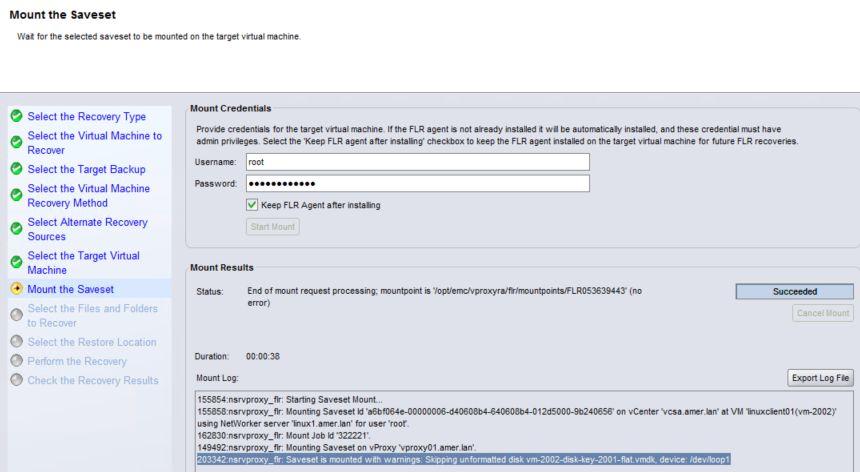
Solución alternativa:
Antes de NetWorker 19.7.x y vProxy 4.3.0-29, realice una recuperación instantánea de la VM. Esto crea una copia temporal (offline) de la VM en el sistema Data Domain. Los discos necesarios se pueden montar en NFS en la VM de origen (en línea) y copiarse desde el sistema operativo de la máquina virtual. Este proceso se detalla en: https://www.dell.com/support/kbdoc/000158482
Affected Products
NetWorkerProducts
NetWorker Family, NetWorker, NetWorker SeriesArticle Properties
Article Number: 000056216
Article Type: Solution
Last Modified: 17 Mar 2025
Version: 5
Find answers to your questions from other Dell users
Support Services
Check if your device is covered by Support Services.