PowerStore:透過 SSH 連線時驗證方法發生錯誤
Summary: 本文針對建立 SSH 連線至 PowerStore 節點時遇到的問題提供解決方案。
This article applies to
This article does not apply to
This article is not tied to any specific product.
Not all product versions are identified in this article.
Symptoms
使用 SSH 連線至 PowerStore 節點時,您可能會遇到以下其中一個錯誤:
- 沒有支援的驗證方法可用 (伺服器已傳送:publickey、gssapi-keyex、gssapi-with-mic)
- 權限遭拒 (publickey、gssapi-keyex、gssapi-with-mic)
範例: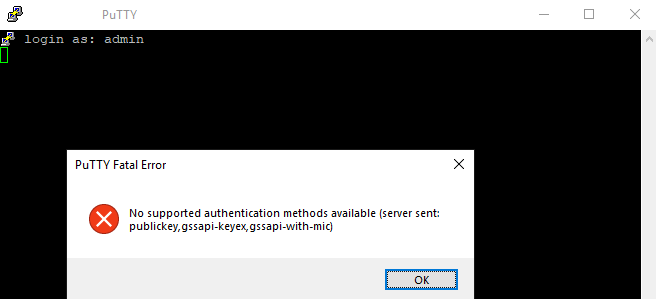
Cause
這是使用服務以外的任何使用者登入時的預期行為。
Resolution
使用 服務使用者登入。
任何其他使用者名將產生上述錯誤。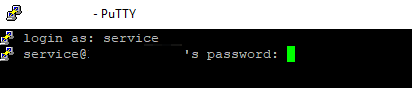
Additional Information
注意:
嘗試透過 ssh 登入時的另一個常見錯誤是:網路錯誤:連線逾時:
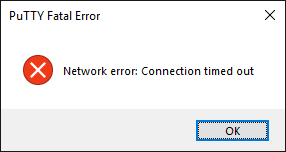
如果 PowerStore 停用 ssh 可能會發生這種情況 (預設為停用)。
若要從 PowerStore Manager 啟用 SSH,請前往「設定 >」 安全性 >SSH 管理
- 服務使用者密碼會在系統初始化期間定義。
- 如果您記不住此密碼,請嘗試使用與管理員使用者相同的密碼。否則,請聯絡系統初始化人員,或從「設定 >」支援 >服務帳戶下的 PowerStore Manager (GUI) 重設服務密碼
嘗試透過 ssh 登入時的另一個常見錯誤是:網路錯誤:連線逾時:
如果 PowerStore 停用 ssh 可能會發生這種情況 (預設為停用)。
若要從 PowerStore Manager 啟用 SSH,請前往「設定 >」 安全性 >SSH 管理
Affected Products
PowerStore, PowerStore 1000X, PowerStore 1000T, PowerStore Expansion Enclosure, PowerStore 3000X, PowerStore 3000T, PowerStore Rack, PowerStore 5000X, PowerStore 5000T, PowerStore 7000X, PowerStore 7000T, PowerStore 9000X, PowerStore 9000TArticle Properties
Article Number: 000132163
Article Type: Solution
Last Modified: 13 May 2025
Version: 6
Find answers to your questions from other Dell users
Support Services
Check if your device is covered by Support Services.