PowerStore: How to remove unused storage network (User Correctable)
Summary: This document is to describe the procedure to remove the unused storage network.
This article applies to
This article does not apply to
This article is not tied to any specific product.
Not all product versions are identified in this article.
Instructions
## The default storage network which is configured during the Initial Configuration Wizard(ICW) is not able to be removed, the IP address could be re-configured only.
We can remove the admin-created storage network following the procedures below.
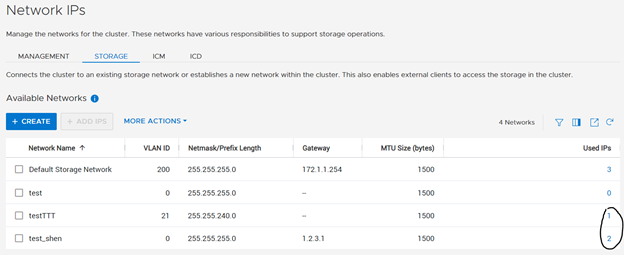
Using this image below:
The storage network with 0 "Used IP" can be directly removed.
The networks with the used IPs circled can be removed by following the steps below:
- Example: (Go to Settings >> Networking >> Network IPs to see this section as shown in the image below)
The storage network was created but not mapped to any interface yet, "Global Storage Discovery IP" was configured.
-
Example: We remove IP 21.1.2.3 to 21.1.2.5 as shown in image below
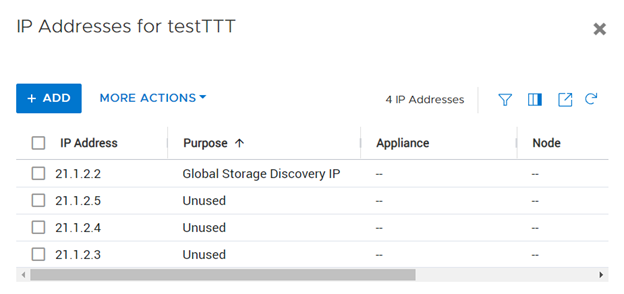
Select the network name>> more actions>> reconfigure, update the Global storage discovery IP to None.
- Example: The image below shows the screen that will be seen after selecting Reconfigure

Storage network was mapped to the network interface.
Verify that the IP addresses are not in use.
Select "Hardware" >> Appliance>> Ports >> physical port >> More Actions>> Remove Mapping.
- Example: The image below shows what will be seen after following the above steps
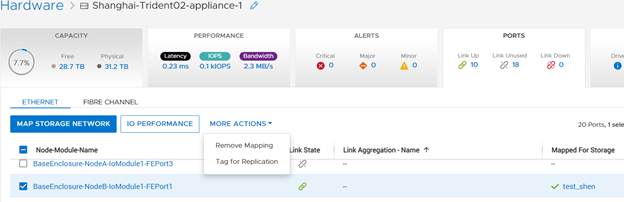
Removal of the unused storage network
From the Network IPs page, select the network requiring removal > Select More Actions > Delete > Confirm change.
Affected Products
PowerStoreProducts
PowerStore 1000X, PowerStore 1000T, PowerStore 3000X, PowerStore 3000T, PowerStore 5000X, PowerStore 5000T, PowerStore 500T, PowerStore 7000X, PowerStore 7000T, PowerStore 9000X, PowerStore 9000TArticle Properties
Article Number: 000192500
Article Type: How To
Last Modified: 31 Dec 2024
Version: 2
Find answers to your questions from other Dell users
Support Services
Check if your device is covered by Support Services.