如何在 S4100 交換器上清理安裝 ONIE、韌體更新程式、SSD 韌體和 OS10
Summary: 本文說明從 USB 對 ONIE、韌體更新程式、SSD 韌體和 OS10 執行清理安裝的程序 當您從原廠安裝的韌體或舊韌體升級交換器時,這會很有幫助。根據 Dell SmartFabric OS10 安裝、升級和降級指南,您必須解除安裝 OS10,然後全新安裝執行於 10.4.2.x 或更早版本的交換器。
This article applies to
This article does not apply to
This article is not tied to any specific product.
Not all product versions are identified in this article.
Instructions
- 將 USB 隨身碟格式化為 FAT32 格式,並將所有必要的檔案移至 USB 資料夾的根目錄
- 備份交換器 (
show running-configuration)。通常,如果使用舊韌體進行 xml 備份,則 startup.xml 還原將無法運作。您可以將命令的輸出複製/貼到記事本中。 - 將交換器重新啟動或重新開機,選取 ONIE,然後選取解除安裝作業系統


4.交換器會解除安裝現有的作業系統並重新啟動電源。從 ONIE 選單選擇「更新 ONIE」,以更新 ONIE 軟體。

5. 開機至 ONIE 提示字元後,請按照下列程序操作
onie-discovery-stop  <------------------------- stop discovery messages
fdisk -l                     <------------------------- See the list of partitions
mkdir /mnt/usb    <------------------------- Create a directory for the USB to mount to
mount -t vfat /dev/sdb1 /mnt/usb  <------------------------- Mount the USB to the newly created directory
cd /mnt/usb             <------------------------- Navigate to the directory that we just mounted the USB drive
ls -al                             <------------------------- list the contents of USB

6.發出命令「onie-self-update <onie filename>」
onie-self-update onie-updater-x86_64-dellemc_s4100_c2338-r0.3.33.1.1-10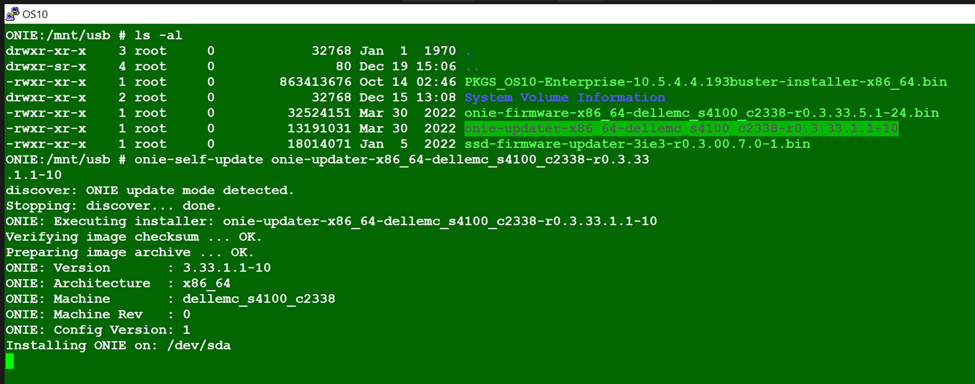
7.交換器會更新 ONIE 軟體並重新啟動電源。從 ONIE 功能表中選擇 ONIE-Rescue。

8.再次執行步驟 5。看到 ONIE 提示後,請執行


9.交換器電源週期從 ONIE 功能表中選取 ONIE-Rescue,然後再次執行步驟 5。
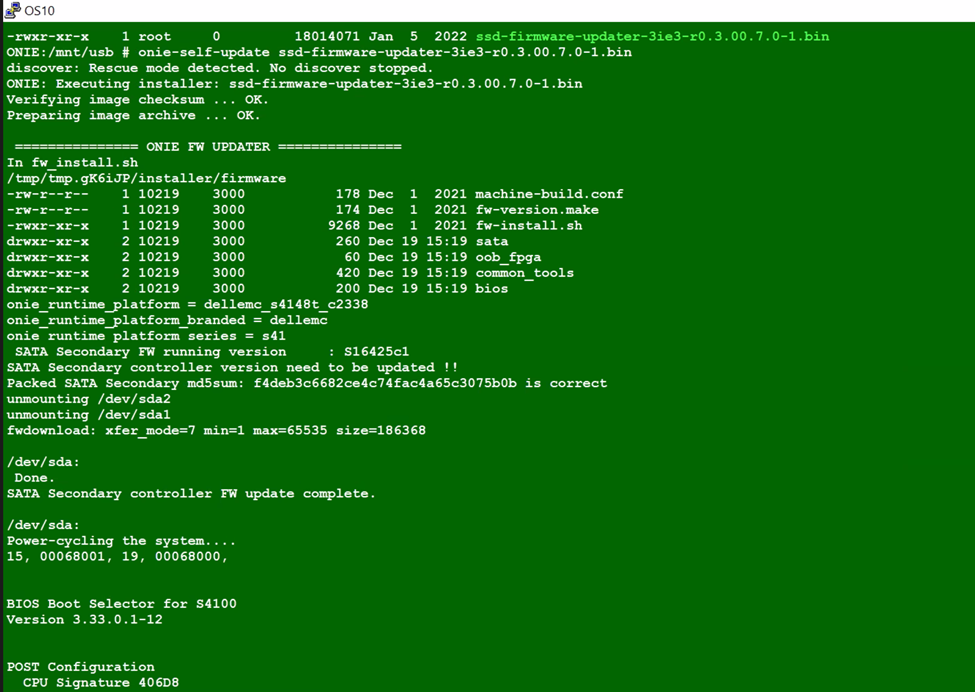
onie-self-update <firmware updater file >
10.執行命令
11.交換器電源週期再次選擇 ONIE-Rescue ,並使用以下兩個命令確定 SSD 韌體已更新。
 onie-self-update <ssd firmware>
example :  onie-self-update ssd-firmware-updater-3ie3-r0.3.00.7.0-1.bin
dmesg | grep "3IE3" | sed -n '1p' | cut -d ',' -f2 | sed "s/ //g"
dmesg | grep 3IE3


onie-nos-install <OS10 file>
example :onie-nos-install PKGS_OS10-Enterprise-10.5.6.1.100buster-installer-x86_64.bin

14.從之前進行的備份中分段還原配置並保存。
15. 比較舊組態與新組態。
15. 比較舊組態與新組態。
Additional Information
NA
Affected Products
Operating Systems, Switches, SmartFabric OS10 SoftwareArticle Properties
Article Number: 000206589
Article Type: How To
Last Modified: 09 Jun 2025
Version: 4
Find answers to your questions from other Dell users
Support Services
Check if your device is covered by Support Services.