如何在 S4100 交换机上全新安装 ONIE、固件更新程序、SSD 固件和 OS10
Summary: 本文记录了从 USB 执行 ONIE、固件更新程序、SSD 固件和 OS10 的全新安装的过程 当您从出厂安装的固件或旧固件升级交换机时,这将很有帮助。根据 Dell SmartFabric OS10 安装、升级和降级指南,您必须卸载 OS10 并全新安装运行在 10.4.2.x 或更低版本上的交换机。
This article applies to
This article does not apply to
This article is not tied to any specific product.
Not all product versions are identified in this article.
Instructions
- 以 FAT32 格式化 USB 笔驱动器,并将所有必要的文件移动到 USB 文件夹的根目录
- 备份交换机 (
show running-configuration)时,此方法起作用。通常,如果对旧固件执行 xml 备份,startup.xml还原将不起作用。您可以将命令的输出复制/粘贴到记事本中。 - 重启或重新启动交换机,选择 ONIE,然后选择卸载作系统
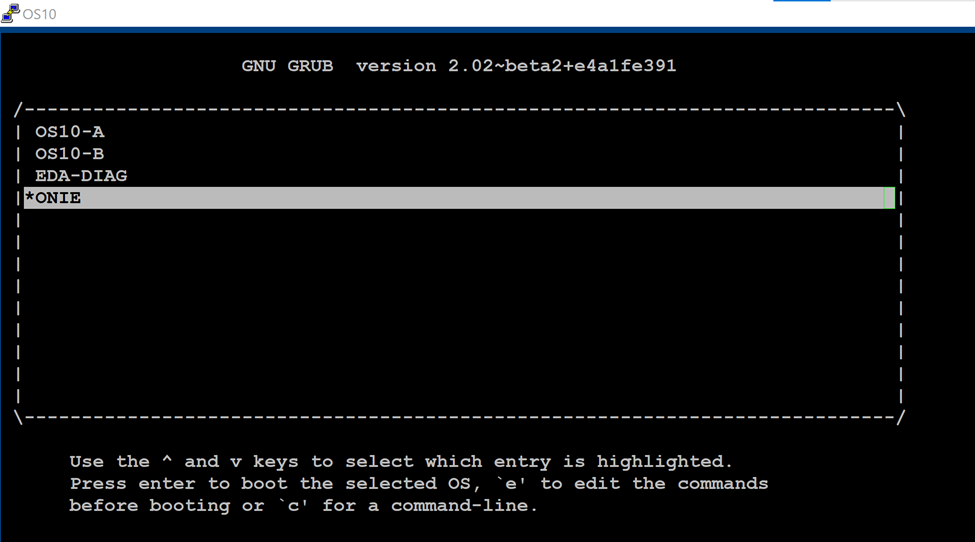

4.交换机将卸载现有作系统并重启电源。从 ONIE 菜单中选择“更新 ONIE”以更新 ONIE 软件。
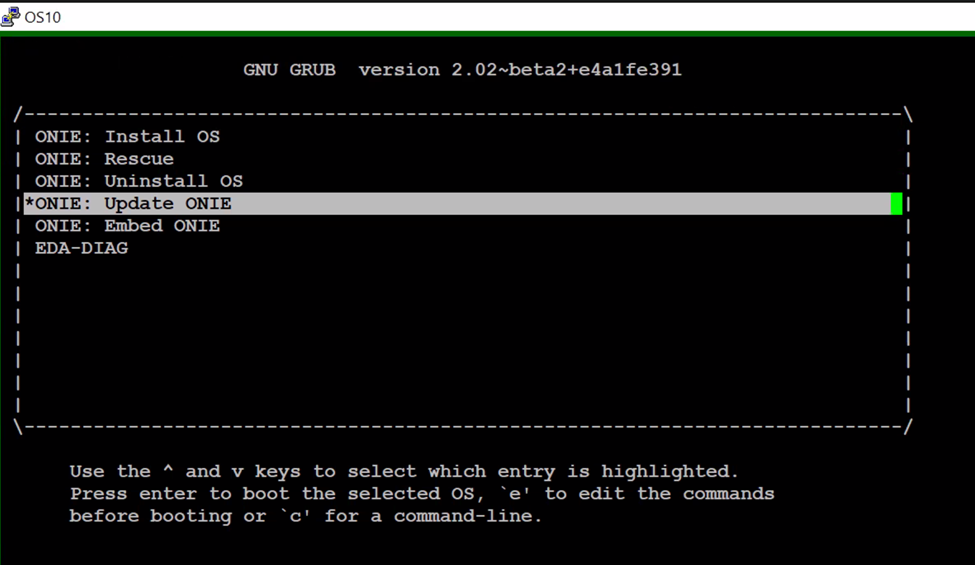
5. 引导至 ONIE 提示符后,请按照以下步骤作
onie-discovery-stop  <------------------------- stop discovery messages
fdisk -l                     <------------------------- See the list of partitions
mkdir /mnt/usb    <------------------------- Create a directory for the USB to mount to
mount -t vfat /dev/sdb1 /mnt/usb  <------------------------- Mount the USB to the newly created directory
cd /mnt/usb             <------------------------- Navigate to the directory that we just mounted the USB drive
ls -al                             <------------------------- list the contents of USB

6.发出命令“onie-self-update <onie filename>”
onie-self-update onie-updater-x86_64-dellemc_s4100_c2338-r0.3.33.1.1-10
7.交换机将更新 ONIE 软件并关闭电源后重启。从 ONIE 菜单中选择 ONIE-Rescue。

8.再次执行步骤 5。看到 ONIE 提示符并运行


9.关闭电源后重启。从 ONIE 菜单中选择 ONIE-Rescue,然后再次执行步骤 5。
onie-self-update <firmware updater file >
10.运行命令
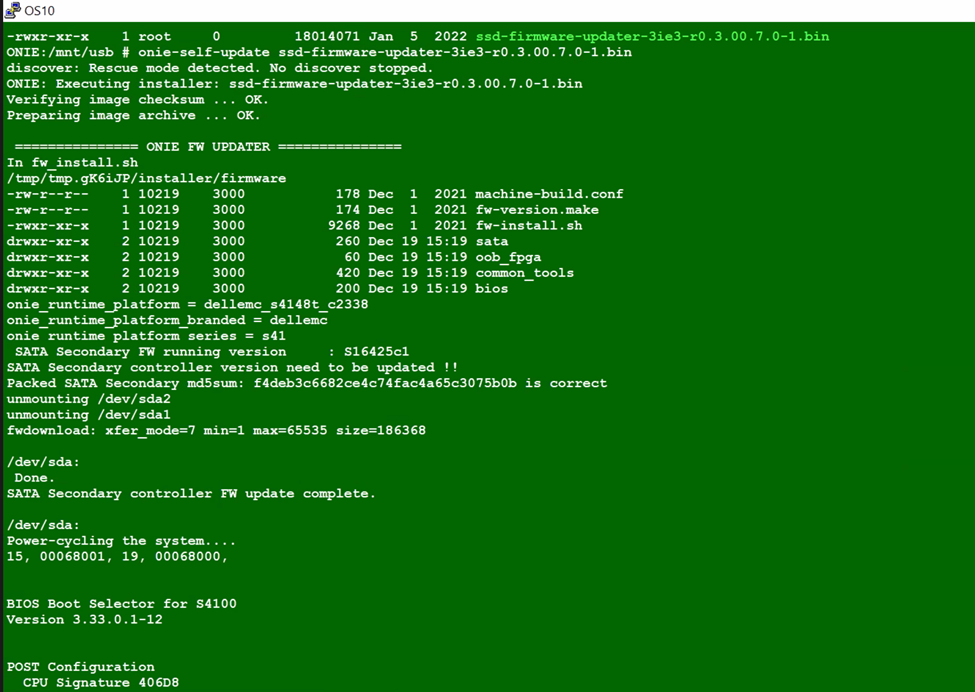
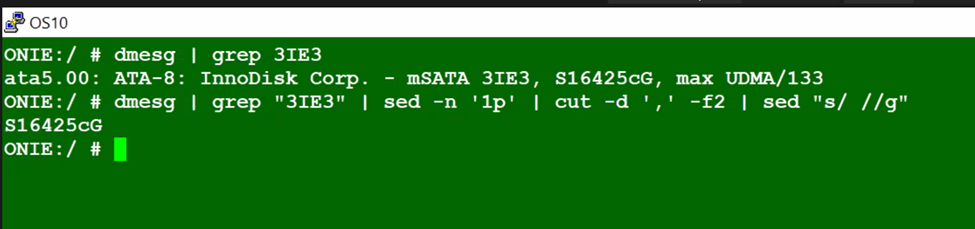
11.关闭电源后重启。再次选择 ONIE-Rescue ,并使用以下两个命令确保更新 SSD 固件。
 onie-self-update <ssd firmware>
example :  onie-self-update ssd-firmware-updater-3ie3-r0.3.00.7.0-1.bin
dmesg | grep "3IE3" | sed -n '1p' | cut -d ',' -f2 | sed "s/ //g"
dmesg | grep 3IE3

onie-nos-install <OS10 file>
example :onie-nos-install PKGS_OS10-Enterprise-10.5.6.1.100buster-installer-x86_64.bin
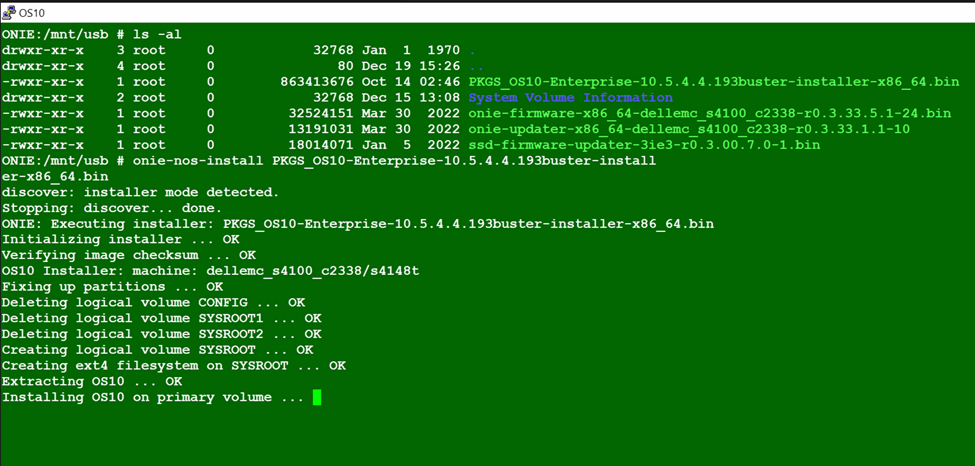
14.从之前执行的备份分段中恢复配置,然后保存。
15. 比较新旧配置。
15. 比较新旧配置。
Additional Information
不适用
Affected Products
Operating Systems, Switches, SmartFabric OS10 SoftwareArticle Properties
Article Number: 000206589
Article Type: How To
Last Modified: 09 Jun 2025
Version: 4
Find answers to your questions from other Dell users
Support Services
Check if your device is covered by Support Services.