PowerEdge: How to remove the 'System Not Registered' notification from Red Hat Enterprise Linux GNOME and Subscription-Manager Cockpit
Summary: Multiple places in the GNOME show System Not Registered notification
This article applies to
This article does not apply to
This article is not tied to any specific product.
Not all product versions are identified in this article.
Symptoms
Multiple places in the GNOME show System Not Registered notification
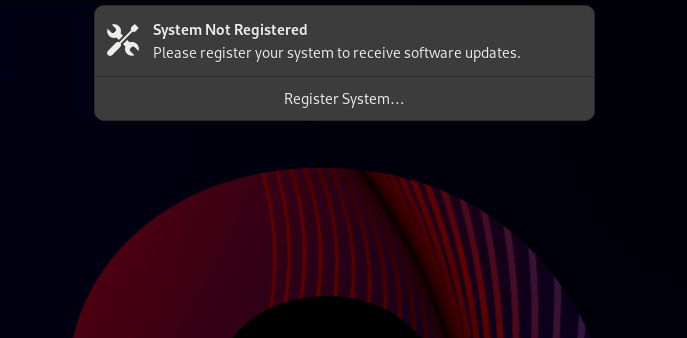
GNOME Popup:
About Notification:
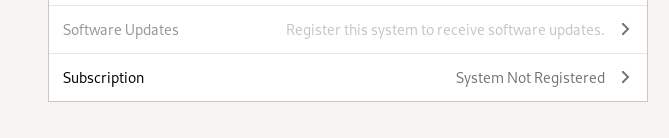
Figure 2: Screenshot of system subscription registration request
Red Hat Server Cockpit Notification:
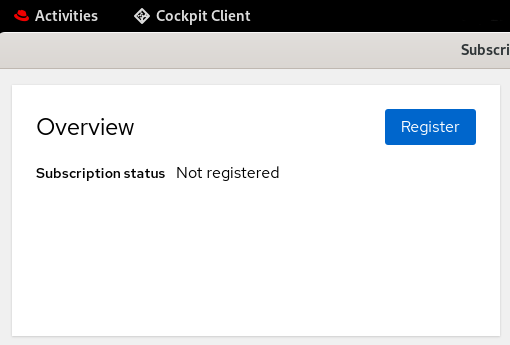
Figure 3: Red Hat Server Cockpit Notification showing system not registered
How to get rid of the System Not Registered notification from GNOME.
The message System Not Registered still asks to register for an offline Red Hat Enterprise Linux system that is already registered using the Offline Method .
.
GNOME Popup:
Figure 1: System Not Registered message in GNOME
About Notification:
Figure 2: Screenshot of system subscription registration request
Red Hat Server Cockpit Notification:
Figure 3: Red Hat Server Cockpit Notification showing system not registered
How to get rid of the System Not Registered notification from GNOME.
The message System Not Registered still asks to register for an offline Red Hat Enterprise Linux system that is already registered using the Offline Method
.Cause
-
In Red Hat Enterprise Linux 9 systems, the System Not Registered notification is managed by the GNOME Subscription Management service which is triggered by the file /lib/systemd/user/org.gnome.SettingsDaemon.Subscription.service.
-
In Red Hat Enterprise Linux 8 systems, the System Not Registered notification is managed by the GNOME Subscription Management service which is triggered by the file /etc/xdg/autostart/org.gnome.SettingsDaemon.Subscription.desktop.
-
The Subscription-Manager Cockpit UI is provided by the subscription-manager-cockpit package.
Resolution
Red Hat does not recommend disabling the System Not Registered notification.
NOTE: The above changes may be reverted if the gnome-settings-daemon and subscription-manager packages are updated on the system.
- For Red Hat Enterprise Linux 9 system:
- The following file must be edited:
/lib/systemd/user/org.gnome.SettingsDaemon.Subscription.service
Comment out the line below as shown below:
ExecStart=/usr/libexec/gsd-subman

# cat /lib/systemd/user/org.gnome.SettingsDaemon.Subscription.service |grep -i gsd-subman
  #ExecStart=/usr/libexec/gsd-subman
- Remove the subscription-manager-cockpit package to disable Red Hat SM Cockpit UI notification:
# yum remove subscription-manager-cockpit
- For Red Hat Enterprise Linux 8 system:
- The following file must be edited:
/etc/xdg/autostart/org.gnome.SettingsDaemon.Subscription.desktop
Comment out the line below as shown below:
Exec=/usr/libexec/gsd-subman

# cat /etc/xdg/autostart/org.gnome.SettingsDaemon.Subscription.desktop |grep -i gsd-subman
  #Exec=/usr/libexec/gsd-subman
- Remove the subscription-manager-cockpit package to disable Red Hat SM cockpit UI notification:
# yum remove subscription-manager-cockpit
Reboot the system to apply the changes.
NOTE: The above changes may be reverted if the gnome-settings-daemon and subscription-manager packages are updated on the system.
Affected Products
DSS 8440, Poweredge C4140, PowerEdge C6420, PowerEdge C6615, PowerEdge FC640, PowerEdge M640, PowerEdge M640 (for PE VRTX), PowerEdge MX740C, PowerEdge MX750c, PowerEdge MX760c, Red Hat Enterprise Linux Version 9, Red Hat Enterprise Linux Version 8Products
PowerEdge XR2, PowerEdge MX840C, PowerEdge R240, PowerEdge R250, PowerEdge R260, PowerEdge R340, PowerEdge R350, PowerEdge R360, PowerEdge R440, PowerEdge R450, PowerEdge R470, PowerEdge R540, PowerEdge R550, PowerEdge R640, PowerEdge R6415
, PowerEdge R650, PowerEdge R650xs, PowerEdge R6515, PowerEdge R6525, PowerEdge R660, PowerEdge R660xs, PowerEdge R6615, PowerEdge R6625, PowerEdge R670, PowerEdge R6715, PowerEdge R740, PowerEdge R740XD, PowerEdge R740XD2, PowerEdge R7415, PowerEdge R7425, PowerEdge R750, PowerEdge R750XA, PowerEdge R750xs, PowerEdge R7515, PowerEdge R7525, PowerEdge R760, PowerEdge R760XA, PowerEdge R760xd2, PowerEdge R760xs, PowerEdge R7615, PowerEdge R7625, PowerEdge R770, PowerEdge R7715, PowerEdge R7725, PowerEdge R840, PowerEdge R860, PowerEdge R940, PowerEdge R940xa, PowerEdge R960, PowerEdge T140, PowerEdge T150, PowerEdge T160, PowerEdge T340, PowerEdge T350, PowerEdge T360, PowerEdge T440, PowerEdge T550, PowerEdge T560, PowerEdge T640, PowerEdge XE2420, PowerEdge XE7420, PowerEdge XE7440, PowerEdge XE8545, PowerEdge XE8640, PowerEdge XE9640, PowerEdge XE9680, PowerEdge XR11, PowerEdge XR12, PowerEdge XR4510c, PowerEdge XR4520c, PowerEdge XR5610, PowerEdge XR7620, PowerEdge XR8610t, PowerEdge XR8620t
...
Article Properties
Article Number: 000216343
Article Type: Solution
Last Modified: 21 Jan 2025
Version: 3
Find answers to your questions from other Dell users
Support Services
Check if your device is covered by Support Services.