NetWorker: Unable to log in to the NMC. NetWorker AUTHC server encounters 'java.io.IOException: toDERInputStream: tag 45'
Summary: The NetWorker Management Console (NMC) fails to launch due to a connection issue with the server on port 9090.
This article applies to
This article does not apply to
This article is not tied to any specific product.
Not all product versions are identified in this article.
Symptoms
The following error appears while logging in to the NetWorker Management Console (NMC):
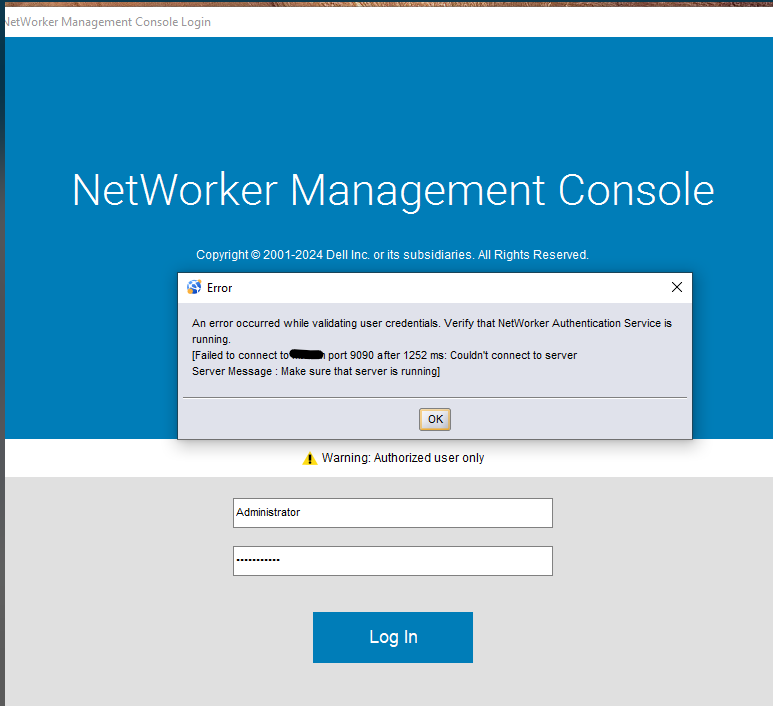
nsrlogin fails with the following error:
Authentication library error: Failed to connect to localhost port 9090 after 1220 ms: Couldn't connect to server
Server Message: Make sure that server is running
Error when verifying contents of authc.keystore:
keytool -list -keystore "C:\Program Files\EMC NetWorker\nsr\authc-server\tomcat\conf\authc.keystore" -storepass <password>"

Error: `java.io.IOException: toDERInputStream: tag 45`
NOTE: The above path assumes the default installation path on Windows. If NetWorker was installed in another location, use the full path for
..\nsr\authc-server\tomcat\conf\authc.keystore. The file is located under /nsr/authc/conf/authc.keystore on Linux.
The following is seen in the NetWorker server's authc-server.log:
- Linux:
/nsr/authc/logs/authc-server.log - Windows:
C:\Program Files\EMC NetWorker\nsr\authc-server\tomcat\logs\authc-server.log:
Failed to load server keys from key store: An error occurred while loading server keys: Failed to initialize key store <Path to-nsr>\nsr\authc-server\tomcat\conf\authc.keystore
Default server keys will be used
Server certificate is not available, please check your configuration
Cause
The authc.keystore was accidentally overwritten with a certificate private key instead of a valid JKS format, resulting in authentication errors.
Resolution
The authc.keystore must be re-created.
NOTE: If the NetWorker Authentication service (AUTHC) was previously configured to use CA-signed certificates. The certificates must be reimported after performing the below procedure. This process is documented in the articles listed in the Additional Info section.
Linux Server:
- Stop NetWorker services:
nsrshutdown -forsystemctl stop networker - Rerun the AUTHC configuration script:
/opt/nsr/authc-server/scripts/authc_configure.sh
When prompted if you would like to use the existing keystore. Enter "n" and a new keystore is created.
root@lnx-srvr03:~# /opt/nsr/authc-server/scripts/authc_configure.sh

Specify the directory where the Java Standard Edition Runtime Environment (JRE) software is installed [/opt/nre/java/latest]:

The installation process will install an Apache Tomcat instance.
For optimum security, EMC NetWorker Authentication Service will
use a non-root user (nsrtomcat) to start the Apache Tomcat instance.
If your system has special user security requirements, ensure that proper
operational permissions are granted to this non-root user (nsrtomcat).
Please refer to NetWorker Installation Guide.

The Apache Tomcat will use "lnx-srvr03.networker.lan" as the host name.
The Apache Tomcat will use "9090" as the port number.

The NetWorker Authentication Service requires a keystore file to configure encryption and to provide SSL support.

EMC recommends that you specify a keystore password that has a minimum of six characters.

Do you want to use the existing keystore /nsr/authc/conf/authc.keystore [y]? n

The installation process will create a new keystore file.

Specify the keystore password:
Confirm the password:

Creating the installation log in /opt/nsr/authc-server/logs/install.log.

Performing initialization. Please wait...


The installation completed successfully.
- Start NetWorker services:
systemctl start networker - Validate that authentication works:
nsrlogin -u administrator`
You are prompted to enter the NetWorker administrator password. If authentication succeeds, run:nsrlogout
Windows Server:
- Uninstall NetWorker.
NOTE: This does not remove any NetWorker configurations or files. The
authc.keystore and authc.truststore files are created during AUTHC installation.
- Rename
authc.keystore,authc.truststore. Default path:
C:\Program Files\EMC NetWorker\nsr\authc-server\tomcat\conf\authc.keystoreC:\Program Files\EMC NetWorker\nsr\authc-server\conf\authc.truststore
- Reinstall NetWorker over the previous installation path.
- Post-installation validation, run:
nsrlogin -u administrator`
You are prompted to enter the NetWorker administrator password. If authentication succeeds, run:nsrlogout
Additional Information
Affected Products
NetWorkerProducts
NetWorker FamilyArticle Properties
Article Number: 000388699
Article Type: Solution
Last Modified: 07 Jan 2026
Version: 1
Find answers to your questions from other Dell users
Support Services
Check if your device is covered by Support Services.