NetWorker: Unable to setup direct save with server: busy"
Summary: NetWorker backups are reporting the message "Unable to setup direct save with server: busy"
This article applies to
This article does not apply to
This article is not tied to any specific product.
Not all product versions are identified in this article.
Symptoms
The following message appears in NetWorker backup logs
Unable to setup direct save with server: busy
The same message may appear in the NetWorker server and client's daemon.raw
- Linux:
/nsr/logs/daemon.raw - Windows (Default):
C:\Program Files\EMC NetWorker\nsr\logs\daemon.raw - NetWorker: How to use nsr_render_log to render .raw log files
Cause
When all clients backups are running, connection to the target device could not be made due to the following possibilities:
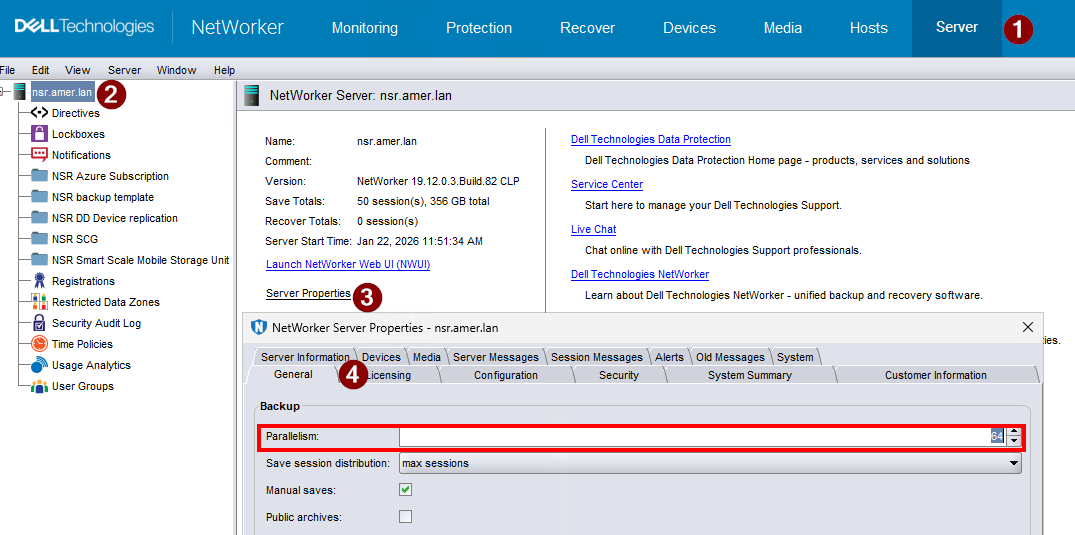
1. Max parallelism of the NW server has been reached:
2. Max number of sessions the target device can handle: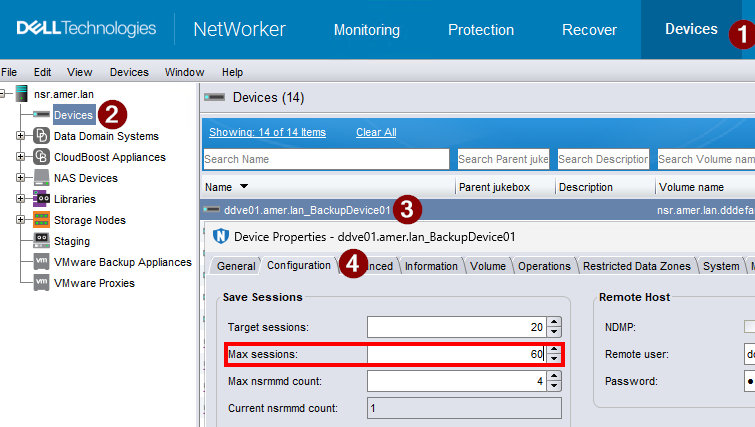
3. Network congestion (for DD Boost) devices
Resolution
This is a tuning and optimization issue. There are several actions that may be performed. For example, consider each of the following:
- Review the version-specific NetWorker Performance Optimization and Planning Guide. This guide provides details regarding system resource requirements. If the server or storage nodes are under-resourced, they may take longer to complete jobs; resulting in congestion or bottlenecks. Additional TCP and kernel optimizations are detailed in: NetWorker: Best practices for networking configuration
- Increase Server Parallelism documentation in the NetWorker Administration Guide and NetWorker Performance Optimization and Planning Guide. Adjust the server parallelism to meet your environments needs.
- Review Max Session documentation in the NetWorker Administration Guide and NetWorker Performance Optimization and Planning Guide. Adjust the max sessions (if possible) to meet your environments needs.
- Review workflow scheduling under Protection -> Protection Policies. If specific time frames are found to be too intensive, adjust schedules to reduce load. Also review backup level scheduling, for example, utilize incremental backups (if possible) to reduce backup times.
- Review connection performance between the NetWorker server, remote storage nodes, clients and Data Domain: NetWorker: How to use the DDPCONNCHK tool to test DD ddboost connectivity from NetWorker Hosts
NOTE:
DDPCONNCHK should be tested under both high and low load conditions. This helps determine performance/bandwidth conditions in both scenarios.
Additional Information
NetWorker version-specific guides are available through: Support for NetWorker | Overview (you must sign in with your Dell support account to access these materials).
Affected Products
NetWorkerProducts
NetWorkerArticle Properties
Article Number: 000078703
Article Type: Solution
Last Modified: 28 Jan 2026
Version: 4
Find answers to your questions from other Dell users
Support Services
Check if your device is covered by Support Services.