非 EN SQL 实例上的内部或日期时间 varchar 转换错误
Summary: 当 Dell Security Management Server(以前称为 Dell Data Protection |Enterprise Edition)安装在非英语服务器操作系统上(例如法语),您可能会在 WebUi 控制台中遇到“内部错误”或“数据访问错误”。
This article applies to
This article does not apply to
This article is not tied to any specific product.
Not all product versions are identified in this article.
Symptoms
受影响的产品:
- Dell Data Protection | Enterprise Edition
受影响的版本:
- v9.7 及更早版本
受影响的平台:
- Windows 服务器
兼容性日志报告类似于以下内容的错误:varchar 数据类型转换为日期时间数据类型会产生超出范围的值。
Cause
不适用
Resolution
在这种情况下:
- 打开 SQL Server Management Studio
- 转至 登录的 属性 。
提醒:Instance\Security 下 的登录 不是 database\Security 下的 用户 ,由 Dell Data Protection 服务用于连接到 Dell Data Protection 数据库
- 确保 默认数据库 设置为 Dell Data Protection 数据库。
- 默认语言 设置为 英语。
- 然后重新启动安全和兼容性服务器服务。
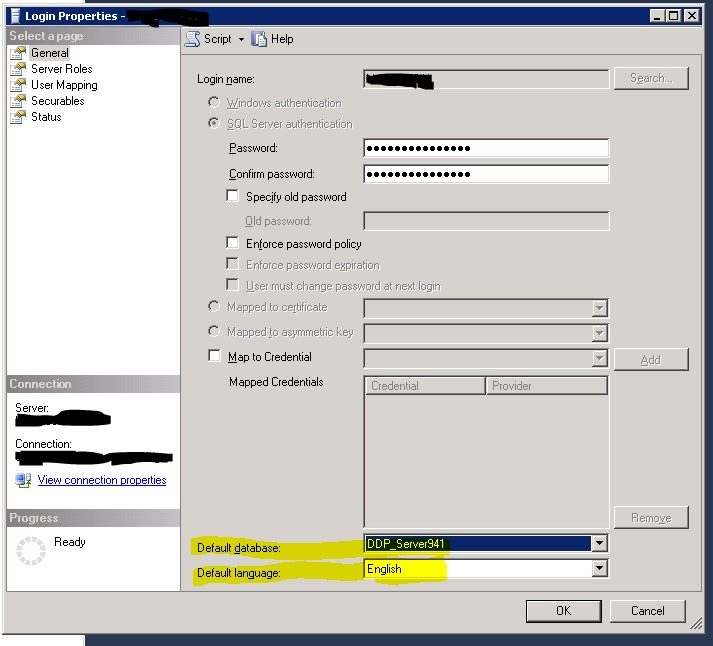
图 1:(仅限英文)设置默认数据库和默认语言
要联系支持部门,请参阅 Dell Data Security 国际支持电话号码。
转至 TechDirect,在线生成技术支持请求。
要获得更多见解和资源,请加入戴尔安全社区论坛。
Affected Products
Dell EncryptionArticle Properties
Article Number: 000126660
Article Type: Solution
Last Modified: 06 Sept 2023
Version: 8
Find answers to your questions from other Dell users
Support Services
Check if your device is covered by Support Services.