Mellanox MT27800 Family ConnectX-5 link is Down After Replacement
Summary: Dell Part number (DPN) 6FKDT faulty network card replacement found with link down but does not have any error showing in the TSR or SupportAssist log.
This article applies to
This article does not apply to
This article is not tied to any specific product.
Not all product versions are identified in this article.
Symptoms
Issue background:
- Mellanox ConnectX-5 is not detected under Device Setting
- After replacing networking card, can detect Mellanox ConnectX-5 under Device Setting but link is down or polling
Hardware information provided:
- Two identical servers but only one unit encounters this issue
- Both servers have the operating system CentOS 7.5
DAC-QSFP28-100G-5.0M(DPN 0FN4FC)- Mellanox Driver version 4.5-1.0.1
- User cross-swaps DAC cables that are confirmed as good and the switch ports
- DPN 6FKDT is an InfiniBand card which is part of unmanaged adapters unable to obtain card information.
Example:
See the example below for card firmware, card setting, and link status:
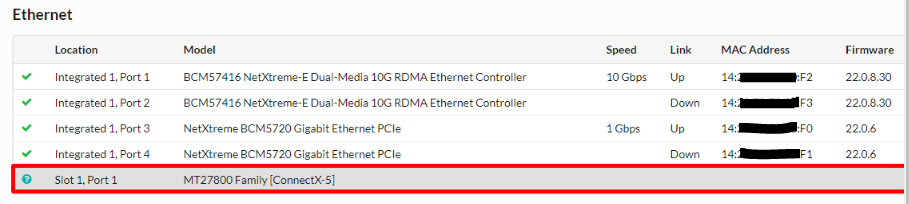
Figure 1: Example of card firmware level, card setting, and link status
See the example below for card firmware, card setting, and link status:
Figure 1: Example of card firmware level, card setting, and link status
Operating system level information is provided:
ibstatcommand - Queries basic status of InfiniBand device- User runs "
ibstat" command from the problematic server and the server that is working as expected for comparison
Example:
Problematic Mellanox card found link layer shown "InfiniBand"
Problematic Mellanox card found link layer shown "InfiniBand"
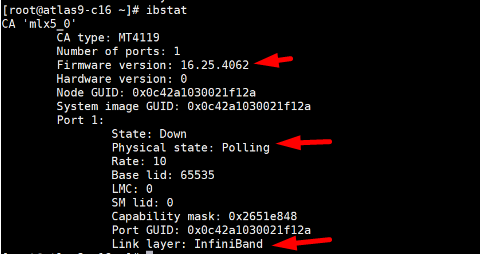
Figure 2: Screenshot of a problematic Mellanox card with link "InfiniBand"
Working as designed the Mellanox card found the link layer shown "Ethernet"

Figure 3: Screenshot of working as designed Mellanox card with link "Ethernet"
Confirmed with User whether connected to an InfiniBand switch or Ethernet switch
- User confirms that Mellanox card is connected to an Ethernet switch
Cause
Remarks
- Since this is a ConnectX-5 VPI card that means it can be set to run Ethernet mode or InfiniBand mode.
- If this card is running on InfiniBand mode, it cannot have a connection with an Ethernet switch.
- Replacement card default link mode should always be on InfiniBand.
Resolution
Follow NVIDIA article Using mlxconfig 
IB/ETH parameters.
In order to set IB/ETH parameters through mlxconfig, use the following command line:
# mlxconfig -d <device> set [LINK_TYPE_P1=<link_type>] [LINK_TYPE_P2=<link_type>]
Example:
Configuring both ports as Ethernet:
# mlxconfig -d /dev/mst/mt4119_pciconf0 set LINK_TYPE_P1=2 LINK_TYPE_P2=2

Device #1:
----------
Device type:    ConnectX5
Name:           MCX556A-ECA_Ax
Description:    ConnectX-5 VPI adapter card; EDR IB (100Gb/s) and 100GbE; dual-port QSFP28; PCIe3.0 x16; tall bracket; ROHS R6
Device:         /dev/mst/mt4119_pciconf0

Configurations:                              Next Boot       New
         LINK_TYPE_P1                        IB(1)          ETH(2)
         LINK_TYPE_P2                        IB(1)          ETH(2)

Apply new Configuration? (y/n) [n] : y
Applying... Done!
-I- Please reboot machine to load new configurations.

Remarks
P1 = Port 1
P2 = Port 2
Value 1 for InfiniBand
Value 2 for Ethernet
Other resources:
Affected Products
Rack Servers, Tower ServersArticle Properties
Article Number: 000218037
Article Type: Solution
Last Modified: 07 May 2025
Version: 2
Find answers to your questions from other Dell users
Support Services
Check if your device is covered by Support Services.