Avamar Proxy Deployment Manager Fails with "Not all disks were mapped"
Summary: Proxy Deployment Manager (PDM) is reporting an error during proxy deployment, "Not all disks were mapped."
This article applies to
This article does not apply to
This article is not tied to any specific product.
Not all product versions are identified in this article.
Symptoms
Proxy recommendation is completed successfully and taking parameters from the user.
Proxy is getting deployed using ovf, but failing during proxy registration with Avamar.
When deploymanager.log is reviewed, it is observed that Disks are not able to map to proxy. The below errors are seen:
Proxy is getting deployed using ovf, but failing during proxy registration with Avamar.
When deploymanager.log is reviewed, it is observed that Disks are not able to map to proxy. The below errors are seen:
Log Path: /usr/local/avamar/var/log/vcs/deploymanager.log

2024-01-10T15:40:45.221+0200 DEBUG [Thread-91][worker.DeployWorker#oUploadUrlMapping]: Added (/<hostname> (19.9.100-78)/VirtualLsiLogicController0:0, https://xxxxxxxx/nfc/xxxxxxxx-xxxxxxx/disk-0.vmdk) to map
2024-01-10T15:40:45.221+0200 DEBUG [Thread-91][worker.DeployWorker#oUploadUrlMapping]: Added (/hostname (19.9.100-78)/VirtualLsiLogicController1:2, https://xxxxxxxx/nfc/xxxxxxxxx/disk-1.vmdk) to map
2024-01-10T15:40:45.221+0200 ERROR [Thread-91][worker.DeployWorker#oUploadUrlMapping]: Not all disks were mapped
Cause
This issue is mainly observed due to permissions of the Avamar Backup User configured in vCenter for VM backups.
Resolution
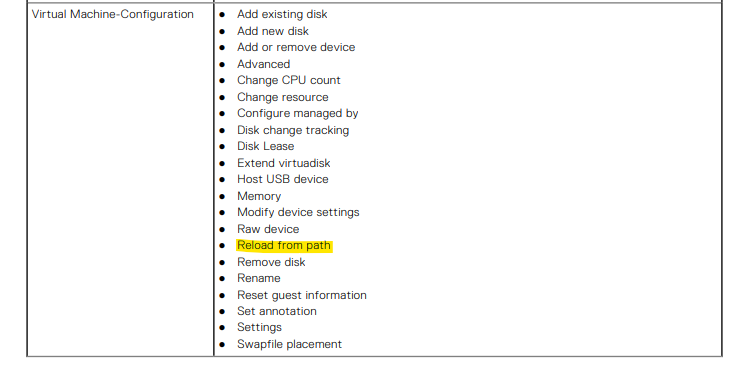
Ensure the vCenter user used for Avamar integration has all the following required privileges as explained in the Avamar for VMware Administrator Guide.
If the issue persists, contact Dell Support for further assistance.
If the issue persists, contact Dell Support for further assistance.
Article Properties
Article Number: 000237643
Article Type: Solution
Last Modified: 23 Oct 2024
Version: 1
Find answers to your questions from other Dell users
Support Services
Check if your device is covered by Support Services.