VxRail:iSM「未執行」「執行功能受限」或「停用 (失效)」
Summary: iSM 處於「未執行」或「執行功能受限」的狀態。本文介紹解析的方法。
Symptoms
iDRAC 服務模組 (iSM) 是主機上的一項重要服務,可從 iDRAC 收集資訊以進行監控。
這可能會在 iDRAC 中顯示為下列狀態。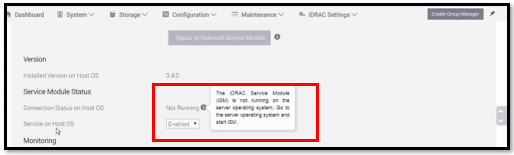
若要檢查 iSM 服務狀態:
透過 7.0.x 全 VxRail
/etc/init.d/dcism-netmon-watchdog status
8.0+
/etc/init.d/dellism status
他們可能具有以下狀態之一:
- iSM 作用中 (執行中)
- 這是完全正常運行的狀態
- iSM 處於作用中 (未執行)
- iSM 處於作用中 (執行的功能有限)
- iSM 處於非作用中 (失效)
Cause
此問題有許多可能的原因。其中一個範例是 iDRAC 上的服務無法完全正常運作,導致 iSM 無法與之交談。
任何個別的根本原因都應在一般技術審查之下進行調查 (記錄、版本資訊、知識文章 (KB) 等),並視需要使用標準流程 (CTE、DE、EE) 向上呈報。
Resolution
若要解決此問題,請執行下列步驟:
-
為每個 iSM 未在 IDRAC 上執行的節點開啟 SSH 工作階段。
在每個節點上按照下列各個步驟操作:
-
首先,將 iDRAC 冷重新開機,以重新啟動其作業系統。以下每種方法都是完成此任務的方法;因此,不一定要運行所有三個。
/opt/vxrail/tools/ipmitool mc reset cold

SSH into iDRAC (same login as web)
racadm> racreset hard
-
停止節點上的 iSM 服務。
7.0.x and earlier
# /etc/init.d/dcism-netmon-watchdog stop
8.0
# /etc/init.d/dellism stop
-
安裝 iSMPKIHelper
# cd /opt/dell/srvadmin/iSM/bin
# ./Invoke-iSMPKIHelper -install
-
在節點上啟動 iSM 服務。
7.0.x and earlier
# /etc/init.d/dcism-netmon-watchdog start
8.0
# /etc/init.d/dellism start
-
將服務從 0 設定為 1
# esxcli system wbem set -e 0
# esxcli system wbem set -e 1
-
執行 SupportAssistCollection 指令檔以收集 iDRAC 記錄
# cd /opt/dell/srvadmin/iSM/bin
# ./Invoke-SupportAssistCollection
SupportAssist log Collection is in progress..
[||||||||||||||||||||||||||||||||||||||||||||||||||||||||||||]100%
Downloading the collected log file is in progress..
SupportAssist Collection logs can be found in path /tmp/TSR20190826xxxxxx_xxxxxx.zip
如果 iSM 為「作用中 (未執行)」,且無法透過「/etc/init.d/dcism-netmon-watchdog restart“或”/etc/init.d/dellism“:可能與以下服務有關。
請嘗試下列步驟。
/etc/init.d/dcism-netmon-watchdog status
/etc/init.d/sfcbd-watchdog stop
/etc/init.d/sfcbd-watchdog start
/etc/init.d/dcism-netmon-watchdog restart
/etc/init.d/dcism-netmon-watchdog status
下列工作方式與上述相同:
7.0.x 及更舊版本
/opt/vxrail/tools/ipmitool mc reset cold ; sleep 300 ; /etc/init.d/sfcbd-watchdog stop ; /etc/init.d/dcism-netmon-watchdog stop; /etc/init.d/vxrail-pservice stop; rm /var/run/log/vxps_cache.dat ; sleep 10 ; /etc/init.d/sfcbd-watchdog start ; /etc/init.d/dcism-netmon-watchdog start; sleep 120 ; /etc/init.d/vxrail-pservice start
8.0
/opt/vxrail/tools/ipmitool mc reset cold ; sleep 300 ; /etc/init.d/sfcbd-watchdog stop ; /etc/init.d/dellism stop; /etc/init.d/vxrail-pservice stop; rm /var/run/log/vxps_cache.dat ; sleep 10 ; /etc/init.d/sfcbd-watchdog start ; /etc/init.d/dellism start; sleep 120 ; /etc/init.d/vxrail-pservice start
8.0.3xx:
/opt/platformsvc/bin/ipmitool.sh mc reset cold ; sleep 300 ; /etc/init.d/sfcbd-watchdog stop ; /etc/init.d/dellism stop; esxcli daemon control stop -s platformsvc; rm /var/run/log/vxps_cache.dat ; sleep 10 ; /etc/init.d/sfcbd-watchdog start ; /etc/init.d/dellism start; sleep 120 ; esxcli daemon control start -s platformsvc
如果 iSM 狀態為「非啟用 (失效)」,重新啟動 iSM 服務並不會將狀態變更為失效。嘗試透過 iSM 移除、升級或安裝會導致以下錯誤。
It is not safe to continue. Please reboot the host immediately to discard the unfinished update.
cause = ('DEL-dcism(4.1.0.0.2410-DEL.700.0.0.15843807)', "Failed to unmount tardisk dcism.v00 of VIB DEL_bootbank_dcism_4.1.0.0.2410-DEL.700.0.0.15843807: Error in running [rm /tardisks/dcism.v00]:\nReturn code: 1\nOutput: rm: can't remove '/tardisks/dcism.v00': Device or resource busy\n")
vibs = ['DEL_bootbank_dcism_4.1.0.0.2410-DEL.700.0.0.15843807']
Please refer to the log file for more details.
[root@nl93vh1012:/tardisks] localcli software vib remove -n dcism
Errors:
[LiveInstallationError]
DEL_bootbank_dcism_4.1.0.0.2410-DEL.700.0.0.15843807: Failed to unmount tardisk dcism.v00 of VIB DEL_bootbank_dcism_4.1.0.0.2410-DEL.700.0.0.15843807: Error in running [rm /tardisks/dcism.v00]:
Return code: 1
Output: rm: can't remove '/tardisks/dcism.v00': Device or resource busy
停止服務,使其釋放對上述 tardisk 的訪問許可權。在此之後,iSM 程序可以開始備份。
/etc/init.d/sfcbd-watchdog stop
接著您可以重試升級或立即手動更新 iSM,因為:
esxcli software vib update -d /vmfs/volumes/vsan\:*/upgradeBundles-*/<ISM version being upgraded to>.zip
其中 vSAN upgradeBundles 資料夾涉及 UUID,而 ISM 版本取決於 VxRail 升級要升級的目標。
如果這樣做無法解決問題,您可能需要為節點排空電力。
建議您先嘗試虛擬電力排空,因為此操作可在遠端完成。實體電力排空需要實體存取權限。
Dell EMC VxRail:如何透過 iDRAC 執行節點的遠端輔助電力排空 (需要 Dell 支援帳戶才能檢視此文章)
如果問題持續存在,建議您聯絡 Dell 技術支援以取得協助;請參考此 KB。