Latitude E7450 LED Status Guide
Summary: The following article is a visual guide to the LED indicators on your Latitude E7450 laptop.
Instructions
Table of Contents:
A Guide to the System Status LEDs on your Latitude E7450
I have created a visual guide below which shows the various LED indicators on your laptop. I have shown what the LEDs represent. What each of the stages are that the LED can go through.
The External LEDs
The small indicator lights on the laptop are Light Emitting Diodes (LEDs). They serve as status lights for your laptop.
In this section, we deal with the three LEDs along the top edge on the exterior of the laptop.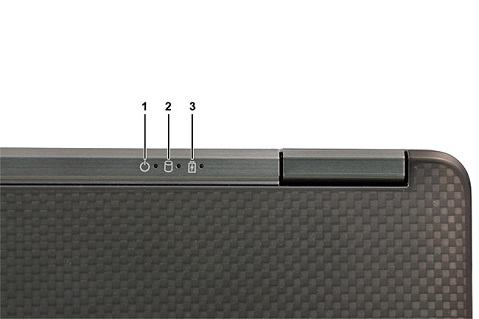
(Figure.1 External LEDs)
| 1 | Power LED - Indicates the Power Status. | 2 | Hard drive Activity LED - Turns white when the laptop reads or writes to the hard drive. |
| 3 | Battery LED - Indicates the Battery Status. |
The Power LED indicates the power status as follows:
| Power State | LED Behavior |
|---|---|
| On | Solid White |
| Standby | Breathe White (Flashes slowly). |
| Off Hibernate | Off |
The Battery LED indicates the Battery status as follows:
| Battery State | LED Behavior |
|---|---|
| Non-Dell AC adapter plugged to Laptop. | Alternately blinking Amber and White light |
| Temporary Battery Failure with AC Adapter present | Alternately blinking Amber with a steady White light |
| Fatal Battery Failure with AC Adapter present | Constantly blinking Amber light |
| Battery in Full-Charge Mode with AC Adapter present | Light off |
| Battery in Charge Mode with AC Adapter present | Constant White light |
The palm-rest LEDs
The Device status LEDs are located across the upper right hand side of the keyboard. They display the status of the Storage, Battery, and the Wireless Activity. You can use them as a diagnostics tool.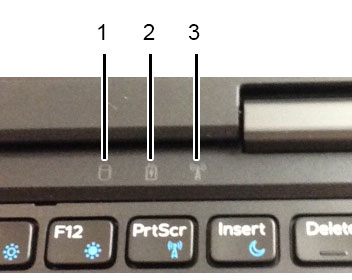
(Fig.2 Status LEDs)
| 1 | Storage LED | 2 | Power LED |
| 3 | Wireless LED |
For more information about using the LEDs to further troubleshoot any issues you are having, check the Links section.
Additional Information
I have included several links below. These articles either use LEDs to troubleshoot a fault, or explain what the state of the LEDs means.
- Laptop Diag LED codes and Battery LED codes
- Diagnostic Indicators (Precision Mobiles)
- ePSA Diagnostics Guide
- How to Troubleshoot a No POST Issue on a Dell laptop PC
- How to Troubleshoot a No Power Issue on a laptop PC
- How to Troubleshoot a Dell laptop LCD Panel issue
- How to resolve Wireless Networking issues on my Dell computer