SupportAssist OS Recovery Shows Blank Blue Screen on Computer with AMD CPUs
Summary: This article provides more information about computers with AMD CPUs showing a blank blue screen when attempting to recover the operating system using SupportAssist OS Recovery.
This article applies to
This article does not apply to
This article is not tied to any specific product.
Not all product versions are identified in this article.
Symptoms
Affected Products:
- SupportAssist OS Recovery
Affected Operating Systems:
- Windows 10 20H2 (version 19042) and later
Affected Platforms:
- Dell computers with AMD CPUs
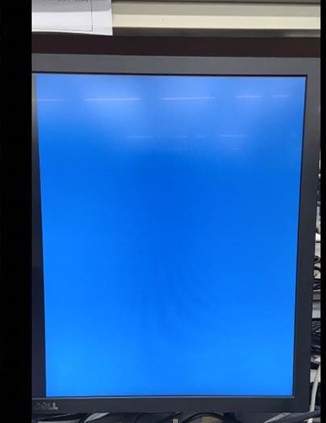
When customers attempt to recover the operating system through SupportAssist OS Recovery by pressing F12 during boot up. The computer might show a blank blue screen instead of showing normal OS recovery procedures. This only happens on computers with AMD CPUs and running Windows 10 20H2 or later.
When this issue happens, the computer auto shuts down after one minute if no action is taken. Or during the one minute, the user can press Esc to exit and it returns to the BIOS setup menu.
Cause
This is a known issue, and AMD has no fix plan.
Resolution
Recover the operating system by Windows inbox Recovery function using the steps below or perform an Operating System Re-Installation.
Steps to recover the operating system in Windows:
- Boot to the operating system desktop, press Shift and Restart button simultaneously (the computer reboots into WinRE).
- Go to Troubleshoot and find Reset this PC, it lists available options.
- Select Keep My files or Remove everything per-user discretion.
- Select Local reinstall to perform operating system recovery on the computer.
- It takes some time to recover default operating system settings, then it directs to the corresponding page when complete.
- If you choose Keep my files, the computer boots to the sign in page.
- If you choose Remove everything, the computer boots to the Out of Box Experience page.
Affected Products
SupportAssist OS RecoveryArticle Properties
Article Number: 000182271
Article Type: Solution
Last Modified: 06 Aug 2025
Version: 6
Find answers to your questions from other Dell users
Support Services
Check if your device is covered by Support Services.