Data Protection Advisor: Upgrading on Windows Fails with .iawin32.dll Not Found.
Summary: Upgrading DPA on a Windows server fails with a missing iawin32.dll file. The DPA version is not relevant.
This article applies to
This article does not apply to
This article is not tied to any specific product.
Not all product versions are identified in this article.
Symptoms
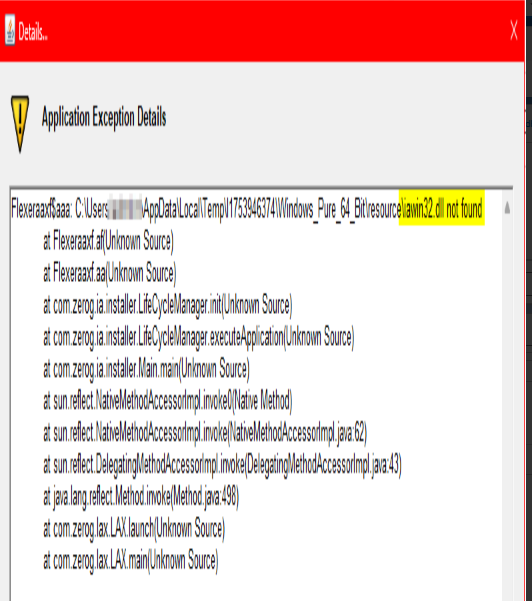
Upgrading DPA on a Windows server fails with a missing library file.
Application Exception Details: "...iawin32.dll not found":
Operating System (OS): Windows 2025 64-bit server
The installer is looking for a file called iawin32.dll. The temp location of the installer directory path shows that the file is present.
Cause
The cause of the problem is that any version of DPA is not qualified with Windows 2025. The latest DPA version 19.12 SP1 is not yet supported. This means previous versions are not qualified either.
Reference: DPA 19.12 SP1 Compatibility Guide on E-Lab Navigator
DPA_19_12_SP1.pdf
Resolution
The following workaround can be applied:
- Set the environment variable to be Windows 2019:
C:\inst> SET JAVA_TOOL_OPTION=-Dos.name=”Windows 2019”
- Run the upgrade again.
Affected Products
Data Protection AdvisorArticle Properties
Article Number: 000361080
Article Type: Solution
Last Modified: 04 Dec 2025
Version: 2
Find answers to your questions from other Dell users
Support Services
Check if your device is covered by Support Services.