PPDM Unity Backups Fail, ABNA0026-Unable Complete SNAPSHOT_AND_SLICE Operation, Excessive Snapshots
Summary:
PowerProtect Data Manager Backups for Unity fail with error ABNA0026: Unable to complete the SNAPSHOT_AND_SLICE operation because the NAS Agent cannot create the snapshot for the share
path .
...
This article applies to
This article does not apply to
This article is not tied to any specific product.
Not all product versions are identified in this article.
Symptoms
Unity NAS backups are failing with the following error:
ABNA0026: Unable to complete the SNAPSHOT_AND_SLICE operation because the NAS Agent cannot create the snapshot for the share path unity_data01_smb.

Creation of the snapshot for the asset cannot be completed because an error occurred.

 To troubleshoot this issue:
1) Check and address the vendor specific message for more details.
2) Check the array to ensure that no errors occurred during snapshot creation.
3) Check if the snapshot capability license is available and enabled.
4) Manually clean up the snapshot if the snapshot capacity for the asset/file system has been exceeded.
5) Make sure that backup user has all required privileges.
6) Check if the filesystem has requisite available storage.
7) Verify that the array can be reached over the proxy network.
8) Check for the export path length. The characters that are allowed for path length should be within 255 characters.
And for the detailed error message:


NAS vProxy Engine Protection_ENGINE_FQDN is unable to perform SnapshotAndSlice operation for nasShare unity_data01_smb.

Error Details:
 TaskId: 0f105547-a457-4939-83d1-0b76a92693dc, JobId 0f105547-a457-4939-83d1-0b76a92693dc
 NAS agent error code 'ABNA0026'. Snapshot creation failed for file system 'unity_data01_smb'. Reason: Rest response code 409 for url : https://UNITY_IP/api/types/snap/instances, error Code : 1903001780, error message : Unable to create the snapshot because the maximum number of snapshots already exists for the file system. (Error Code:0x716d80b4)
Trying to take a manual snapshot on the Unity File Systems displays this error message:
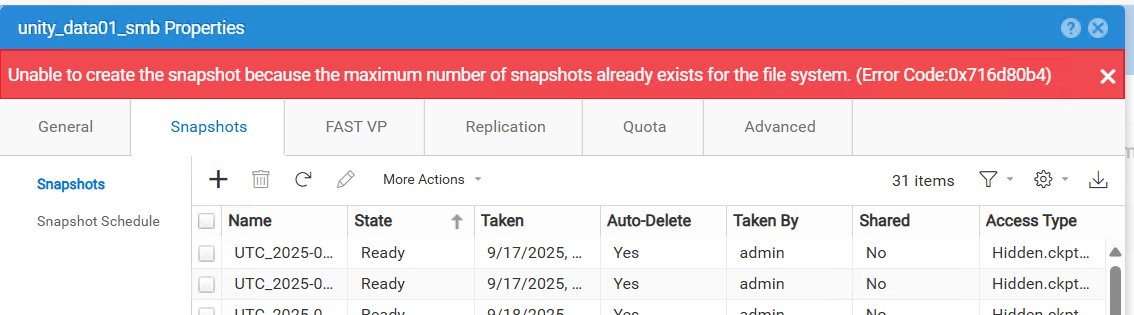
Unable to create the snapshot because the maximum number of snapshots already exists for the file system. (Error Code: 0x716d80b4)
Cause
This happens because too many snapshots for the same File Systems are present.
From the Unity Unisphere, in System > Software and Licenses > System limits, there is the system snapshot limitation:
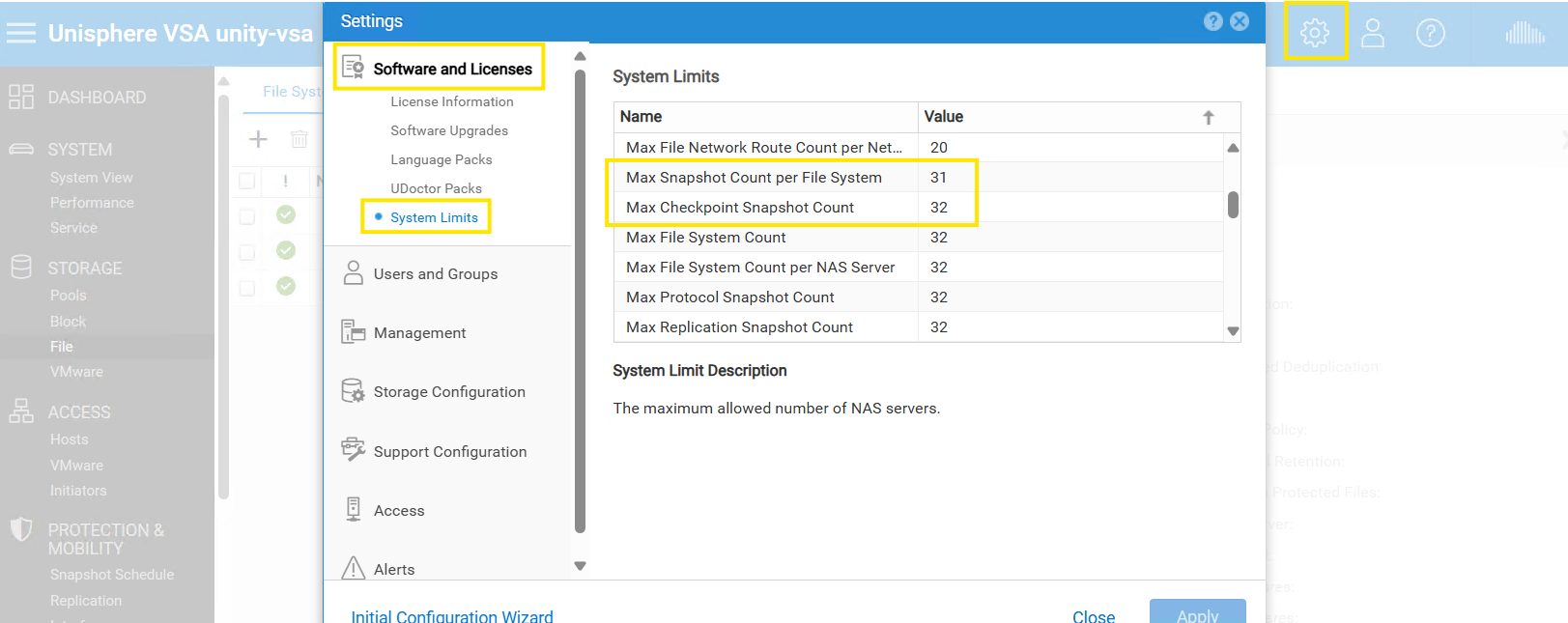
This shows the snapshots limitation.
Resolution
To fix this issue, reduce the number of snapshots from the File Systems.
If this cannot be done, a suggestion is to open a Service request to Dell Unity Support to discuss and understand why many snapshots are presents.
Affected Products
PowerProtect Data ManagerArticle Properties
Article Number: 000371277
Article Type: Solution
Last Modified: 06 Dec 2025
Version: 2
Find answers to your questions from other Dell users
Support Services
Check if your device is covered by Support Services.