Dell Networking: Intermittent Ping Drops to Management IP of OS9 Switches
Summary: Ping drops to management on Dell Networking OS9 switches.
This article applies to
This article does not apply to
This article is not tied to any specific product.
Not all product versions are identified in this article.
Symptoms
Affected Products:
All Dell Networking OS9 switches
Issue:
The end user is unable to access the management IP of an OS9 switch or is reporting intermittent ping loss.
Setup:
This issue is reported multiple times, and the setup usually includes:
- Management L2 switch
- L3 switch or router
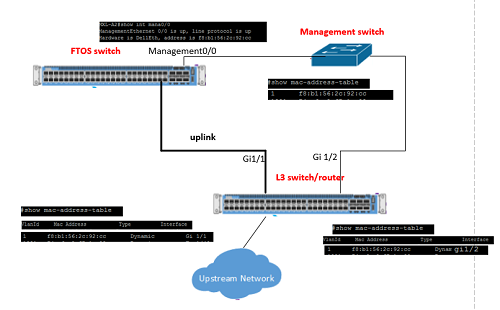
- FTOS switch with management 0/0 out-of-band interface connected to a management switch on a data port. The L3 switch or router is also connected to the management switch from a data port.
- The user is attempting to access the management IP of the OS9 switch which is located in the Upstream network, connecting from the L3 switch or router.
Observations:
- The MAC address of the management 0/0 interface (in this example x:x:x:x:92:cc) is learned on both ports gi1/1 and gi1/2 in the same VLAN of the L3 switch.
- When the L3 switch sends a packet, it can send the packet to any of the two ports gi1/1 and gi1/2. Some packets are sent through port gi1/1, other packets through port gi1/2 depending on the port where the MAC address was learned last. This is seen as MAC flapping between two ports on the L3 switch or router. The packets sent toward port gi1/1 are dropped by the OS9 switch because packets received on the in-band data port of the OS9 switch are not forwarded to the management plane. These packets do not reach the destination management 0/0 out-of-band IP address. The packets sent through port gi1/2 reach the destination. This flapping creates the intermittent packet loss.
Cause
This is caused by a mixing of the in-band and out-of-band networks. This is not permitted as OS9 uses the same MAC address for both management and data ports. The OS9 switch is working as designed.
Resolution
There are two workarounds:
- The management VLAN should be removed from the trunk between the FTOS switch and the L3 switch or router.
- The IP address can be removed from management 0/0 interface and placed on a data VLAN for in-band management of the FTOS switch.
Affected Products
OS9, Force10 S2410-01-10GE-24P, Force10 S2410-01-10GE-24CP, Force10 S25N-S50N, Force10 S25-01-GE-24P, Force10 S25-01-GE-24T, Force10 S25-01-GE-24V, Force10 S50-01-GE-48T-V, Force10 S50-01-GE-48T, PowerSwitch S3048-ON, PowerSwitch S4048-ON
, PowerSwitch S4810P, PowerSwitch S4810-ON, PowerSwitch S5000, Force10 S55T, Force10 S60-44T, PowerSwitch S6000, PowerSwitch S6000 ON, Force10 Z9000, Dell Networking Z9500, Dell Networking S3100 Series, PowerSwitch S4048T-ON, PowerSwitch S6010-ON, PowerSwitch S6100-ON, PowerSwitch Z9100-ON
...
Article Properties
Article Number: 000141092
Article Type: Solution
Last Modified: 24 Mar 2025
Version: 6
Find answers to your questions from other Dell users
Support Services
Check if your device is covered by Support Services.