PowerFlex 3.X: How to renew the default SSL certificate
Summary: PowerFlex Manager generates a 2-year default self-signed SSL certificate when it is deployed. You can replace this default SSL certificate by generating a CSR, having it signed by a trusted certificate authority and uploading the signed certificate to PowerFlex Manager. If you are not using a trusted certificate authority and must renew the default self-signed SSL certificate, then you can use the following instructions. ...
Instructions
This generates a new 2 year self-signed SSL certificate. This should only be done if the default self-signed SSL certificate is still being used.
1- Confirm that the default SSL certificate is still being used:
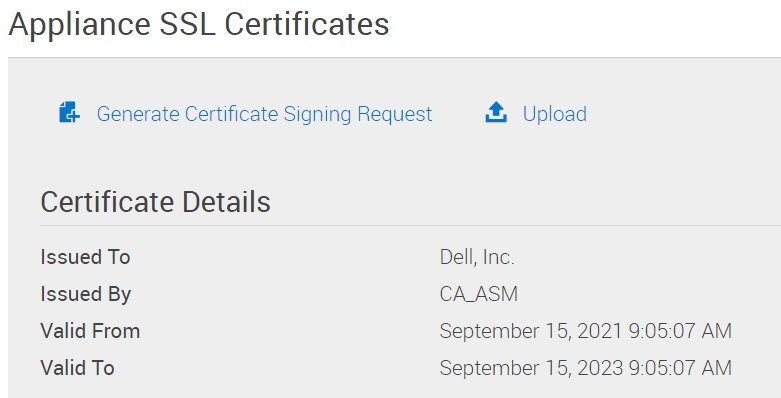
PowerFlex Manager -> Settings -> Virtual Appliance Management ->Appliance SSL Certificates
The "Certificate Details" will have it "Issued To" "Dell, Inc." and "Issued By" "CA_ASM"
The "Valid From" date will be the date PowerFlex Manager was deployed.
The "Valid To" date will be 2 years later.
2- Log in to the PowerFlex Manager appliance with the delladmin user
3-
sudo su -
4- Delete the old self-signed CA data:
   >  cd /opt/Dell/ssl
   >  rake reset_ca
5- Remove old self-signed certificate.
> rm /etc/pki/tls/certs/localhost.crt
6- Reboot PowerFlex Manager
> shutdown -r now
7- Confirm that the new self-signed SSL certificate is loaded: PowerFlex Manager -> Settings -> Virtual Appliance Management -> Appliance SSL Certificates The "Certificate Details" will have it "Issued To" "Dell, Inc." and "Issued By" "CA_ASM" The "Valid From" date will be the current date. The "Valid To" date will be 2 years later.