Dell Networking SONiC에서 MC-LAG Active-Standby 역할 선출
Summary: 이 문서에서는 DELL SONiC의 MC-LAG에서 Active 또는 Standby Role에 대해 설명합니다.
This article applies to
This article does not apply to
This article is not tied to any specific product.
Not all product versions are identified in this article.
Instructions
MC-LAG 피어는 활성 또는 대기 모드여야 합니다. 활성 또는 대기는 제어 계층의 개념입니다. 그러나 데이터 계층에서 각 MC-LAG 피어는 역할에 관계없이 데이터 전달 경로를 개별적으로 결정합니다.
MC-LAG 역할은 구성된 IPV4 source-ip 및 peer-ip를 기반으로 피어에 의해 결정됩니다.
- source-ip가 peer-ip보다 작으면 장치가 활성 상태가 됩니다.
- 소스 ip가 피어-ip보다 크면 장치가 대기 상태가 됩니다.
참고: Active 또는 Standby 역할은 Peers 운영 상태 또는 피어 링크 연결 상태와 무관합니다. Active MC-LAG 피어가 재부팅되는 경우 대기 상태가 활성 상태가 되지 않고 그 반대의 경우도 마찬가지입니다.
예: Switch-1이 소스 IP 10.0.0.1을 사용하고 있고 Switch-2에는 소스 IP 10.0.0.2가 있습니다.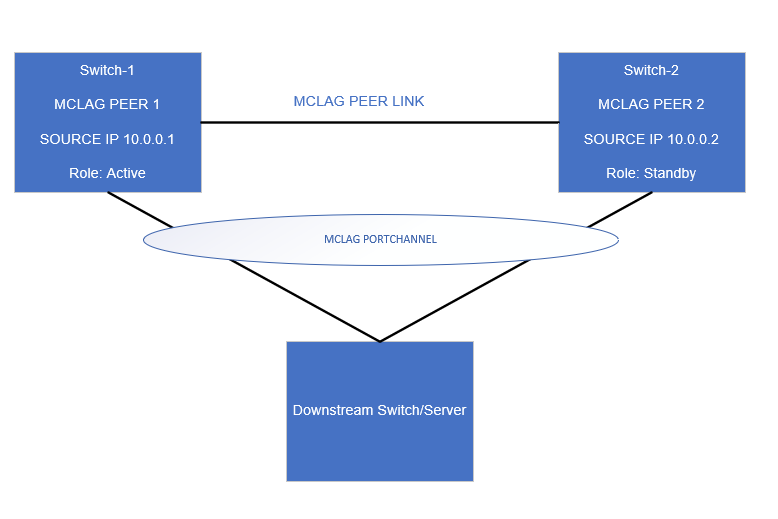
스위치-1의 MC-LAG 구성
Swicth-1# show running-configuration mclag
!
mclag domain 1
source-ip 10.0.0.1
peer-ip 10.0.0.2
peer-link PortChannel1
mclag-system-mac xx:xx:xx:xx:xx:xx
keepalive-interval 1

Swicth-1# show running-configuration mclag

Domain ID            : 1
Role                 : active
Session Status       : up
Peer Link Status     : up
Source Address       : 10.0.0.1
Peer Address         : 10.0.0.2
Peer Link            : PortChannel1
Keepalive Interval   : 1 secs
Session Timeout      : 30 secs
Delay Restore        : 300 secs
System Mac           : xx:xx:xx:xx:xx:xx
Mclag System Mac     : xx:xx:xx:xx:xx:xx
Switch-1은 Active 역할을 하는 피어 IP(10.0.0.2)보다 소스 ip(10.0.0.1)가 낮기 때문에
스위치-2의 MC-LAG 구성
Swicth-2# show running-configuration mclag
!
mclag domain 1
source-ip 10.0.0.2
peer-ip 10.0.0.1
peer-link PortChannel1
mclag-system-mac xx:xx:xx:xx:xx:xx
keepalive-interval 1

Swicth-2# show running-configuration mclag

Domain ID            : 1
Role                 : standby
Session Status       : up
Peer Link Status     : up
Source Address       : 10.0.0.2
Peer Address         : 10.0.0.1
Peer Link            : PortChannel1
Keepalive Interval   : 1 secs
Session Timeout      : 30 secs
Delay Restore        : 300 secs
System Mac           : xx:xx:xx:xx:xx:xx
Mclag System Mac     : xx:xx:xx:xx:xx:xx
Switch-2는 피어 IP(10.0.0.1)보다 소스 ip(10.0.0.2)가 더 높으므로 대기 역할을 합니다.
Affected Products
Enterprise SONiC Distribution, PowerSwitch E3200-ON Series, Dell EMC Networking N3200-ON, PowerSwitch S5212F-ON, PowerSwitch S5224F-ON, PowerSwitch S5232F-ON, PowerSwitch S5248F-ON, PowerSwitch Z9264F-ON, PowerSwitch Z9432F-ONArticle Properties
Article Number: 000206830
Article Type: How To
Last Modified: 12 Jan 2024
Version: 4
Find answers to your questions from other Dell users
Support Services
Check if your device is covered by Support Services.