Dell Unity: 업그레이드 전 상태 점검이 실패하고 다음 오류가 발생합니다. Check_connectemc_sender_1
Summary: 다음 오류와 함께 PUHC(Pre-Upgrade Health Check)가 실패합니다. ERROR_CODE=플랫폼::check_connectemc_sender_1|오류 |업그레이드를 진행할 수 없음(Dell 수정 가능)
This article applies to
This article does not apply to
This article is not tied to any specific product.
Not all product versions are identified in this article.
Symptoms
다음 오류와 함께 PUHC(Pre-Upgrade Health Check)가 실패합니다.
ERROR_CODE=platform::check_connectemc_sender_1|Error|
UPGRADE CANNOT PROCEED.
check_connectemc_sender_1
errors :0x1000300- Operation failed. Error code: 0x1000300 The requested object could not be found on the system. Recheck the command name. 0x6400bee - Failed to perform the operation because connect home has not been configured
Cause
참고: Unity OE 5.3부터는
ConnectHome 를 사용하여 연결 알림 <serialNumber>@dell.com 더 이상 기본값이 아닙니다.
ConnectHome 연결을 구성할 때 시스템 도메인 이름의 이메일 주소 또는 SMTP 서버에서 인증을 통과하는 해당 이메일 주소를 포함합니다.
5.3 이상에서 SupportAssist를 활성화하려면 ConnectEMC에 "보낸 사람" 이메일 주소가 있어야 합니다.
Resolution
이 문제를 해결하기 위한 두 가지 옵션이 있습니다.
- PUHC를 건너뛰고 업그레이드를 수행합니다. 나중에 보낸 사람 이메일 주소를 추가합니다.
- 지금 보낸 사람 이메일 주소를 추가한 다음 업그레이드를 수행합니다.
옵션 1: PUHC를 건너뛰고 업그레이드 수행
- 아래 명령을 실행합니다.
svc_skip_puhc
- 아래 명령을 실행하여 오류를 건너뜁니다.
+58

50: flr::check_for_disk_transitions
51: flr::check_for_faulted_disks
52: flr::check_for_no_pulled_disks
53: flr::check_for_snaps_in_an_active_state
54: flr::check_movesession_exists
55: slic::check_for_slic_committed
56: platform::check_centralized_esrs_version
57: platform::check_unsupported_proxy
58: platform::check_connectemc_sender
- 일단
check_connectemc_sender을 건너뜀 경우 Unisphere 에서 업그레이드를 시작하십시오 . - 보낸 사람 이메일 주소 추가
ConnectEMC. (아래 참조)
옵션 2: 보낸 사람 이메일 주소를 추가한 다음 업그레이드
보낸 사람 이메일 주소를 추가하는 세 가지 옵션이 있습니다.
- Unisphere
svc_connectemc명령을Uemcli명령을
Unisphere 크랙:
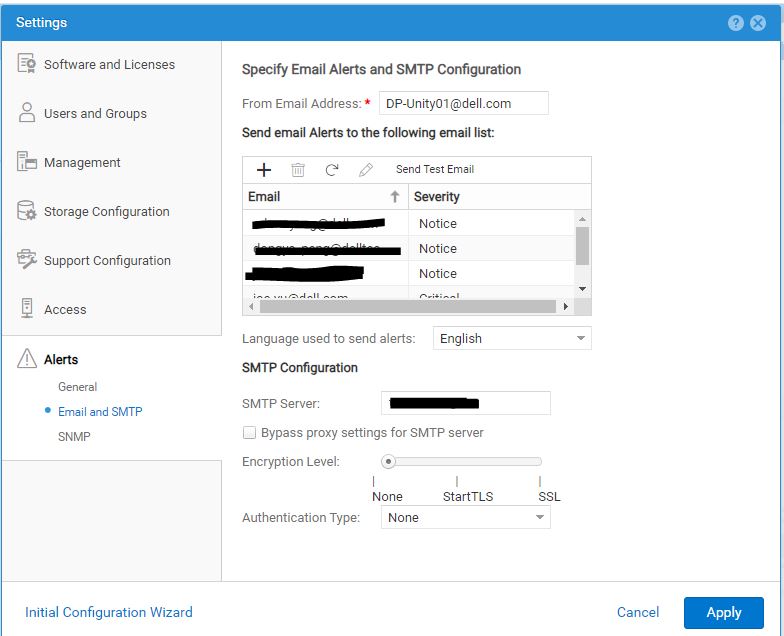
svc_connectemc:
- 아래 명령을 실행하여 표시합니다.
ConnectEMC상태:
svc_connectemc -s

ConnectEMC: NOTRUNNING DISABLE
- 다음의 기능 테스트
ConnectEMC아래 명령을 사용하여 지원에 메시지를 보내려면 다음을 수행합니다.
spa:/cores/service/user# svc_connectemc -t

ERROR [spa]: Email (ConnectEMC) not configured
- 아래 명령을 실행하여 표시합니다.
ConnectEMC구성 세부 정보:
svc_connectemc -g

INFO [spa]: SMTP Host: smtp.server.com
INFO [spa]: SENDER EMAIL: DP-Unity01@dell.com
INFO [spa]: EMC Destination Email: emailalert@emc.com
- 아래 명령을 실행하여 이메일 주소를 설정합니다.
ConnectEMC알림을 보내는 데 사용합니다.
05:57:12 root@CKM002XXXXX929 spa:/cores/service/user# svc_connectemc -m DP-Unity01@dell.com

INFO [spa]: Verifying peer connectivity ...
ERROR [spa]: Email (ConnectEMC) not configured. Please enable connetEMC first.
- 아래 명령을 실행하여
ConnectEMC:
05:58:30 root@CKM002XXXXX929 spa:/cores/service/user# svc_connectemc --enable 10.1XX.1XX.1X1 --sendermail DP-Unity01@dell.com

INFO [spa]: Verifying peer connectivity ...
INFO [spa]: Enabling ConnectEMC
INFO [spa]: Verifying peer connectivity ...
INFO [spa]: copying connectEMC config to peer
INFO [spa]: Persisting SMTP server configuration
INFO [spa]: Persisting sender email address configuration
INFO [spa]: ConnectEMC has been enabled successfully.
- 활성화 후
ConnectEMC, 연결을 테스트합니다.svc_connectemc -t INFO [spa]: Test Dialhome request
Uemcli:
- 아래 명령을 실행하여 현재 구성을 나열합니다.
uemcli /sys/support/connecthome show -detail

1:  Enabled       = yes
   SMTP server     = 10.1XX.1XX.1X1
   E-mail from address = (none)@emc.com
   E-mail to address  = emailalert@emc.com
활성화하기 전에
ConnectEMC테스트 명령을 확인하면 다음 오류와 함께 실패합니다.
Operation failed. Error code: 0x1000300
The requested object could not be found on the system. Recheck the command name. (Error Code:0x1000300)
- 아래 명령을 실행하여
ConnectEMC:
uemcli -d 10.0.0.1 -u local/joe -p Password /sys/support/connecthome set –enable yes –smtpServer 10.10.22.22 -emailFromAddr DP-Unity01@dell.com
활성화 후
ConnectEMC, 테스트하면 성공적으로 통과합니다.
09:05:02 root@CKM002XXXXX929 spb:/cores/service/user# uemcli -u admin -securepassword /sys/support/connecthome test
Password:
Storage system address: 127.0.0.1
Storage system port: 443
HTTPS connection

Remote certificate:
Issuer:   CN=DP-UNITY01
Subject:  CN=DP-UNITY01
Valid from: 2020:06:14:07:13:27
Valid to:  2023:06:14:07:13:27
Serial:   00a382cb17422be9fd
Id:     2957123456
Would you like to:
 [1] Accept the certificate for this session
 [2] Reject the certificate
Please input your selection (The default selection is [1]):
Operation completed successfully.
- 구성 변경 후의 현재 세부 정보를 나열합니다.
uemcli /sys/support/connecthome show -detail

Please input your selection (The default selection is [1]):
1:  Enabled       = yes
   SMTP server     = 10.1XX.1XX.1X1
   E-mail from address = DP-Unity01@dell.com
   E-mail to address  = emailalert@emc.com
Additional Information
참조는 Dell Unity 제품군 Unisphere 명령줄 인터페이스 사용자 가이드를 참조하십시오.
Affected Products
Dell EMC Unity FamilyArticle Properties
Article Number: 000224165
Article Type: Solution
Last Modified: 18 Dec 2025
Version: 4
Find answers to your questions from other Dell users
Support Services
Check if your device is covered by Support Services.