IDPA: UI show Backup Agents Installation in Progress with circle spinning after deployment
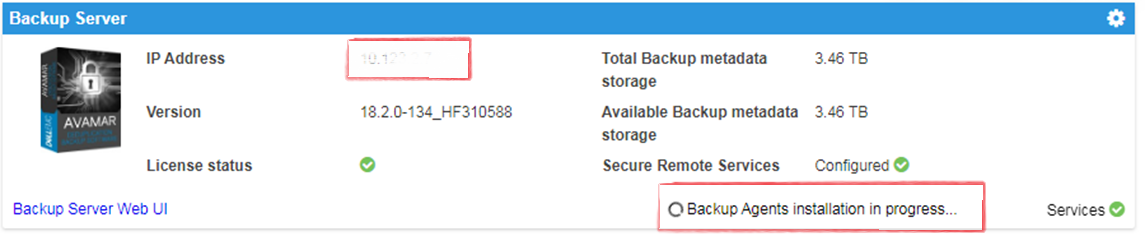
Summary: The Integrated Data Protection Appliance (IDPA) User Interface (UI) shows Agents Install in Progress, installer complete. A missing success identify makes the UI think agents are being installed. ...
This article applies to
This article does not apply to
This article is not tied to any specific product.
Not all product versions are identified in this article.
Symptoms
- A
Backup Agents installation in Progressmessage appears on the Appliance Configuration Manager (ACM). - AVI shows no packages ready to install. History shows packages as complete, while on ACM the
- A
Backup Agents installation in Progressmessage appears:
Cause
This issue occurs after a new deployment.
Resolution
- Log in to Avamar:
https://<Avamar_IP>/avi
The Verified AVI installer user interface for Avamar shows no packages waiting to be installed and history shows packages completed.
- Log in to Avamar SSH.
Verified status of dpnctl status and all services are up and running fine.
Run the command: dpnctl status
- Log in to ACM SSH and run the following command to clear the
Backup Agents installation in Progressmessage:touch /usr/local/dataprotection/var/av_ucd_install_success
- Restart the ACM webapp service using the below commands:
Stop webapp
Stop webapp service:
Start webapp service:
service dataprotection_webapp
Start webapp service:
service dataprotection_webapp start
Affected Products
Integrated Data Protection Appliance FamilyProducts
PowerProtect Data Protection Software, Integrated Data Protection Appliance FamilyArticle Properties
Article Number: 000170900
Article Type: Solution
Last Modified: 20 Jan 2026
Version: 4
Find answers to your questions from other Dell users
Support Services
Check if your device is covered by Support Services.