SupportAssist Enterprise: VE mostra "Not Connected to Dell" e il campo Setup Details è vuoto
Summary: SAE VE mostra il messaggio "not Connected to Dell EMC" e il campo Setup Details è vuoto.
This article applies to
This article does not apply to
This article is not tied to any specific product.
Not all product versions are identified in this article.
Symptoms
I sintomi di questo problema includono:
- Croce Rossa accanto a "Connected to Dell"
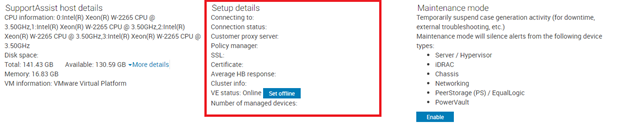
- La maggior parte degli stati in About > Setup Details sono vuoti
Esempi: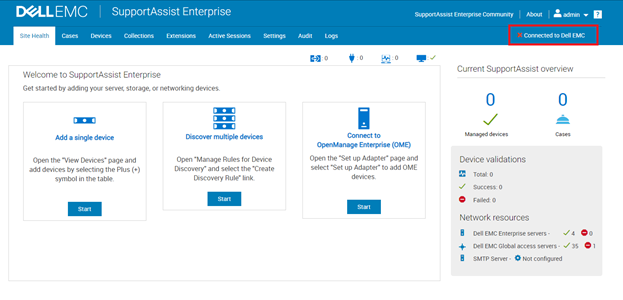
Cause
Scadenza di un certificato SSL di un componente interno interessato da tutte le versioni di SAE VE 4.x.
Resolution
Nota: Questo problema non influisce su connessione home, trasferimenti di file o sessioni remote.
Per risolvere questo problema:Verificare
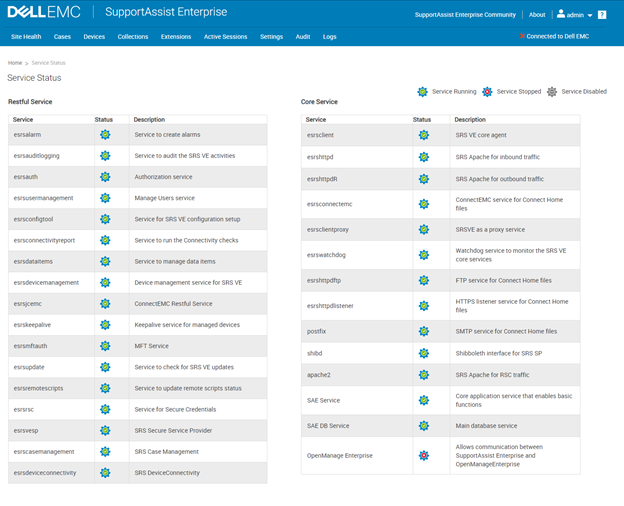
che tutti i servizi tranne OpenManage siano operativi, altrimenti potrebbero esserci altre cause sottostanti.
- Scaricare il file tar allegato (
veWebIssueFIX_csp_en_US_1_en_US_1.tar) - Copiare il file sul server SAE VE in
/tmp - Copiare il file in Secure Remote Services Docker in
/tmp: docker cp /tmp/vveWebIssueFIX_csp_en_US_1_en_US_1.tar esrsde-app:/tmp - Accedere a Secure Remote Services Docker Bash:
docker exec -it esrsde-app bash - Accedere al
/tmp under ESRS Docker: cd /tmp - Estrarre i file dal file tar:
tar -xvf veWebIssueFIX_csp_en_US_1_en_US_1.tar - Eseguire lo script:
./veWebIssueFIX_csp_en_US_1.sh
Affected Products
SupportAssist Enterprise Virtual Appliance, SupportAssist Enterprise Virtual Appliance 4.xArticle Properties
Article Number: 000193553
Article Type: Solution
Last Modified: 10 Apr 2025
Version: 3
Find answers to your questions from other Dell users
Support Services
Check if your device is covered by Support Services.