PowerFlex 2.6: Convert SVM OS fails "UNEXPECTED Error java.lang.NullPointerException executing command .CustomizeSvmCommand"
Summary: PowerFlex Convert SVM OS fails with "UNEXPECTED Error java.lang.NullPointerException executing command.CustomizeSvmCommand"
This article applies to
This article does not apply to
This article is not tied to any specific product.
Not all product versions are identified in this article.
Symptoms
Converting SVM OS from SLES 11.3 to SLES 12.2 with the GW
Symptoms
The task in GW operation fails with an Unexpected error.
scaleio-trace.log contains the following:
2018-08-28 13:39:40,241 [executor-27] ERROR c.e.s.s.d.i.c.CustomizeSvmCommand - UNEXPECTED Error java.lang.NullPointerException executing command .CustomizeSvmCommand (abort) : com.emc.scaleio.serverCommons.vmwareObj.VmWareSpecGenerator.getCustomizationSpec(VmWareSpecGenerator.java:88)
com.emc.scaleio.serverCommons.vmwareObj.vCenterClient.copyCustomization(vCenterClient.java:1863)
com.emc.scaleio.serverCommons.vmwareConnectors.VCenterConnectorImpl.copyVmCustomization(VCenterConnectorImpl.java:416)
com.emc.s3g.scaleio.domain.installation.VCenterConnectionImpl.copyVmCustomization(VCenterConnectionImpl.java:238)
com.emc.s3g.scaleio.domain.installation.commands.CustomizeSvmCommand.executeVCenterCommand(CustomizeSvmCommand.java:59)
com.emc.s3g.scaleio.domain.installation.commands.CustomizeSvmCommand.executeVCenterCommand(CustomizeSvmCommand.java:29)
com.emc.s3g.scaleio.domain.installation.commands.VCenterCommand.executeCommand(VCenterCommand.java:48)
com.emc.s3g.scaleio.domain.installation.commands.BaseCommand.call(BaseCommand.java:515)
java.util.concurrent.FutureTask.run(FutureTask.java:266)
java.util.concurrent.ThreadPoolExecutor.runWorker(ThreadPoolExecutor.java:1149)
java.util.concurrent.ThreadPoolExecutor$Worker.run(ThreadPoolExecutor.java:624)
java.lang.Thread.run(Thread.java:748)
Impact
Unable to proceed with the conversion.
Cause
The vmware-tools process in the original SVM is having an issue, and VCenter is not able to retrieve the IPs from it, and thus unable to configure the new SVMs accordingly.
Looking into the VCenter's VM summary tab, The "IP Addresses" list is empty, as shown in the screen capture below. However the "VMware Tools" status could still be "Running."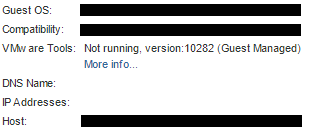
Resolution
Identify all the (original) SVMs that do not show IP addresses in vCenter, login to them, and restart the vmware-tools process, for example:
systemctl restart vmtoolsd
Additional Information
Impacted versions
This is not a ScaleIO/VxFlex OS issue.
Affected Products
PowerFlex SoftwareProducts
PowerFlex SoftwareArticle Properties
Article Number: 000031281
Article Type: Solution
Last Modified: 22 Sept 2025
Version: 4
Find answers to your questions from other Dell users
Support Services
Check if your device is covered by Support Services.