Avamar: SQL backup failing with "BACKUP DATABASE permission denied in database" error
Summary: This knowledge base (KB) article discusses Avamar SQL backups failing due to a permissions issue.
This article applies to
This article does not apply to
This article is not tied to any specific product.
Not all product versions are identified in this article.
Symptoms
The SQL client backup may fail due to the following error messages in the log:
avsql Error <9072>: sqlconnectimpl_smo::execute Microsoft.SqlServer.Management.Common.ExecutionFailureException: An exception occurred while executing a Transact-SQL statement or batch. ---> System.Data.SqlClient.SqlException: BACKUP DATABASE permission denied in database 'OperationsManager'.
 (Log #10)
avsql Error <6478>: VDS::Getconfig failed with 'The api was waiting and the timeout interval had elapsed' (Log #10)
avsql Error <6478>: VDS::Getconfig failed with 'The api was waiting and the timeout interval had elapsed' (Log #10)
avsql Error <6479>: Timed out. Was Microsoft SQLServer running? (Log #10)
avsql Error <6479>: Timed out. Was Microsoft SQLServer running? (Log #10)
avtar Info <7202>: Backup CANCELLED, wrapping-up session with Server (Log #2)
avtar Info <7202>: Backup CANCELLED, wrapping-up session with Server (Log #3)
...
avsql Error <9072>: sqlconnectimpl_smo::execute Microsoft.SqlServer.Management.Common.ExecutionFailureException: An exception occurred while executing a Transact-SQL statement or batch. ---> System.Data.SqlClient.SqlException: BACKUP DATABASE permission denied in database 'master'.
avsql Error <9072>: sqlconnectimpl_smo::execute Microsoft.SqlServer.Management.Common.ExecutionFailureException: An exception occurred while executing a Transact-SQL statement or batch. ---> System.Data.SqlClient.SqlException: BACKUP DATABASE permission denied in database 'msdb'.
...
avsql Error <14272>: There are no successfully finished database tasks!
avsql Error <14294>: An error occurred when generating sql metadata
Cause
The account (local SYSTEM by default) configured for the Backup Agent service does not have appropriate rights to back up the SQL Server databases.
Resolution
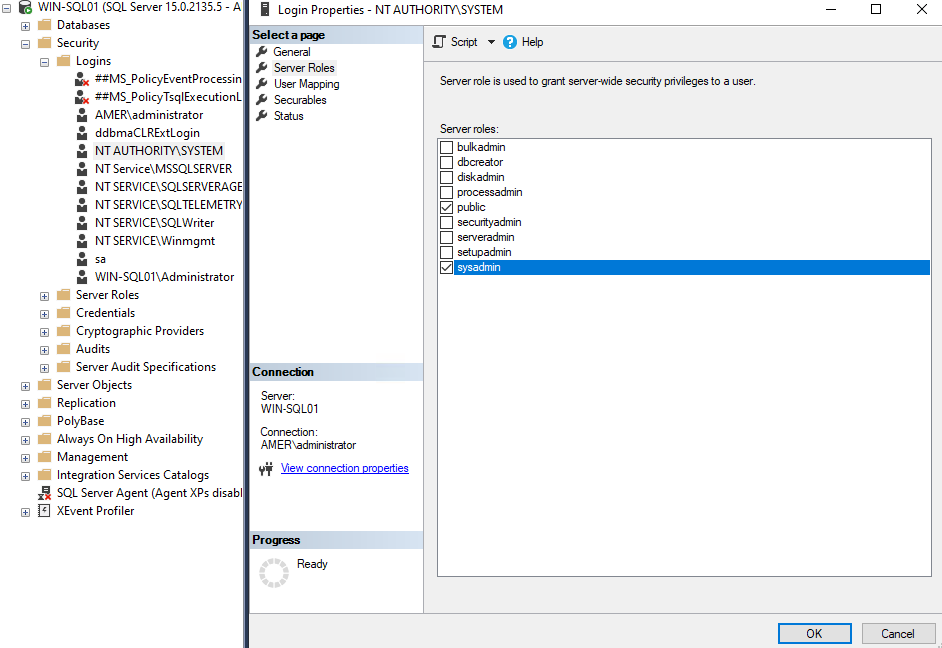
Open SQL Server Management studio and verify that the Backup Agent service account is added to SQL SERVER ROLE "sysadmin."
To assign SQL Server roles to the Backup Agent service account:
- On the SQL client, start SQL Server Management Studio.
- In the left pane of the SQL Server Management Studio window, expand the tree to display first the required SQL Server and then the Security folder.
- Under the Security folder, click Logins to display the users in the right pane.
- In the Logins list, right-click the Account (either NT Authority\SYSTEM or the dedicated backup account), and then click Properties.
- In the login properties box, select the Server Roles page.
- In the Server roles box, enable the sysadmin role by clicking the checkmark next to it.
- Click the OK button to save the changes.
Affected Products
Avamar, Avamar Plug-in for SQLArticle Properties
Article Number: 000039635
Article Type: Solution
Last Modified: 22 Jul 2025
Version: 4
Find answers to your questions from other Dell users
Support Services
Check if your device is covered by Support Services.