VNXe: Enabling or disabling Secure Shell (SSH) on the system. (User Correctable)
Summary: Enable or disable Secure Shell on the system
This article applies to
This article does not apply to
This article is not tied to any specific product.
Not all product versions are identified in this article.
Instructions
To connect to the system and perform advanced system maintenance, you need to enable the Secure Shell (SSH) protocol on both Storage Processors (SPs). This service action allows you to run service tools, such as service actions or service scripts, on the VNXe system. Once SSH is enabled, you or your service provider can run the tools through a service portal. When the service tools have finished running, disable the SSH protocol to ensure that the system is secure.
To learn more about using service scripts, go to the EMC Online Support website. From the VNXe Product page, search for VNXe Service Commands.
Note
If SSH is enabled prior to a system reboot, failover, or the system enters Service Mode, SSH remains enabled.
To enable or disable SSH:
Procedure

To learn more about using service scripts, go to the EMC Online Support website. From the VNXe Product page, search for VNXe Service Commands.
Note
If SSH is enabled prior to a system reboot, failover, or the system enters Service Mode, SSH remains enabled.
To enable or disable SSH:
Procedure
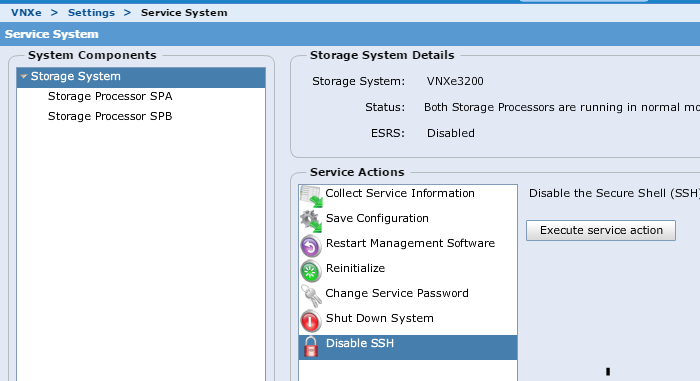
1.Click Settings > Service System.
2.Enter the Service password to access the Service System page.
3.Under System Components, select Storage System.
4.Under Service Actions, select Enable SSH or Disable SSH.
5.Click Execute service action.
6.In the confirmation dialog box, click OK to enable or disable SSH.
2.Enter the Service password to access the Service System page.
3.Under System Components, select Storage System.
4.Under Service Actions, select Enable SSH or Disable SSH.
5.Click Execute service action.
6.In the confirmation dialog box, click OK to enable or disable SSH.
To log into SSH after enabeling SSH in Unishpere
username: service
password: the service password you assigned or the admin password
username: service
password: the service password you assigned or the admin password
Affected Products
VNXe3200Products
VNX1 Series, VNX2 Series, VNXe1600, VNXe2 Series, VNXe3200Article Properties
Article Number: 000022454
Article Type: How To
Last Modified: 07 Nov 2025
Version: 5
Find answers to your questions from other Dell users
Support Services
Check if your device is covered by Support Services.