How to Collect Logs for Dell Data Security Using DiagnosticInfo
Summary: DiagnosticInfo can be used to collect logs for Dell Data Security and Dell Data Protection applications.
This article applies to
This article does not apply to
This article is not tied to any specific product.
Not all product versions are identified in this article.
Instructions
Note:
- Products listed in the Affected Products may not be in an Active state. For up-to-date information about support for a product, reference Product Life Cycle (End of Support and End of Life) Policy for Dell Data Security. If you have any questions on alternative articles, either reach out to your sales team or contact endpointsecurity@dell.com.
- Reference Endpoint Security for additional information about current products.
This article provides the steps for collecting logs using DiagnosticInfo on Windows computers running Dell Data Security (formerly Dell Data Protection) solutions.
Affected Products:
- Dell Encryption Enterprise
- Dell Encryption Personal
- Dell Data Guardian
- Dell Security Management Server
- Dell BitLocker Manager
- Dell Encryption Self-Encrypting Drive Manager
- Dell Threat Defense
- VMware Carbon Black Cloud Endpoint
- Dell Data Protection Personal Edition
- Dell Data Protection Enterprise Edition
- Dell Data Protection Enterprise Edition Server
- Dell Data Protection Security Tools
- Dell Data Protection Cloud Edition
- Dell Data Protection Secure Lifecycle
- Dell Data Protection BitLocker Manager
- Dell Data Protection Self-Encrypting Drive Manager
Affected Versions:
- v8.0.x and Later
Affected Operating Systems:
- Windows
DiagnosticInfo can be ran through the:
Click the appropriate method for additional information.
UI
- Double-click
DiagnosticInfo.exe.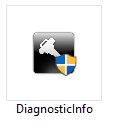 Note:
Note:DiagnosticInfo.execan be obtained:- In the policy-based encryption (
DDSSetup.exeorDDPSetup.exe) product directory: (C:\Program Files\Dell\Dell Data Protection\Encryption) - In the Dell Security Management Server installation ZIP file:
- v9.8.2 and later:
Security Management Server\x64\Program Files 64\Dell\Enterprise Edition\Diagnostics - v9.6.0 to 9.7.0:
Installers\Enterprise Server\x64\Program Files 64\Dell\Enterprise Edition\Diagnostics - v9.5.0 and earlier: Earlier versions of
DiagnosticInfo.execan be obtained through Dell Data Security ProSupport. For more information, reference Dell Data Security International Support Phone Numbers.
- v9.8.2 and later:
- Through Dell Data Security ProSupport: For more information, reference Dell Data Security International Support Phone Numbers.
- In the policy-based encryption (
- Select one of the following:
- The Client radio button and then go to Step 3
- The Server radio button and then go to Step 4

- Check the appropriate client logs to be gathered and then click Next.
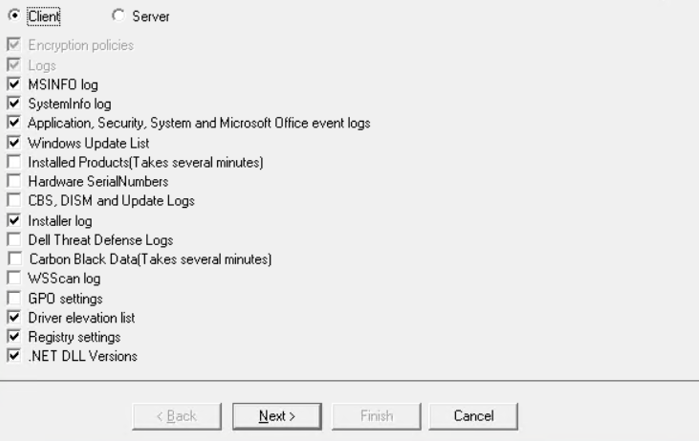
Note:The selections for available client log types differ depending on the version of DiagnosticInfo. The example image depicts an example of client logs that can be gathered depending on the version of DiagnosticInfo that is being used. - Check the appropriate server logs to be gathered and then click Next.
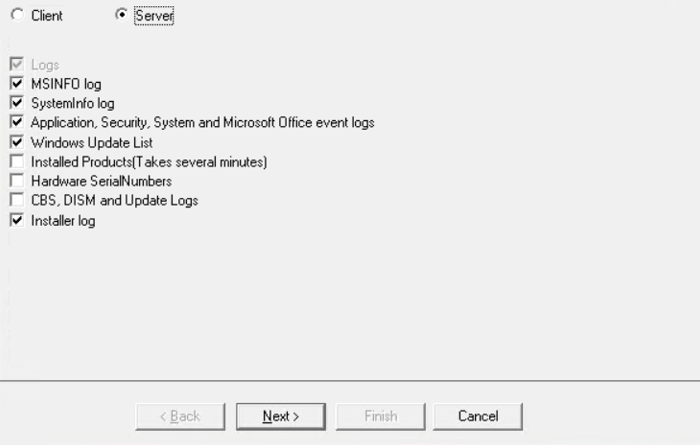
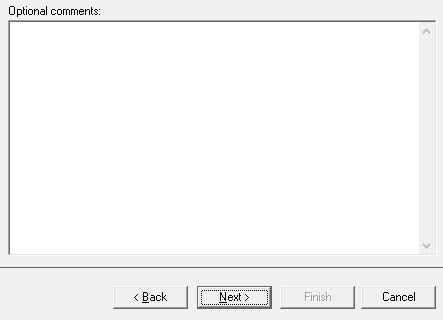
Note:The selections for available server log types differ depending on the version of DiagnosticInfo. The example image depicts an example of server logs that can be gathered depending on the version of DiagnosticInfo that is being used. - Optionally, write any comments pertaining to the logs and then click Next.
- Populate a Password, Confirm Password, and then (optionally) a Password Hint. Once populated, click Next.
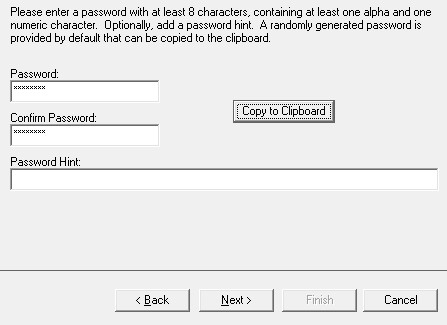 Note: The Password must be provided to the support representative.
 - Browse to a directory to save the log bundle to and then click Finish.
 Note: The default log bundle format (CMG) is only accessible by Dell Data Security ProSupport. Alternatively, a Self extracting executable may be selected to create a bundle (EXE) that is accessible to anyone with the password (Step 6). This option may be useful to read the logs internally.
 - DiagnosticInfo collects the selected logs (Selected in either Step 3 or Step 4).
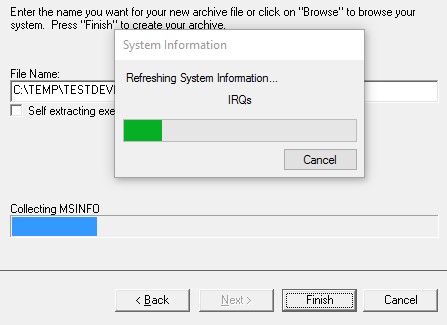 Note: DiagnosticInfo may display "not responding" for up to thirty minutes during the log collection process.
 - Once DiagnosticInfo has finished running, the log bundle is generated at the previously specified location (Step 7).
CLI
Note: Administrator privileges are required to run DiagnosticInfo.
| Bundle Switches | Required | Purpose |
|---|---|---|
/shield |
Shield or Server | Collect log files from the Dell Encryption client. Cannot be combined with /server. |
/server |
Server or Shield | Collect logs from Dell Security Management Server. Cannot be combined with /client. |
/silent |
Yes | Runs silently. |
/password |
Yes | Used to encrypt the data with the specified password. The password must be supplied to the technician working the case. |
/hint |
No | Hint for /password. |
/comment |
No | Comment to be associated with log bundle. |
/filename |
No | Overrides default file name <Machine><Year><Month><Day> with specification. |
/selfextractingexe |
No | Create a self-extracting executable (EXE) instead of a CMG file. |
| Log Switches | Purpose |
|---|---|
/all |
Collects all items that are associated with either /shield or /server. This switch overrides any other log switches. |
/installer |
Collects any related installer logs. |
/registry |
Collects any registry entries that are associated with /shield or /server. |
/eventlogs |
Collects application, system, and security event logs. |
/msinfo |
Collects system information using MSINFO.EXE. |
/systeminfo |
Collects system information using SYSTEMINFO.EXE. |
/gpo |
Collects the group policy object (GPO) settings using GPRESULT.EXE. |
/driverelevation |
Collects the active file drivers and their ordering using FLTMC.EXE. |
/wsscan |
Collects a list of encrypted files. |
/dotnetdllver |
This switch requires a DiagnosticInfo utility that is gathered from Dell Data Security software running version 11.3 or later. Collects the version numbers of all .NET DLL files. |
/windowsupdatelist |
This switch requires a DiagnosticInfo utility that is gathered from Dell Data Security software running version 11.3 or later. Collects Windows update list using the Microsoft WMI command-line (WMIC) utility. |
/instlledProducts |
This switch requires a DiagnosticInfo utility that is gathered from Dell Data Security software running version 11.3 or later. Collects all installed products in the machine. |
/hardwareSerials |
This switch requires a DiagnosticInfo utility that is gathered from Dell Data Security software running version 11.3 or later. Collects the serial numbers of BIOS and BASEBOARD. |
/windowslogs |
This switch requires a DiagnosticInfo utility that is gathered from Dell Data Security software running version 11.3 or later. Collects the Windows logs from CBS, DISM, and update logs. |
/carbonblackdata |
This switch requires a DiagnosticInfo utility that is gathered from Dell Data Security software running version 11.3 or later. Collects all data that is related to VMware Carbon Black. Applicable only if VMware Carbon Black is installed. |
/dellthreatdefense |
This switch requires a DiagnosticInfo utility that is gathered from Dell Data Security software running version 11.3 or later. Collects install logs for Dell Threat Defense. Applicable only if Dell Threat Defense is installed. |
Note: DiagnosticInfo is generated on the desktop of the active user.
Example #1
DiagnosticInfo.exe /shield /silent /password Ex@mpl3 /Hint "Password Example"
Example #1 contains:
- Installer =
DiagnosticInfo.exe - Mode = Shield
- Silent install = Yes
- Password =
Ex@mpl3 - Hint = Password Example
- Comment = No
- Default value since no comment is defined
- Filename = <Machine><Year><Month><Day>
- Default value since no filename is defined
- EXE or CMG = CMG
- Default value since EXE or CMG is not defined
- Logs gathered:
- Default value since logs are not defined
- Product Logs
- MSINFO
- SystemInfo
- Registry
- Driver Elevation
- Event Logs
- Default value since logs are not defined
Example #2
DiagnosticInfo.exe /server /silent /password Dell1234 /comment "Case number 5234" /gpo /selfextractingexe
Example #2 contains:
- Installer =
DiagnosticInfo.exe - Mode = Server
- Silent install = Yes
- Password =
Dell1234 - Hint = No
- Default value since no hint is defined
- Comment = Case number 5234
- Filename = <Machine><Year><Month><Day>
- Default value since no filename is defined.
- EXE or CMG = EXE
- Logs gathered:
- Product Logs
- MSINFO
- SystemInfo
- Registry
- Driver Elevation
- Event Logs
- GPO
To contact support, reference Dell Data Security International Support Phone Numbers.
Go to TechDirect to generate a technical support request online.
For additional insights and resources, join the Dell Security Community Forum.
Affected Products
Dell Encryption, Dell Threat Defense, VMware Carbon BlackArticle Properties
Article Number: 000126729
Article Type: How To
Last Modified: 31 Jul 2025
Version: 16
Find answers to your questions from other Dell users
Support Services
Check if your device is covered by Support Services.