NVP-vProxy: VM Restore is missing disks during recovery disk selection
Summary: You have a VM which is configured with multiple disks. VM backups have been completing successfully. When recovering the VM, not all the VM disks are available for recovery. The missing disks are configured in VMware as Independent or RDM disks. VMware will not snapshot Independent disks, this is required for backing up the disk. RDM disks are bypassed during backup as they are not supported. ...
This article applies to
This article does not apply to
This article is not tied to any specific product.
Not all product versions are identified in this article.
Symptoms
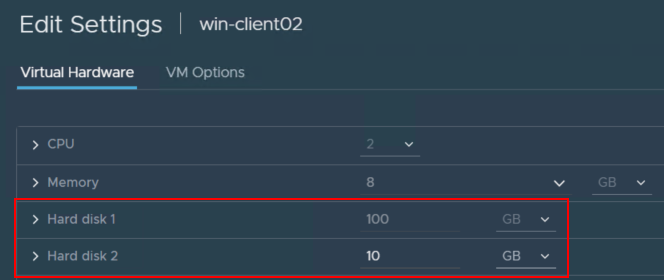
You have a VM which is configured with multiple disks:
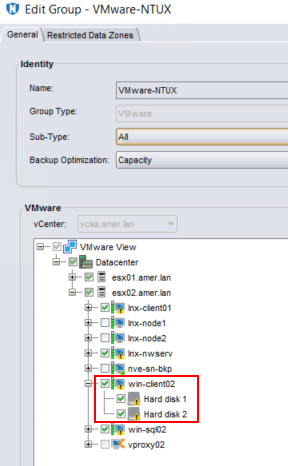
 The VM has multiple disks selected in a NetWorker Protection Group:
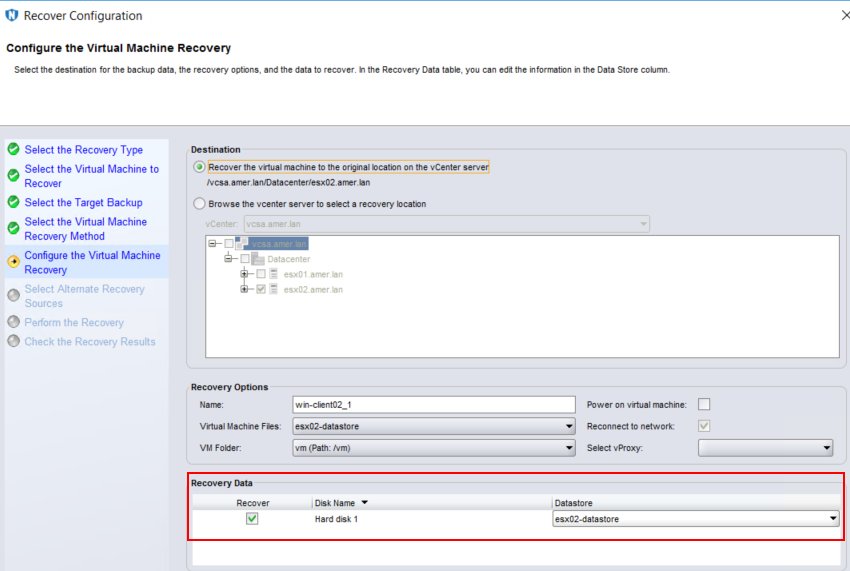
 When recovering the VM not all the VM disks are available for recovery.
Cause
The missing disks are configured in VMware as Independent or RDM disks.

The backup logs contain no errors as it did not attempt to backup the unsupported disks. The DiskStats in the VM backup session log do not show the "missing disk", meaning it was not picked up for backups.
2023-10-04T19:39:03Z INFO:   [@(#) Build number: 99] DiskStats: Disk Label    |  Mode  | Bytes Moved |  Read Rate   |  Write Rate  |     Overhead  |   VDDK Wait   |   Total Time  | VM MORef  | VM Name
2023-10-04T19:39:03Z INFO:   [@(#) Build number: 99] DiskStats: ------------- | ------ | ----------- | ------------ | ------------ | ------------- | ------------- | ------------- | --------- | ------------------------------
2023-10-04T19:39:03Z INFO:   [@(#) Build number: 99] DiskStats: Hard disk 1   | hotadd |      12 MiB |     13 MiB/s |    185 MiB/s |       0:00:16 |        1.4 us |       0:00:29 | vm-1011   | win-client02
2023-10-04T19:39:03Z INFO:   [@(#) Build number: 99] DiskStats: Total         |        |      12 MiB |     13 MiB/s |    185 MiB/s |       0:00:16 |        1.4 us |       0:00:29 | vm-1011   | win-client02
2023-10-04T19:39:03Z INFO:   [@(#) Build number: 99] DiskStats: CSV: Generate stats in CSV format for friendly import to spreadsheet.
2023-10-04T19:39:03Z INFO:   [@(#) Build number: 99] DiskStats: CSV: VM MORef,VM Name,Disk Label,Mode,Bytes Moved,Total Time (sec),Overhead (sec),VDDK Wait (sec),Read Rate (b/s),Write Rate (b/s)
2023-10-04T19:39:03Z INFO:   [@(#) Build number: 99] DiskStats: CSV: vm-1011,win-client02,Hard disk 1,hotadd,11796480,30,17,0,12605127,193072883
NOTE: VM Session logs can be found in the /nsr/logs/policy/POLICY_NAME/WORKFLOW_NAME directory on the NetWorker server, or under /opt/emc/vproxy/runtime/logs/recycle/vbackup/DATE on the vProxy appliance.
For Independent disks the backup log lists the "Independent" disk in the vmspec section at the top of the backup session log:
2023-10-04T19:38:29Z NOTICE: [@(#) Build number: 99]         "VmSpec": {
2023-10-04T19:38:29Z NOTICE: [@(#) Build number: 99]             "Name": "win-client02",
2023-10-04T19:38:29Z NOTICE: [@(#) Build number: 99]             "VmMoref": "vm-1011",
2023-10-04T19:38:29Z NOTICE: [@(#) Build number: 99]             "VirtualDisks": [
2023-10-04T19:38:29Z NOTICE: [@(#) Build number: 99]                 {
2023-10-04T19:38:29Z NOTICE: [@(#) Build number: 99]                     "Label": "Hard disk 1",
2023-10-04T19:38:29Z NOTICE: [@(#) Build number: 99]                     "Key": 2000
2023-10-04T19:38:29Z NOTICE: [@(#) Build number: 99]                 }
2023-10-04T19:38:29Z NOTICE: [@(#) Build number: 99]             ],
2023-10-04T19:38:29Z NOTICE: [@(#) Build number: 99]             "IndependentDisks": [
2023-10-04T19:38:29Z NOTICE: [@(#) Build number: 99]                 {
2023-10-04T19:38:29Z NOTICE: [@(#) Build number: 99]                     "Label": "Hard disk 2",
2023-10-04T19:38:29Z NOTICE: [@(#) Build number: 99]                     "Key": 2001
2023-10-04T19:38:29Z NOTICE: [@(#) Build number: 99]                 }
2023-10-04T19:38:29Z NOTICE: [@(#) Build number: 99]             ],

Resolution
It will not be possible to recover data from these disks as they were never backed up. There are two options available to ensure that data on the unsupported disks is protected:
1. If the VM is powered on, log in to the VM and Shut down the operating system.
2. Connect to the vCenter using the vSphere web client. Log in as a user which has privileges to modify VM configurations (example: administrator@vsphere.local).
3. Open the VM properties by right clicking the VM and select "Edit Settings."
4. Identify the "Independent" disk and change it from "Independent" to "Dependent":
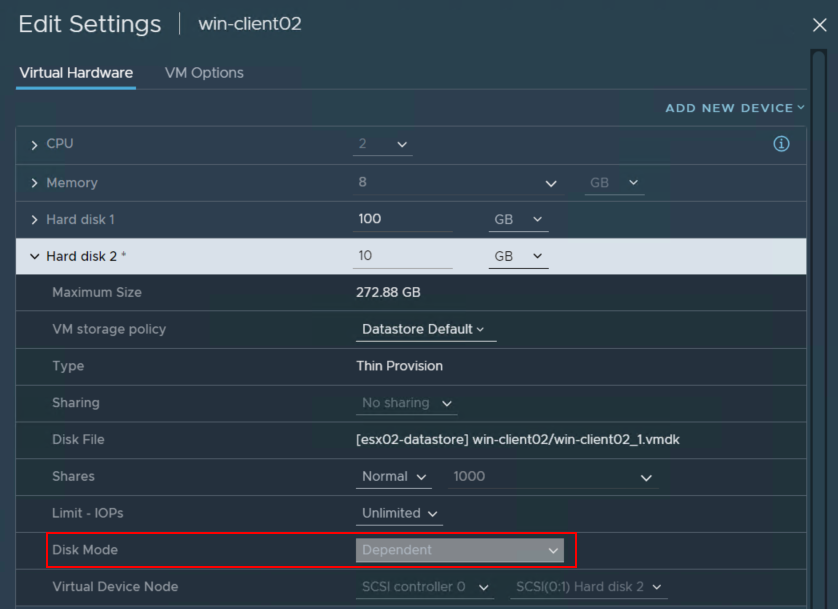
5. Perform a backup of the VM, the backup log should report both disks backed up:
Option 1:
Leave the VM configuration as is. Remove the unsupported (Independent or RDM) disk from the disk selection in the NetWorker Protection Group. If you want to backup data on the unsupported disk, install the NetWorker client software on the VM and configure a NetWorker client for the VM, selecting the Independent/RDM disk as a save set.
Option 2 (only applicable for Independent disks):
If the VM disk is Independent, you can convert it to a dependent disk. This supports VMware snapshot capabilities and allows image-based protection of the disk. Consult with your VMware admin and the VM's system administrator before making any changes to the system.1. If the VM is powered on, log in to the VM and Shut down the operating system.
2. Connect to the vCenter using the vSphere web client. Log in as a user which has privileges to modify VM configurations (example: administrator@vsphere.local).
3. Open the VM properties by right clicking the VM and select "Edit Settings."
4. Identify the "Independent" disk and change it from "Independent" to "Dependent":
5. Perform a backup of the VM, the backup log should report both disks backed up:
2023-10-04T20:01:12Z INFO:   [@(#) Build number: 99] DiskStats: Disk Label    |  Mode  | Bytes Moved |  Read Rate   |  Write Rate  |     Overhead  |   VDDK Wait   |   Total Time  | VM MORef  | VM Name
2023-10-04T20:01:12Z INFO:   [@(#) Build number: 99] DiskStats: ------------- | ------ | ----------- | ------------ | ------------ | ------------- | ------------- | ------------- | --------- | ------------------------------
2023-10-04T20:01:12Z INFO:   [@(#) Build number: 99] DiskStats: Hard disk 2   | hotadd |      10 GiB |      2 GiB/s |    489 MiB/s |       0:00:16 |        1.3 us |       0:00:49 | vm-1011   | win-client02
2023-10-04T20:01:12Z INFO:   [@(#) Build number: 99] DiskStats: Hard disk 1   | hotadd |      35 MiB |     12 MiB/s |     96 MiB/s |       0:00:17 |        1.0 us |       0:00:33 | vm-1011   | win-client02
2023-10-04T20:01:12Z INFO:   [@(#) Build number: 99] DiskStats: Total         |        |      11 GiB |    971 MiB/s |    483 MiB/s |       0:00:33 |        2.3 us |       0:01:23 | vm-1011   | win-client02
2023-10-04T20:01:12Z INFO:   [@(#) Build number: 99] DiskStats: CSV: Generate stats in CSV format for friendly import to spreadsheet.
2023-10-04T20:01:12Z INFO:   [@(#) Build number: 99] DiskStats: CSV: VM MORef,VM Name,Disk Label,Mode,Bytes Moved,Total Time (sec),Overhead (sec),VDDK Wait (sec),Read Rate (b/s),Write Rate (b/s)
2023-10-04T20:01:12Z INFO:   [@(#) Build number: 99] DiskStats: CSV: vm-1011,win-client02,Hard disk 2,hotadd,10737418240,50,17,0,1434551729,512396687
2023-10-04T20:01:12Z INFO:   [@(#) Build number: 99] DiskStats: CSV: vm-1011,win-client02,Hard disk 1,hotadd,35782656,33,17,0,11556617,99708496
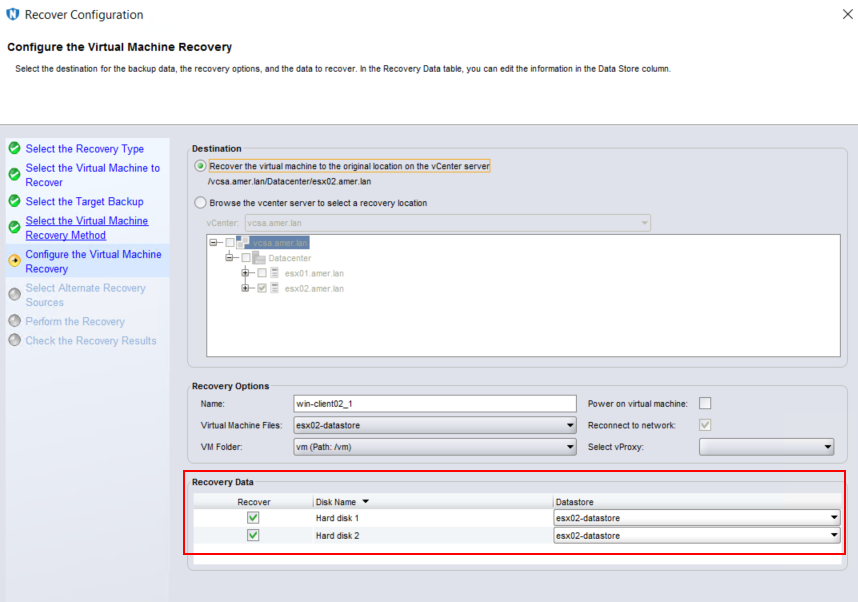
6. The previously missing disks should now appear during restores of backups taken since the disk was converted to dependent:
Additional Information
- Change Disk Mode to Exclude Virtual Disks from Snapshots: https://docs.vmware.com/en/VMware-vSphere/7.0/com.vmware.vsphere.vm_admin.doc/GUID-8B6174E6-36A8-42DA-ACF7-0DA4D8C5B084.html
- Snapshot Limitations: https://docs.vmware.com/en/VMware-vSphere/7.0/com.vmware.vsphere.vm_admin.doc/GUID-53F65726-A23B-4CF0-A7D5-48E584B88613.html
- NVP vProxy: VM Backup Is Not Warning When VM Contains Independent Disk

You can identify VMs with Independent disks by performing the following:
On the NetWorker server run:
nsrvim -d VCENTER_NAME
Where VCENTER_NAME is the name of the vCenter/hypervisor as its added in NetWorker.
This creates a couple of .xml files. If Linux, under /nsr/cores/nsrvim. If Windows, the files are generated in the directory from which the nsrvim command was run.
Open the vcenter.xml file and search/filter for Independent.

Affected Products
NetWorkerProducts
NetWorkerArticle Properties
Article Number: 000034600
Article Type: Solution
Last Modified: 30 May 2024
Version: 5
Find answers to your questions from other Dell users
Support Services
Check if your device is covered by Support Services.