Data Domain 高可用性:初始 IP 組態期間發生錯誤「ethxxx 用於互連,無法設定」
Summary: 初始 IP 組態問題的 Data Domain 高可用性 (DDHA) 因應措施。「config setup」在 DDHA 的情況下無法運作。它會顯示下列錯誤「ethxxx 用於互連,無法設定」。CE 必須手動配置管理 IP,才能將兩個頭都連線至網路。手動配置HA。
This article applies to
This article does not apply to
This article is not tied to any specific product.
Not all product versions are identified in this article.
Symptoms
在初始設定期間,組態設定無法運作。
初始 IP 組態期間發生錯誤。
在 DDHA 的情況下,組態設定無法運作。
執行組態設定時會出現下列訊息
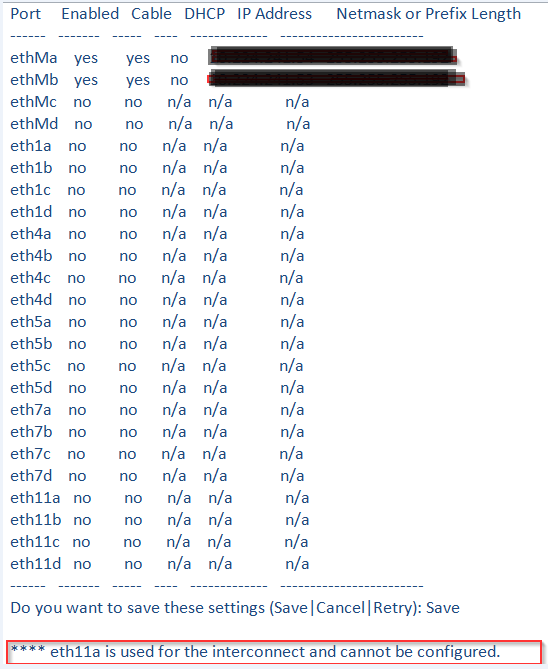
初始 IP 組態期間發生錯誤。
在 DDHA 的情況下,組態設定無法運作。
執行組態設定時會出現下列訊息
「ethxxx 用於互連,無法設定」
Resolution
因應措施是手動設定管理 IP,讓兩個機頭都連線至網路。
下列命令必須在兩個節點上執行:
當兩個頭都連線至網路後,請依照 KB 文章 502203:Data Domain 高可用性:如何為新安裝配置 HA? 使用「ha create peer」 手動配置 HA。
下列命令必須在兩個節點上執行:
- 設定主機名稱:
Net Set 主機名稱<>
mydd.mycompany.commydd.mycompany.com 是頭的名字
mydd.mycompany.commydd.mycompany.com 是頭的名字
- 設定 IP 位址並顯示介面:
網路組態<ifname><ipaddr> up
ifname - 乙太網路連接埠或虛擬乙太網路連接埠
的名稱ipaddr - 頭部
的 IP 例如:net config ethMa <IP 位址> netmask <子網路位址> up
ifname - 乙太網路連接埠或虛擬乙太網路連接埠
的名稱ipaddr - 頭部
的 IP 例如:net config ethMa <IP 位址> netmask <子網路位址> up
- 設定 DNS:
Net Set DNS <ipaddr1>
- 設定閘道:
路由集 GW <IP 位址>
當兩個頭都連線至網路後,請依照 KB 文章 502203:Data Domain 高可用性:如何為新安裝配置 HA? 使用「ha create peer」 手動配置 HA。
Additional Information
如需更多組態選項,請參閱說明網。
如需其他資訊,請參閱下列文件 &KB 文章:
如需其他資訊,請參閱下列文件 &KB 文章:
Products
Data DomainArticle Properties
Article Number: 000064172
Article Type: Solution
Last Modified: 09 Sept 2025
Version: 4
Find answers to your questions from other Dell users
Support Services
Check if your device is covered by Support Services.