Data Domain 高可用性:初始 IP 配置期间出错:“ethxxx 用于互连,无法配置”
Summary: 针对初始 IP 配置问题的 Data Domain High Availability (DDHA) 解决方法。在 DDHA 的情况下,“config setup”不起作用。它将给出以下错误“ethxxx 用于互连,无法配置”。CE 必须手动配置管理 IP,才能将两个头连接到网络中。手动配置 HA。
This article applies to
This article does not apply to
This article is not tied to any specific product.
Not all product versions are identified in this article.
Symptoms
在初始配置期间,配置设置不起作用。
初始 IP 配置期间出错。
在 DDHA 的情况下,配置设置不起作用。
运行配置设置时将显示以下消息
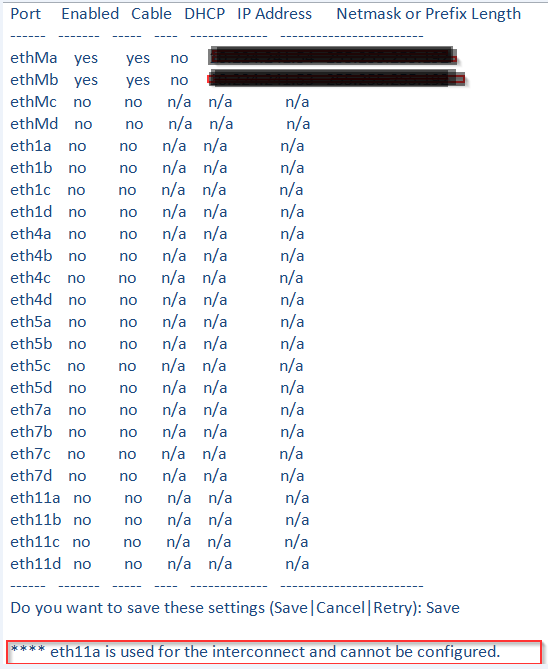
初始 IP 配置期间出错。
在 DDHA 的情况下,配置设置不起作用。
运行配置设置时将显示以下消息
“ethxxx 用于互连,无法配置”
Resolution
解决方法是手动配置管理 IP,使两个头都连接到网络上。
需要在两个节点上运行以下命令:
两个机头都位于网络上后,请按照知识库文章 502203 进行作 :Data Domain 高可用性:如何为新安装配置 HA?使用“ha create peer” 手动配置 HA。
需要在两个节点上运行以下命令:
- 设置主机名:
net set hostname <mydd.mycompany.com mydd.mycompany.com 是磁头的名称>
- 设置 IP 地址并启动接口:
网络配置<ifname><ipaddr> up
ifname - 以太网端口或虚拟以太网端口
的名称ipaddr - 头
的 IP 例如:net config ethMa <IP 地址>网络掩码<子网地址> up
ifname - 以太网端口或虚拟以太网端口
的名称ipaddr - 头
的 IP 例如:net config ethMa <IP 地址>网络掩码<子网地址> up
- 设置 DNS:
net set dns <ipaddr1>
- 设置网关:
Route set gw <ipaddress>
两个机头都位于网络上后,请按照知识库文章 502203 进行作 :Data Domain 高可用性:如何为新安装配置 HA?使用“ha create peer” 手动配置 HA。
Additional Information
有关更多配置选项,请参阅帮助网。
有关更多信息,请参阅以下文档和知识库文章:
有关更多信息,请参阅以下文档和知识库文章:
Products
Data DomainArticle Properties
Article Number: 000064172
Article Type: Solution
Last Modified: 09 Sept 2025
Version: 4
Find answers to your questions from other Dell users
Support Services
Check if your device is covered by Support Services.