PowerFlex Management Platform - Add Existing Resource Group Fails Due To vCLS Datastores Located In a Folder
Summary: Add Existing Resource Group operation fails because PowerFlex Manager (PFxM) cannot detect vCLS datastore(s) located in the vSphere folder.
This article applies to
This article does not apply to
This article is not tied to any specific product.
Not all product versions are identified in this article.
Symptoms
The Resource Group's Deployment State is in Error, meaning the Resource Group Deployment (Add Existing or Deploy New) failed.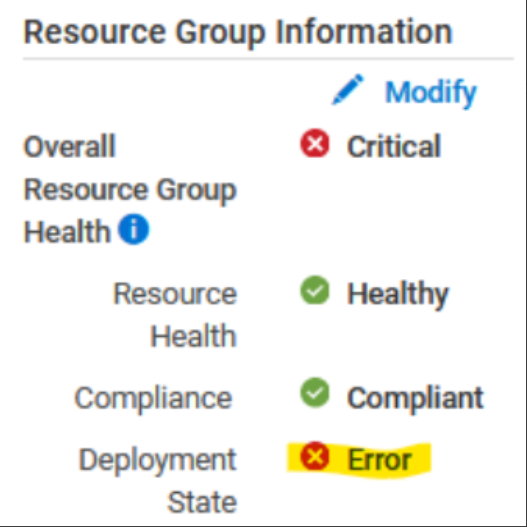
The error below indicates a datastore in the Resource Group that is not part of the vCenter/datacenter.
To validate the issue, enter the thin-deployer pod, and look into the rackserver-<servicetag_123> log in the <device_name> directory:
-
Enter the thin-deployer pod:
x=$(kubectl get pods -n powerflex|grep -i thin|awk '{print $1}'); kubectl exec -it -n powerflex $x -- bash -
Enter the <device_name> directory:
cd /opt/Dell/ASM/device/<device_name>
-
Look into the
rackserver-<servicetag_123>log - indicates that the datastore was not found:Error: datastore object powerflex-TESTCLUSTER1-ds-2 not found Error: /Stage[main]/Asm::Resource_wrapper/Vc_vcls_datastore[TESTCLUSTER1]/ensure: change from 'absent' to 'present' failed: datastore object powerflex-TESTCLUSTER1-ds-2 not found
The datastore may still show in the vCenter inventory file - inventory/rs-vc.boston.ee.com.json:
  {"name"=>"powerflex-TESTCLUSTER1-ds-2",
             "id"=>"datastore-120788",
             "type"=>"Datastore",
             "attributes"=>{"is_local"=>false, "free_space"=>12297699328, "mount_dir"=>"/vmfs/volumes/62e1db72-18264b5c-a653-b8599fc367db",
"volume_name"=>"powerflex-TESTCLUSTER1-ds-2", "capacity"=>15.75, "scsi_device_id"=>"eui.0be0ca503685ed0fea3112de00000004", "vendor"=>"EMC"},
             "children"=>[],
             "path"=>""},
Impact
Unable to add Existing Resource Group/Service.
Cause
A limitation in PFxM results in the inability to view vCLS datastores that are within a vCenter folder.
The issue arises because PFxM cannot recursively search through folders in vCenter.
Resolution
From the vSphere datastores view, move vCLS datastore(s) that are associated with the Resource Group out of the folder and into the data center:
Impacted Version
PFMP 4.5.x
Fixed In Version
PFMP 4.8
Affected Products
PowerFlex rack RCM SoftwareArticle Properties
Article Number: 000225335
Article Type: Solution
Last Modified: 25 Nov 2024
Version: 3
Find answers to your questions from other Dell users
Support Services
Check if your device is covered by Support Services.